guidance on SSH for a newbie

Hi
I have used RDM for a few month's now but never to connect to a Linux host and need some help in my understanding of what is going on.
I can use putty externally and from within RDM but the internal SSH option looks cleaner and is easier on the eyes.
so for example I have a host at IP address nnn.nnn.nnn.nnn i create a session of type Telnet,SSH,RAW,rLogin set a host name and IP. save this and connect to the session after passing credentials to login.
the return from the console is the following
11/29/2013 1:19:41 PM: Host: nnn.nnn.nnn.nnn
11/29/2013 1:19:41 PM: Port: 22
11/29/2013 1:19:41 PM: Login: root
11/29/2013 1:19:41 PM: SSH session established
11/29/2013 1:19:41 PM: Local IP: 127.0.0.2
11/29/2013 1:19:41 PM: Local port: 3390
11/29/2013 1:19:41 PM: Remote port: 3389
11/29/2013 1:19:41 PM: Outgoing tunnel established
11/29/2013 1:19:41 PM: Tunnel Started!
and the output just stays here, I am expecting a $ prompt but never get one, the local ip can be changed from a drop down between .1 and .2 and nothing else.
what am i doing wrong?
additionally passing a macro to the host when working with the putty session within the RDM is very slow is this due to the delay of 300ms and why can't i decrease it below 300ms?
last question I would like to import many sessions of type Telnet,SSH,RAW,rLogin in to RDM via a CSV file but any imported session is brought in as a standard windows RDP session even though the connection type column is populated with Telnet, SSH, RAW, rLogin
any guidance is appreciated
All Comments (5)
Hi
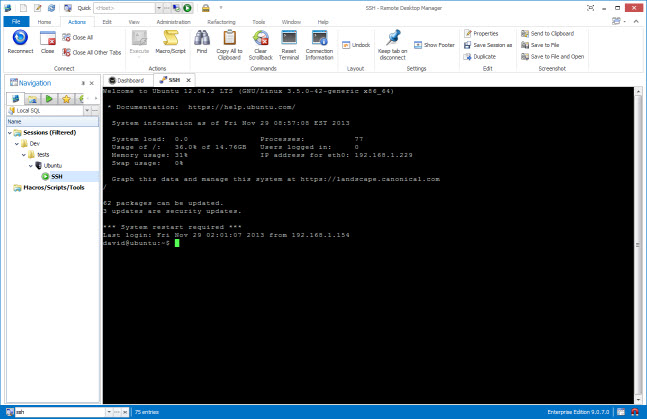
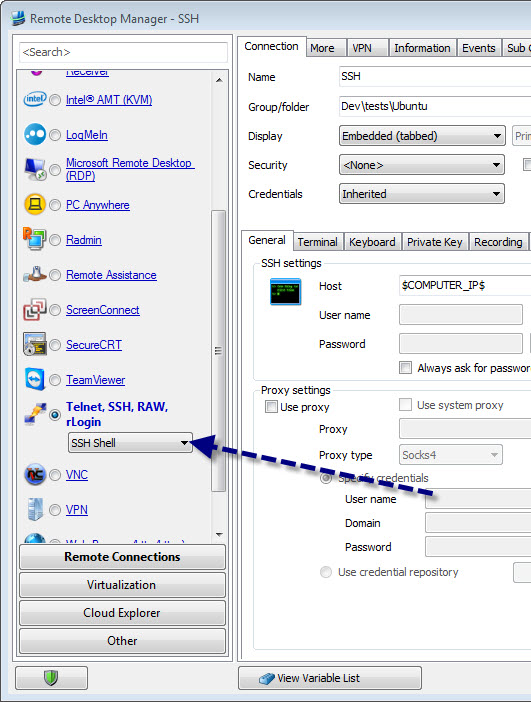
If you want to run embbeded as this
you must select the SSH Shell subtype
Did I understand correctly?
Maurice
ssh2.jpg
ssh1.jpg
For the macro delay, the proper setting is Initial wait
The delay of 300ms is when you include the {DELAY} command in your macro
Maurice
to import to a specific subtype, the second step of the import csv wizard is to select a template. Create a template to your liking and run the wizard.
Were you importing using other means?
Maurice
fantastic.
thank you for your responses works beautifully
is there a way to send a macro to all active sessions? currently I can send to active window and previous window but not to all active windows/sessions. can this become a feature request if not already available?
it is an existing feature request, and its 4th in my todo
We should have it for the holidays ;)
Maurice