Cannot access https websites with Firefox embedded

Hi,
I cannot access https web sites with non trusted certificates with embedded Firefox (http works, https works with Internet Explorer). With version 8 (I think) the workaround from http://forum.devolutions.net/topic1006-allow-embed-firefox-to-access-ssl-winvalid-certs.aspx worked - copying cert_override from Firefox to AppData\Local\Geckofx\1.9\DefaultProfile\.
That doesn't work anymore. Also, there used to be an error message - now, there is no error, just nothing happens.
All Comments (4)
Had a look, I can't get it to work with our current third party tool (MozNET 3.6.28). We need to take a look at the new version (MozNET R22) but the switch won't be trivial.
Stéfane Lavergne
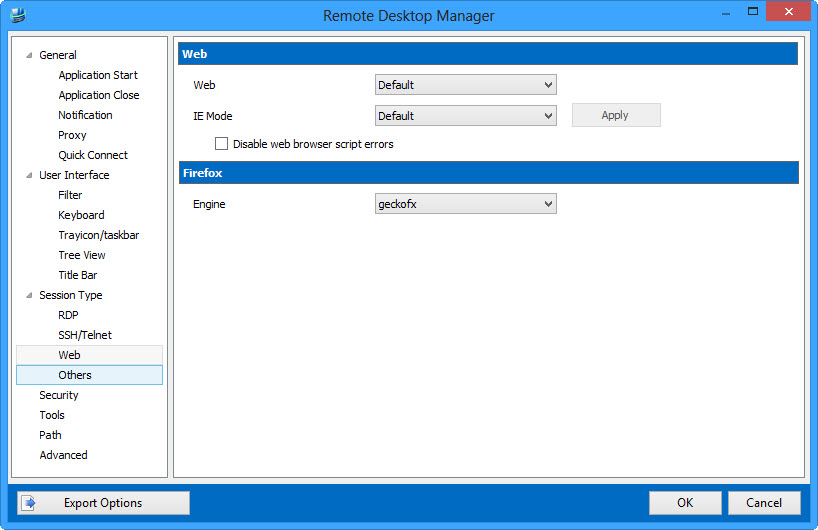
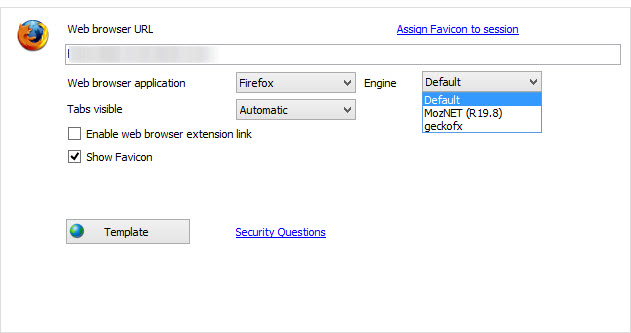
The latest version (v9.0.12.0) now introduces the capability of specifying which Firefox engine (MozNET vs Skybound geckofx) to use when embedded.
You can configure the default engine in File -> Options -> Web. The default is MozNET.
When you create a session you can specify "Default" or override the default with the engine of your choosing.
In your case, set it to geckofx and following the steps outlined in the other forum thread should resolve your issue.
Download from here, simply extract the files within the installation folder.
http://download.devolutions.net/Devolutions.RemoteDesktopManager.Bin.9.0.12.0.zip
Regards,
Stéfane Lavergne
12-17-2013 12-10-00 PM.jpg
12-17-2013 12-05-34 PM.jpg
Confirming that the fix works. Which "engine" am I using now? The one in Applications/XulRunner? Or the one configured in Installation path > GeckoFX xulrunner?
MozNET => Applications/XulRunner
GeckoFX => Installation path of GeckFX XulRunner (same as in v8)
Stéfane Lavergne