Thumbnails for RDP Connections?
0 vote
Is it possible to implement something like Microsoft's RDCMan has where you can see each connection for a group as thumbnails. See an example here:
http://msexchangeteam.com/archive/2010/06/11/455115.aspx
Thanks!
edited by luddy on 2/16/2011
All Comments (60)
Hi,
I'm aware of this feature and it's great. The problem is the way it's implemented. It's a not a thumbnail, it's the ActiveX reduced to seems like a thumbnail. There is many problem related to that in RDM:
- We support multiple mode for the ActiveX (smart size for example) and some of them might add scrollbar when it's resized
- We support mstsc.exe in external and it's not easy to generate the thumbnail.
- We support many other type of session and I sure that adding a thumbnail for some of them, will generate many request for the other one.
For these reasons, I postponed this feature. I hope to get a nice solution and I will see what I can do in the future.
Thank you for your suggestion and don't worry I kept this feature in mind.
David Hervieux
was just wondering what the benefit of this feature would be? I am sorry if I am a little daft
Simon Watz
Senior Support Engineer | Strategic Group
Graduate Certificate in Networking & Systems Administration,
Microsoft Certified Technology Specialist
This is a "cool" feature, but there is not much benefit. The only think I can see that might be nice, it's if the thumbnail is updated frequently, you can monitor multiple server at the same time. Maybe someone has more usage than what I see, let me know?
David Hervieux
I use this during patching. I may be patching and monitoring 5-20 servers an hour and it is nice to have the thumbnail view to monitor the progress from a single view. I would love this feature in RDM!
Thanks,
Tom
That's exactly why I wanted it.
EDIT: That's why I am using Microsoft RDCMAN and not Devolutions product
edited by luddy on 4/9/2012
Did thumbnail views ever become a feature?
I use that all the time with RDCMan to monitor the progress of various things on multiple computers at the same time. If RDM can't do it I will have to continue using RDCMan regularly.
It's still not possible with our current architecture. You have to know that RDCMan does not create a thumbnail. Actually it resize the actual connection to make it look like a thumbnail and unfortunately it's not something that we can do.
David Hervieux

Hi,
is this already possible now?
That would be really helpful for me too.
I'm switching back and forth between Royla TS and RDM but looking at Royal, this feature has been added more than 2 years ago and is called "overview":
http://blog.royalapplications.com/2015/06/07/new-windows-feature-overview/
Admittedly, Royal Tx is not as feature rich as RDM but being more "lightweight" is sometimes quite nice, plus features like the overview push me more and more into using Royal Ts....
It's not possible for now but it's on our todo list. We have changed some internals in RDM 13 (coming soon) and we are confident that we will be able to add this feature eventually.
Regards
David Hervieux
Totally dig this feature in RDCMan. Incredibly useful for installing stuff on multiple servers at the same time. Not just thumbnails, but the live interaction with them all. useful; for installs of software where next needs to be clicked etc on all of them.
This would be great, if you add this Feature soon!!! For updating several servers this is a very helpfull tool. You have all servers in in the category in an overview and can control the servers in thumbnail for needed interactions. Verry Helpfull!!
This feature sounds really awesome for patch purposes. Would like to see it eventually :)
Hi David,
Please let me know any update on this in the new Release 13.5.0.0 as I have installed new version but I am not seeing any progress in the servers only I can see the servers.
Hi,
You can open the Thumbnails here:
Regards

David Hervieux
Thumbnails.png
Hi David,
It seems you didn't understand my question clearly, let me explain you.
First of all I can see all opened servers in Thumbnail as you said. please see the snapshot first before going to read below concerns.
1. First row 7 servers are showing just Black window we cannot see servers exact status.
2. Second row 4 servers are showing status of the servers as an image but we cannot see the running programs live. my requirement is I want to see deployment progress live on all servers at a time.
not sure if it is something that we need to fix and if we able to fix that would be great.
FYI...These two problems I didn't see in Microsoft RDP manager.
please let me know if you need any other details.
RDM_ThumbnailsIssue_2018-03-21_12-12-29.jpg
Hi,
I will investigate for the black preview but it's an thumbnail overview and not a live preview like RDCMan. The reason why it's a preview in RDCMan is simple, it's the ActiveX resized a fitted as a thumbnail. Unfortunately we can do that since it's possible to undock the session and have them side by side.
Do you know if those servers are different or if you focus them if it's update. We capture the ActiveX paint refresh.
Regards
David Hervieux
If I understood your questions here are the answers.
All servers are different and I am not installing any updates on servers.
I am registering vb dll's and installing c# dll's through command line using batch script on all servers at a time and monitoring how they are getting installed.
Your thought sounds good and please investigate that may help us to remove our concern.
please let me know if you have any queries.
Hi,
I've looked at your screen capture and I think I might be able to explain what is happening.
A small portion of the lower right part of the screen, we the clock is, is visible on the first 7 servers.
Thumbnail are only captured when the thumbnail overview is opened to prevent slowing down RDM unnecessarily.
You probably connected to those servers before the thumbnail overview was opened and the servers haven't refreshed the whole screen yet.
Could you please try again but this time open the thumbnail overview first?
Regards
Jonathan Lafontaine
Hi Jonathan,
when I saw the issue yesterday at that time I might not have refreshed RDM. Now surprisingly Thumbnail view is working before and after also but I need to refresh it manually. if you do something to auto refresh when we select thumbnail view that would be great.
And also I am requesting you to work on second concern that will help users much whenever we have parallel deployments on all servers to monitor all at once.
Thank you guys for all of your quick replies in regards to my concerns.
Hello,
the auto refresh is after 10 seconds but we will add a setting to configure that.
Regards
David Hervieux
sounds good thank you.
Hi,
it's possible to add putty session also in the Thumbnails?
Regards
I'm not sure if it's possible. We will evaluation and get back to you.
Regards
David Hervieux
Been nearly 8 years since the start of this post, and 2 years since your comment above, so just checking on the progress, if any, on this highly useful feature.
Also wanted to share how I use this feature in RDCMan:
I've been using RDCMan for several years now, and it has been a godsend in helping manage a farm of similarly provisioned servers (40+). The thing about these servers is that there is no remote execution capability for mass patching, nor was it possible to install such capabilities (simply too far down the hierarchical access chain). So the best way to perform patches was to prepare a powershell script and run it on each server individually. Now PS has the awesome ability of a right-click IMMEDIATE copy of the contents of your current clipboard, now pair that with the EDITABLE thumbnails (that can receive mouse/keyboard events), and this process flowed like butter. All in all, replaced a whole lot of clicks with a little bit of scrolling, and then throw on top of that the visual aid of quickly being able to monitor script errors (red text in PS) along side being able to keep your orientation as far as how far down the list of servers you were and on which server.
I'm new to RDM, and even with as feature rich as it is in comparison to RDCMAN, the ACTIVE thumbnails are just a must for any large amount of server patching. And for that reason, and that reason only, I'll be sticking with RDCMan until RDM finally can implement this. Luckily, I've found that RDCMan does have hidden support for custom Plugins, so that may solve some of my needs in the meantime.
RDM devs, I know you can do it. I'll be back when you do. :)
HB
For those asking for this feature due to work related to patching servers, you may want a different approach. Instead of trying to get RDP to change, maybe look into some alternative methods of patching computers. Take a look at Desktop Central by ManageEngine. It's free for up to 25 computers. It's what I use to manage some 200 servers/desktops.
@Adrain, not asking for them to change their entire approach, simply requesting to continue enhancing an existing feature.
The main reason I checked out RDM was because of this post:
https://blog.devolutions.net/2016/10/alternative-to-microsofts-remote-desktop-connection-manager-rdcman-devolutions-remote-desktop-manager
They hyped it pretty high against RDCMan, and I was sad to find out that the active thumbnail feature (discussed above for years) hadn't been implemented yet.
Since my post above however I have found something that is making us just love the heck out of RDM. The ability to have a web session/entry to use a specific browser engine AND auto fill-in credentials, as well as submitting the form for login. To us, this is simply amazing since all of our RDP servers are tightly integrated with their companion sites, making the whole inheritance thing just butter smooth. On top of that, our sites are crazy specific about enabling compatibility mode and using only IE, and this program is handling it like a champ and the sites never complain, which is highly unusual.
So far we feel that we've stumbled on a gold mine and are looking forward to switching our whole team to this product. Indeed, it's unfortunate that the active thumbnails feature is a stagnant request, however the way I'm starting to see it is if they just so happen to develop that feature, this product becomes that much better.
HB
Yea, every day I'm finding new features that are great. The web entries is definitely up there at the top.
I have a possible solution in mind. I could check with you if it could fit the need. Here is the problem and why the live thumbnails are not implemented in RDM. The reason is simple, it's not a live thumbnail in RDCMan. It's the real ActiveX component resize with Smart Sizing enabled. This is why it's always updated.
So the question is why not do that with RDM? Because we support side by side, docking, undocking or move to another monitor. This means that I can't detach the component from the original view to create a kind of live overview.
So my solution could be to allow you to manual detach the component to move it in the overview window. This mean that original tab will indicate that it has been detach and the overview tab will contains the live thumbnail. You will be able to monitor what is going on for a subset of opened connection or maybe all if it's what you want.
What do you think?
Regards
David Hervieux
@David,
I think I understand what you're saying. And your proposed solution seems reasonable. I'd say it's worth while as long as the detach and reattach process is smooth and fast enough to be handled by the application for a decent user experience.
I'd be more than willing to be the guinea pig!
Appreciate the follow up!
HB
@David,
Any progress on this? I realize this will take some development planning, time, testing, and execution, however I'm more curious as to if this is something that is seriously being considered in adding as a feature/workaround to RDM by your team.
HB
Hello,
I have a working prototype which is a good news. I hope to release this in the next major update (beginning of 2019) and perhaps in beta before.
Regards
David Hervieux
Awesome! Glad to hear of good (working) progress.
Thanks for the update, and FAST response time!
HB
@David,
Just wanted to check in to see if any progress had been made on this and if it will still be implemented? Is the goal still to push it out in the beginning of this year?
Thanks,
HB
This is still planned but nothing new to report for now.
Regards
David Hervieux
Hello,
The live thumbnail feature has been completed internally and should be available starting from RDM 2019.1.24.0.
A new "Start/Stop live display" button has been added at the bottom right of the thumbnail view and can be used to activate or stop this new functionality.
Regards,
Michaël Beaudin
Beautiful! Good to hear. Thanks for putting together this new feature.
HB
If I may add a suggetions to this wonderful feature, is too be able to hide the tabs at top of the window (or have them only in one row) so it doesn't reduce my thumbnail view space.
A part from that, great software!
:)
Do you mean the toolbar?
Regards
David Hervieux
See attached file. If that row of tab could be small or even better, not be there in thumbnail view, that would really be great. Double clicking on a thumbnail would then open a tab.
Devolutions RDP.png
Also, a auto-resize of thumbnails to see as many as possible, as big as possible on a single page... without scrolling.
Glad to see you are a Quebec company. Bon travail.
Hello,
If you want to hide the tabs at the top of the window, you can do it by removing the "Use Tabbed Header setting in the "Window" settings of RDM (see image 1).
As for the double click to open the tab, this feature should be implemented in the currently released version of RDM. If your thumbnail isn't doing a live display, double clicking anywhere on the thumbnail should direct you to the entry's tab.
However, if the thumbnail is live, the only place where you can double click to redirect you to the entry's tab would be the label with the name of your entry (see image 2).
Regards,
Michaël Beaudin
Image2.png
Image1.png
Thank you! You guys rock! It's the little things we oversee that make the differences :)
Anyway to 'pin' this tab so it's always open, even when starting RDM? Or alternatively, an entry item that could be customized and saved? Presently it loses its settings when closing and re-opening the thumbnails tab.
What do you mean by pin this tab? For me it's always opened when I start RDM.
Regards
David Hervieux
I see - I guess what I'm saying is it doesn't retain settings between sessions. For instance, I change the zoom level and rename the tab to shorten it. When I close / re-open RDM it reverts to defaults. Is there a way to make that persistent?
Hello,
You can change the tab page title here:
It seems that zoom level persistence is a bug.
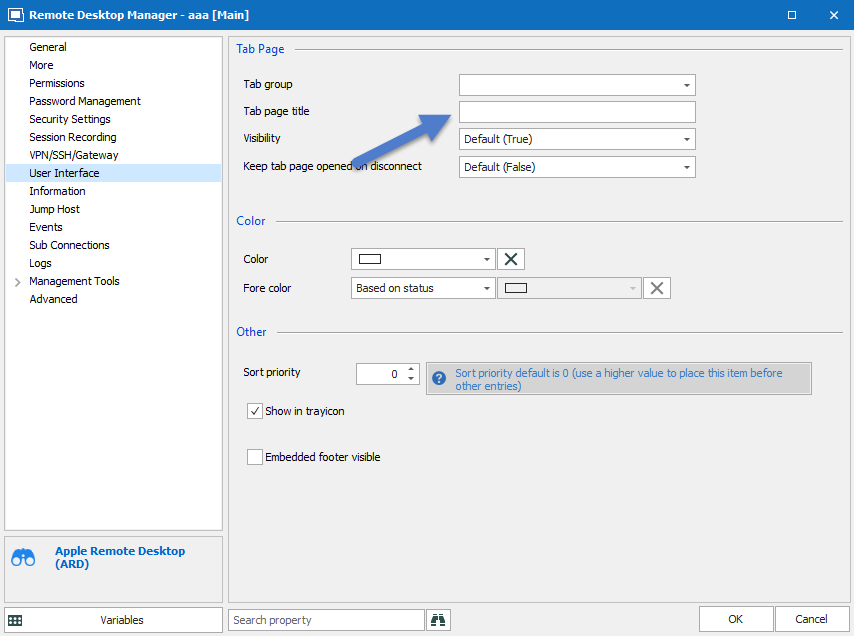
David Hervieux
2019-05-28_19-55-22.png
How do you access that for the thumbnails tab? It doesn't appear in the navigation tree and their is no right-click>properties option.
It's in the ribbon View->Thumbnails [Layout page]
Regards
David Hervieux
I'm sorry, I can't seem to find that. Here's what I see in the ribbon:
But I don't see an option where I can go into the properties box that you attached before. I can rename the tab by right-clicking it and selecting rename, but if I close RDM and open it back up, the name has gone back to its default.
Sorry for the confusion. You need to edit the Entry from the tree view.
David Hervieux
There is no entry in the treeview for the thumbnails tab.
Ok, you want to rename the thumbnail tab page and not an item inside the thumbnail?
David Hervieux
Yes. Initially, I was thinking both the name of the tab and the bug you mentioned before were just preferences that needed to be set. So it made more sense to have a way to configure those preferences and save them.
Since the zoom thing is a bug, it's more or less just changing the default name of the tab. An entry item for this tab would be nice, but probably of dubious value.
Thanks!
Glad to hear this feature is finally available soon
Seems to work relatively seamlessly so far. Only gripes/suggestions I would have thus far would be:
Of course with any new feature, there are always ways to continue to improve, but I really appreciate all the work y'all have done thus far. This will help to be a big selling point feature for future clientele. Keep up the great work!
HB
I wanted to echo @hbas' suggestions - those were small gripes I had as well, the aspect ratio of the thumbnails creating lots of wasted space, setting them to enable automatically, etc.
Those are all really great suggestions that would make this much more useful. As it stands, with my unusual ultrawide configuration, I can only get 2 thumbnails per row, otherwise any smaller makes it illegible.
Hello,
We will try to improve the thumbnail view but I have to be honest: it not possible (for now) to have different size. What I could try is to create the thumbnails in 4/3 ratio to reduce the wasted space. For other web entry type, we have no way to get the thumbnail from the web view. Thank you all for ideas.
By the way I will ask our dev to add a setting to Enable the Live view for all.
Regards
David Hervieux
Understood - thanks David for your efforts.
Ditto!