MS RDP host, Programs tab, RemoteApp seamless mode

What is the "Use RemoteApp (seamless mode)" about on the Programs tab of the Microsoft Remote Desktop Host session type?
It appears with its own checkbox below the standard "Start the following program on connection" fields.
I couldn't find any documentation on it in help or the forums.
I'm running the following:
RDM version 5.9.0.5
Remote Desktop: 6.0.6001.18000
.Net Runtime: v2.0.50727
All Comments (6)
Oh, I think I figured it out.
Looks like it opens an rdp connection, starts the specified program, maximizes the app window and runs without the windows desktop.
I guess that's one way to run SQL Server Management Studio in embedded mode.
Hi,
You got it, it's the RemoteApp feature from Microsoft Remote Desktop.
David Hervieux
Hi,
where has this feature gone?
Cant find it in RDM 6.6
RDM 10.5.2.0 Enterprise
RDMS 2.2.7.0
Hi,
You can see that in the print screen:
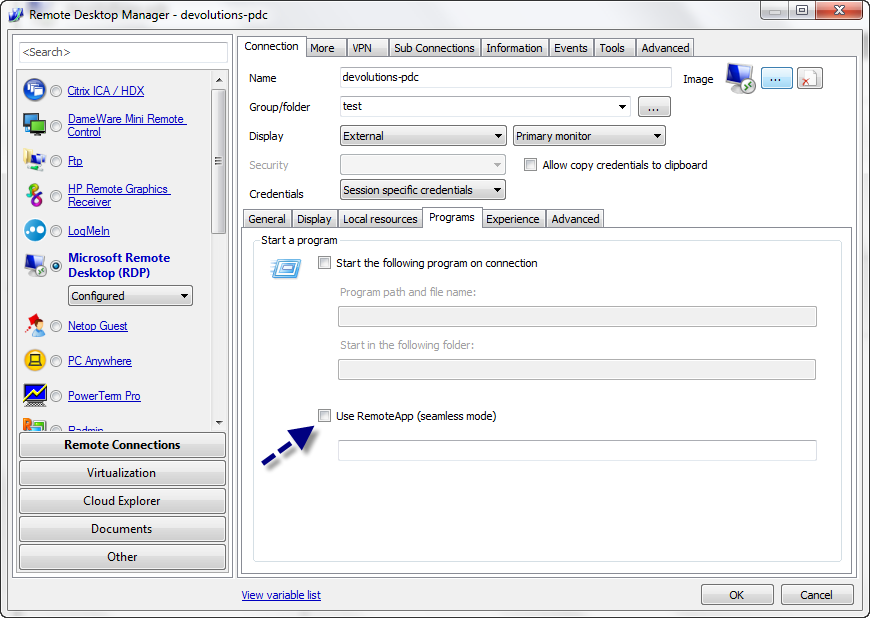
David Hervieux
RemoteApp.png
Thank you for the quick reply David.
Is it possible to implement the import a rdp file configured for remoteapp?
It is currently not working on my side.
I am using RDM 6.6 Enterprise (15-user)
RDM 10.5.2.0 Enterprise
RDMS 2.2.7.0
Could you send me a sample file?
David Hervieux