Unable to find mstsc.exe for external RDP window

Version 0.9.10.0 (0.9.10.0)
Mac OS X 10.9
Hi
I saw this mentioned as fixed in another thread (http://forum.devolutions.net/topic8491-crash-when-quitting-rdp-and-saying-no.aspx).
I have the MS Remote Desktop client installed but RDM will not find it when display is set to External.
I don't think the binary is called mstsc.exe on OS X (could just be the error message is wrong).
Mine is located in /Applications/Remote Desktop Connection.app/Contents/MacOS and is called 'Remote Desktop Connection'.
edited by JHDevolutions on 11/8/2013
edited by JHDevolutions on 11/8/2013

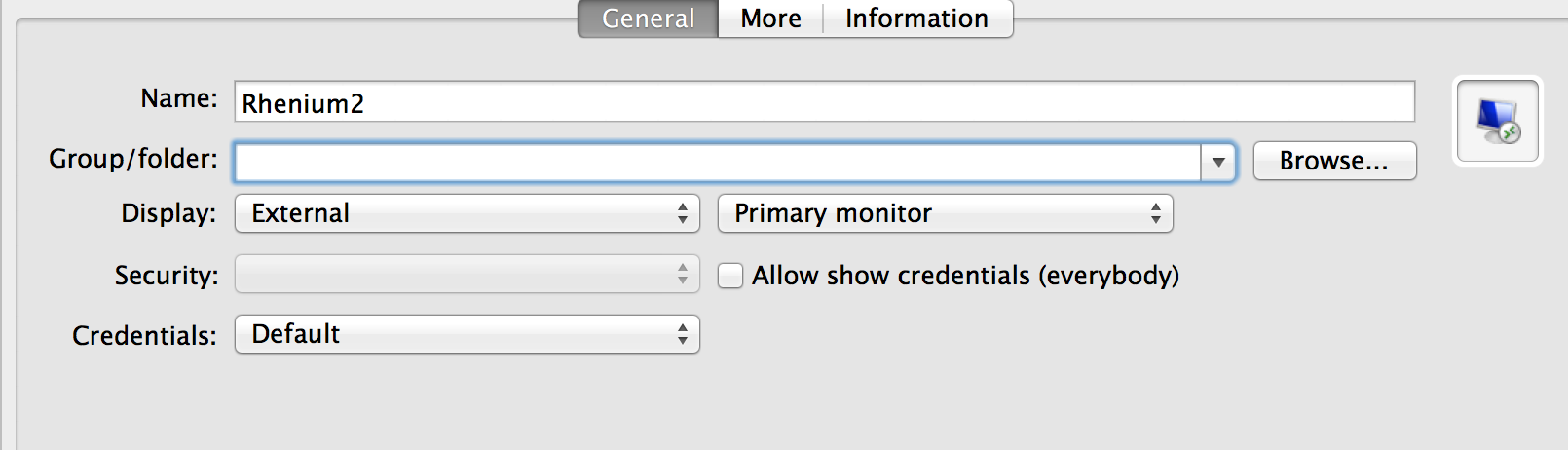
settings.png
mstscerror.png
All Comments (7)
Hi,
For the error message, the text is wrong.
Currently we are only looking for the latest version of the MS RDP app (it was just released via the Mac App Store - https://itunes.apple.com/us/app/microsoft-remote-desktop/id715768417). It is called "Microsoft Remote Desktop".
It seems that you have the old version, and that is why we are not finding it.
Is it possible for you to upgrade to the new client?
Thanks, Richard
Richard Markievicz
Thanks!
Problem Solved
Yes, that works with the App Store version of RDC.
There is some odd behaviour with passing credentials. If I have saved domain name and user name separately in the RDM settings the MS RDP client starts up and presents me with a login box. This is because the domain has been prepended to the username twice:
domain\domain\username
I can work around this in RDM by saving domain\username in the User input text box and leaving domain blank but even when I do that it does not appear to populate the password.
Hi,
The item with the domain is clearly a bug, and we should be able to resolve this.
Passing the password will be more difficult. There exists a workaround to do this on Windows, however I'm not aware of any such workaround on OS X. Also - their doesn't exist any documentation for interacting with the MS client in the way that we are on (on OS X). It will require some further research on our part to see if we can implement this in the future.
Thanks, Richard
Richard Markievicz
The issue with the domain is now fixed in the latest version (0.9.12.0)
This seems to actually be an issue with the MS RDP client for Mac - it seems to be parsing the temporary .rdp file we generate differently to the Windows version. I added in a workaround for this behaviour.
Let me know if you find any further issues!
Thanks, Richard
Richard Markievicz
External: MS RDP client is starting with the correct screen size, login name and domain. So far so good, but the password is blanc.
Undocked: the password is taken from RDM and works.
Hi,
Yep - as I alluded to in my earlier post, we don't currently have a mechanism to forward the password to the MS RDP client on OS X. On Windows we have a workaround for this, but currently not on the Mac.
We will continue to research the issue and implement a solution once found.
Thanks, Richard
Richard Markievicz