Can't add OpenVPN servers

Hi!
I was trying to add an OpenVPN connection so I chose the VPN option from the new item screen and selected OpenVPN from the list to the right and then I have this dialog on bottom allowing me to select the server I want to connect through, I couldn't add any servers to the dropdown list, I tried using both the IP and server name, none of them seems to work and the list remains empty.
What do I need to do?
Is this a bug?
I would like to implement your solution in my company but I can't due to all these bugs (I already sent an automatic report upon crash but I can't really see the status now).
Thank you!
All Comments (5)
Hi,
You need to import an existing OpenVPN file. I have verified the error report and I can't find anything related to OpenVPN
David Hervieux
Great, thanks!
After a lot of pain I finally managed to add the .ovpn file and download OpenVPN GUI 1.0.4 which didn't seem to do the job without having administrator credentials.
I also wanted to set automatic authentication (saving my username and password beforehand) so I won't have to enter the password each and every time, it didn't work.
Also I want the password to be coordinated with my LastPass account so I won't have to reveal all my secrets, is that possible?
I have verified the code (I can't test it) and the Add-on should support the auto fill with the username. However this is not automatic and we need to send the key stroke. We use the dialog title to find the window. Could you tell me what is the title of your password window?
David Hervieux
I attached an image showing the dialog.
openvpn.png
Could you verify if you have this setting checked and the other one over unchecked?
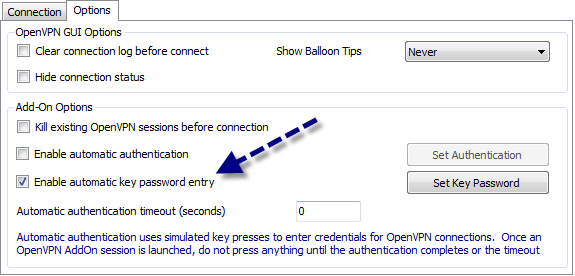
David Hervieux
OpenVPN.png