SQL permissions issue when updating to 8.9.18.0

Good morning. Just updated to 8.9.18.0 and had an issue with updating the remote SQL db. I was running 8.9.13.0 (having to coordinate the upgrade which requires a db update – but it wouldn’t run because of what I think that it is a permissions issue to the SQL server?). I am logged on as a “user” when I got the update error in RDM – then I logged on as a domain admin directly on the SQL server and manually ran the upgrade script and it seems to have worked for RDM to connect to the data source (but SQL query reported back some errors itself). I can use RDM now and seem to be able to use the SQL data source OK.
My user account has full access to the RDM db on the SQL server, but public access to the SQL server itself. My domain admin account has full access to the SQL server, DB's, etc. Do you know what permissions are needed on SQL to run the db update scripts (as a normal user)? Also, can you tell if I should be concerned about any of the errors reported when I manually ran the SQL update script?
Thanks
RDM db update 82 to 84.jpg
RDM db update 82 to 84 - error message.jpg
RDM db update 82 to 84 - DB update errors.txt
All Comments (1)
Thanks for the post.
8.9.13 - the upgrade script was calling sp_configure therefore you needed the rights to reconfigure. I has since be re-written to not require the change.
8.9.18 - the upgrade script doesn't require any special rights other than the normal ones (DB full access)
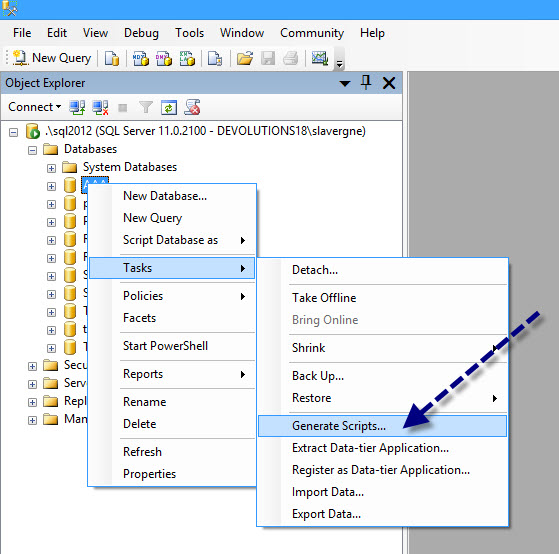
Double checked the update errors and all looks normal. If you would like, you can generate the DB script via Microsoft SQL Server Management Studio (SSMS). Send me the file via private message & I will validate the db structure to be 100% sure all is good.
Stéfane Lavergne
9-30-2013 11-21-41 AM.jpg