Copying username and password not working?

Is it just me? I have some things like the Dell admin pages on servers that I simply right click my server in the tree and select "copy username and password" so that I can paste the username and password into the fields with a single shot. Used to work great, but now it never saves the username.
I thought at first it may be for systems I have that inherit the credentials from a higher level but it does it even for standalone servers now that have username/password in the server properties.
I still see a little popup saying "username and password copied" but all it ever copies is the password.
Copy username still works when I click that only, it does give me username. Just not when it's supposed to get both.
All Comments (7)
Hi,
You’re not the only one. Copy username and password doesn’t put both values on the clipboard at the same time. The username goes first, and RDM moves on to the password once something reads the username. So when you get only the password, something read the username before you pasted it. It’s almost always one of two causes:
1. Minimize-to-tray (fixed in 2026.3.18)
If RDM is set to minimize or hide to the system tray (File > Settings > User interface > Show in taskbar), each minimize or lock and restore made RDM answer every paste request twice. The first paste then skipped ahead. Please check your RDM version (Help > About):
If it’s older than 2026.3.18, please update and try again. If you can’t update right away, setting Show in taskbar to Always visible works around it.
A quick test: if it works right after you restart RDM and breaks after you minimize or lock it, that’s this issue.
2. A clipboard history or sync tool
Anything that reads the clipboard as soon as it changes can take the username before you paste. Common examples: Windows clipboard history (Win+V), Ditto, other clipboard managers, Teams or Office clipboard features, remote-control tools that sync the clipboard, and some browser password-manager extensions. If you use any of these, please close or pause it and try again.
If neither helps, the Clipboard diagnostics tool will show us exactly who reads the value:
Go to Help > Clipboard diagnostics and leave the window open. It records clipboard activity only while it’s open.
Run Copy username and password on an entry, then paste into the Dell login page as usual.
Click Send in the Clipboard diagnostics window. It sends us a report with your clipboard settings and the log of each read request and the process that made it. It never contains the credential values. Or paste the output here.
Regards,
Stéfane Lavergne
You just lost me. Forever I've been selecting "copy username and password" and then I'd paste a username field and paste a password field and it worked flawlessly.
Up until the recent updates it copied both at once and would paste them in order, one at a time.
So now you're telling me what I've been doing all this time was my imagination, yet the server accepted it?
Ah, I'll update, i'm at 3.16.0 not 18.0.
Thought you were saying I was smoking crack and that this never did what I used it for. ;)
And nope. This is absolutely new behavior for me just the last couple of updated versions now since you guys fixed the focus and such. I used this feature last month when I was doing maintenance on about 80 or 90 servers I manage at my datacenter, as well as random client ones on their sites. And have been doing it for years since I started using RDM and first saw that feature.
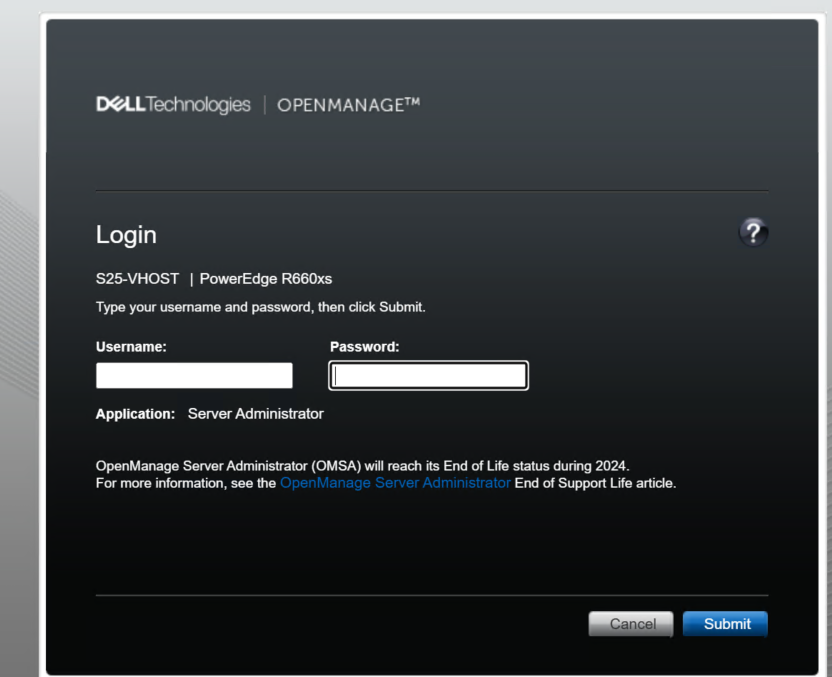
This is specifically where I've used it all this time without any failure. I would select "copy username and password" and I'd then paste the username and past password without issue. Never failed.
Now it won't past the username ever. Wait, I take that back, one that just failed four or five times it pasted the username once a few minutes ago, but trying again it's random whether I get username or not. Sometimes it does sometimes it just pastes the password in the username field and omits copying the username at all.
This is the Dell openmanage webpage on Dell host servers. Going to do more digging with various versions of windows and other browsers to see if I get different results.
Yeah, nothing else was using clipboard. I think it's just slower now in this version than it was. I found if after I copy username and password, I wait a few seconds, then it seems to work. Never had to wait before, I could always past instantly, since it's less than 1 second to move mouse from the context menu to select to copy the username and password to click in the user field and hit control+V. So there may be something in the programming that's making it respond slower or something. But at least now if I slow myself down and run at an intentionally slow pace, it seems to be more consistent...
And nope - even that's not true. The one that seemed to work when I did that now isn't working again no matter what I do.
I'll just deal with it being inoperative most of the time and hopefully at some point it just starts working again for me normally as the program gets other updates and changes.
Thanks anyway
Sorry if I wasn’t clear in my first response. You’re not going crazy. We found a few old bugs, and a few things did change, in theory for the better, but in your case, it doesn’t look like it.
Before 2026.3.18, if RDM was set to minimize or hide to the system tray, we registered an extra message handler every time RDM came back from the tray. Each paste request was then processed several times (one extra time per tray restore since RDM started), which skipped values. This is fixed in 2026.3.18. If you’ve updated and still see the issue, this isn’t the cause. If you haven’t updated yet, please do that first.
Chromium-based apps (Slack, for example, or web browsers) cause some issues with the way they call into Windows to request clipboard data. I think this is where your issue is coming from. You see, when Chromium receives focus, it peeks at the clipboard and takes the first value, then gets notified that the clipboard has changed and takes the second value. We end up with nothing to paste. We changed the code to detect this and work around it. So yes, what you’re seeing could very well be caused by our recent fixes.
The Clipboard diagnostics window will show us exactly who’s reading the values:
Go to Help > Clipboard diagnostics > Debug tab and leave the window open. It records clipboard activity only while it’s open.
Run Copy username and password on an entry, then paste into the Dell login page as usual.
Paste the diagnostic output here.
If you can provide one log where it worked and another where it failed, that would also help.
Best regards,
Stéfane Lavergne
Yeah, nothing else running, not even background processes for web browsers currently showing in task manager. Only RDM, not even any office apps.
Way too busy the rest of this year to troubleshoot stuff at work so I'll just deal with it as it is and cross my fingers that something gets tweaked at some point.
Thanks!