Issue with sftp download status

i'm downloaded a huge file via sftp, but it takes ~30 more minutes to be completly saved.
2026.3.15
All Comments (7)
Hello,
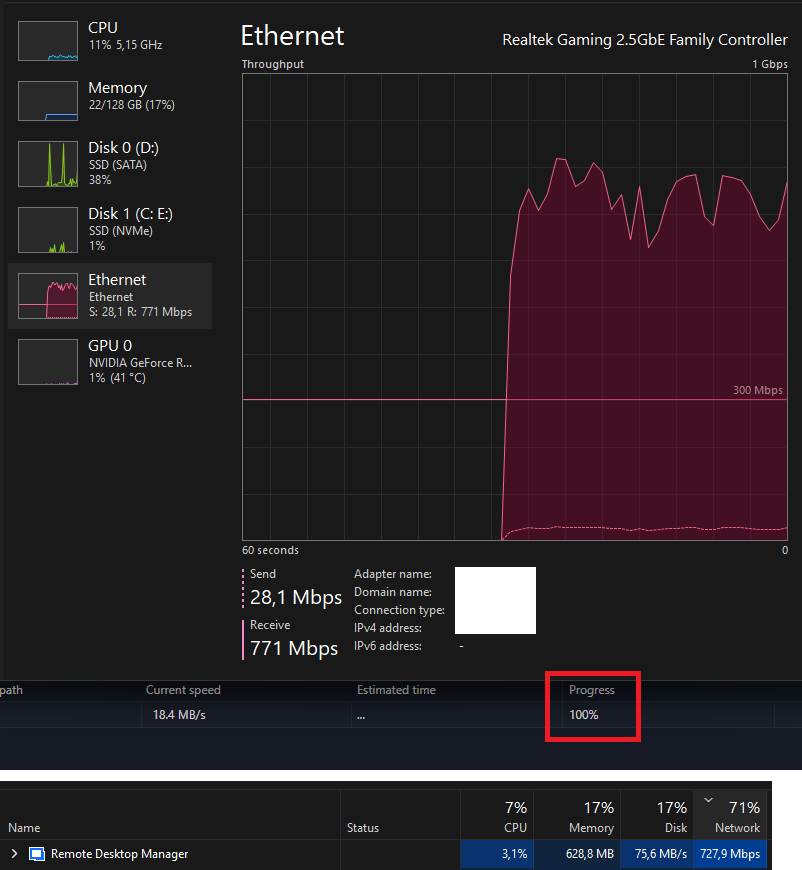
Thank you for the screenshot. It shows that Remote Desktop Manager is still receiving data at about 90 MB/s while the transfer window already shows 100%, so the transfer itself is still in progress, and only the progress display is ahead of it.
To narrow this down, could you please send us:
The exact size of the file, and whether it is a single file or a folder.
Whether the file could still be changing on the server during the download (for example a backup or log that is still being written).
How you started the transfer: a dedicated SFTP entry, the SFTP pane of an SSH session, or “Open embedded (SFTP)” from another entry.
Whether the final file is complete and correct once the download really ends (same size as on the server).
If possible, logs of a transfer: File > Settings > Advanced > Logging, set the level to Verbose and enable “Log to file”, reproduce once, then send us the log file.
Best regards,
Carl Marien
Hello slope game,
Thank you for the screenshot. It shows that Remote Desktop Manager is still receiving data at about 90 MB/s while the transfer window already shows 100%, so the transfer itself is still in progress, and only the progress display is ahead of it.
To narrow this down, could you please send us:
The exact size of the file, and whether it is a single file or a folder.
Whether the file could still be changing on the server during the download (for example a backup or log that is still being written).
How you started the transfer: a dedicated SFTP entry, the SFTP pane of an SSH session, or “Open embedded (SFTP)” from another entry.
Whether the final file is complete and correct once the download really ends (same size as on the server).
If possible, logs of a transfer: File > Settings > Advanced > Logging, set the level to Verbose and enable “Log to file”, reproduce once, then send us the log file.
Best regards,
Thank you for the detailed explanation and troubleshooting steps. The difference between the displayed progress and the actual transfer activity is interesting. Collecting the requested details and checking the verbose logs should help identify whether this is a progress reporting issue or something related to the file transfer itself. Hopefully, the additional information will make it easier to narrow down the cause and find a reliable solution.
single file size 60gb. sftp via sidebar.
> is still receiving data at about 90 MB/s while the transfer window already shows 100%
That’s what’s confusing. 100% implies that everything is ready. A fully downloaded file looks different.
Hello,
Thank you for the details.
We tested downloading a large single file from the SFTP sidebar on the latest version of Remote Desktop Manager (2026.3.18), and the transfer window only reached 100% once the file was completely saved.
Could you please update to 2026.3.18 and try the download again? It is available from Help > Check for Updates, or from our download page.
If it still happens after the update, please let us know:
Whether you started the download by dragging the file from the sidebar into Windows Explorer, or by right-clicking it and choosing Download.
A verbose log of the transfer: File > Settings > Advanced > Logging, set the level to Verbose, enable “Log to file”, reproduce once, then send us the log file.
Best regards,
Carl Marien
how to find this log?)
Hello,
Here is how to collect the logs:
In Remote Desktop Manager, go to Help > Profiler and set the Debug level to 1. You can also set it in File > Settings > Advanced > Debug level.
Download the large file again, the same way you did before, and wait until it is fully saved.
Go to Help > Application Logs, open the Report tab and click Send to Support. In the description, put the case number 00136111 and your forum username, then press OK.
Set the Debug level back to 0. A higher level slows down the application.
Could you also tell us:
Which version you reproduced it on. The issue did not happen in our tests on 2026.3.18.
Whether you started the download by dragging the file from the sidebar into Windows Explorer, or by right-clicking it and choosing Download.
If you were dragging it out, please try right-click > Download in the meantime. In our tests, that downloads the file in a single pass.
Best regards,
Carl Marien