"Global Hotkey" is not global anymore on 2026.3.16.0 and 3.15.0
"Global Hotkey" is not global anymore on 2026.3.16.0 and 3.15.0

Hello,
I'm using Rdm in windows 11 25H2 - 26200.9711. i configure keybord shortcup correctrly (Global HotKey : Ctrl + Shift + A) focus ...
Since the last Windows Kb the hotkey doesn't work it pass directly to the session and not catch bay Rdm to execute the Macro
Thank for help
All Comments (9)
Hello Manuel,
Thank you for your message. To investigate your Global hotkey issue, we need a few details first:
1. Which exact version of Remote Desktop Manager is installed on the affected computer (2026.3.15.0 or 2026.3.16.0)?
2. Which type of workspace do you use (local, Devolutions Server, Devolutions Cloud, other)?
3. In the Keyboard settings, what is the Mode of your shortcut (Default, When not in session, Global hotkey or None)? A screenshot of this line would be perfect.
4. Did you restart Remote Desktop Manager after changing the shortcut? A change to a global hotkey is only applied after a restart.
5. Does Ctrl + Shift + A work when another application has the focus, for example Notepad? Or does it fail only when a session is in focus? If it fails in a session, please tell us the session type (RDP, SSH, other).
6. Was the shortcut working before? If yes, with which RDM version, and what changed on the computer when it stopped (Windows update with its KB number, new or updated software)?
7. Which applications run in the background on this computer (for example PowerToys, Teams, a screenshot tool, a browser extension)? A global hotkey can only be owned by one application: if another one registers Ctrl + Shift + A first, RDM cannot use it.
Best regards,
Alexis Geller Peiro
My Reply :
1. Actual 3.16 (the previous 3.15 doesn't work too
2. Local
3. I trie the foor mode but actual is Global hotkey (Sorry in french)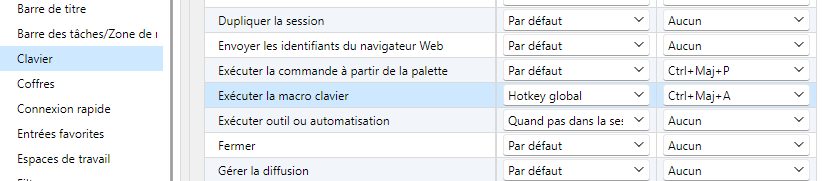
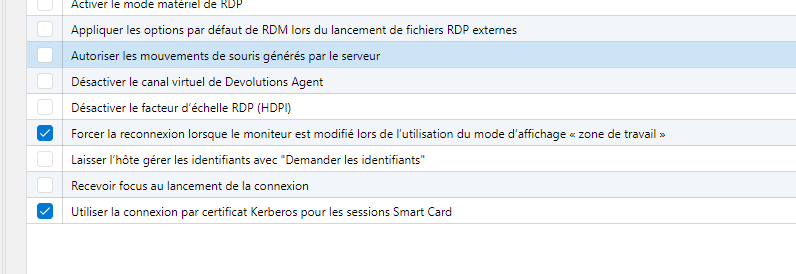
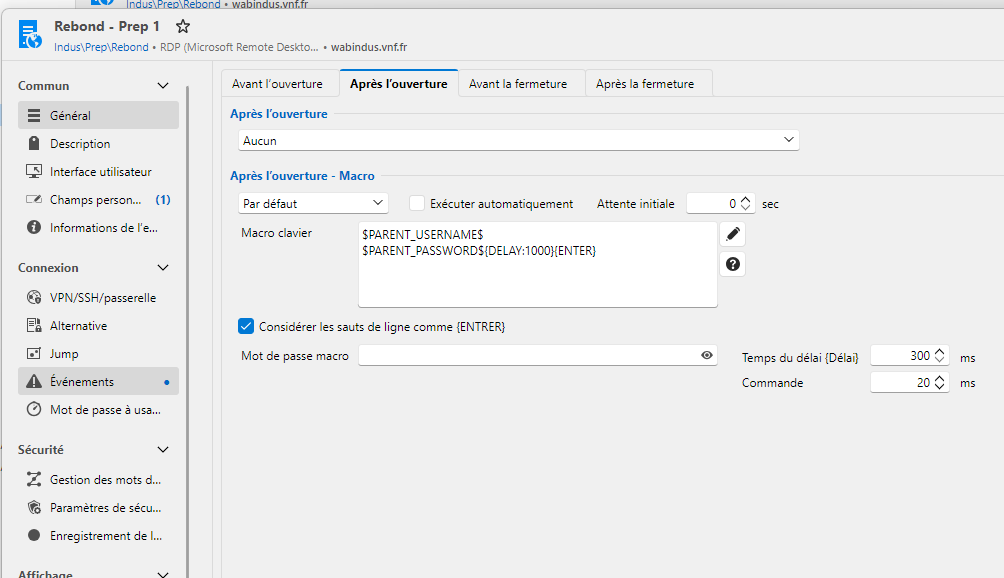
4. Did you restart Remote Desktop Manager after changing the shortcut? Yes
5. Does Ctrl + Shift + A work when another application has the focus, for example Notepad? No
Or does it fail only when a session is in focus? no
If it fails in a session, please tell us the session type RDP only (the session catch the hotkey.
6. Was the shortcut working before? yes in 3.12 and 3.13 since ce kb 3.15 and 3.16 fail :
Description HotFixID InstalledBy InstalledOn
----------- -------- ----------- -----------
Update KB5127690 AUTORITE NT\Système 29/10/2026 00:00:00
Security Update KB5127648 AUTORITE NT\Système 29/10/2026 00:00:00
Security Update KB5127647 AUTORITE NT\Système 29/10/2026 00:00:00
7. Which applications run in the background on this computer (for example PowerToys, Teams, a screenshot tool, a browser extension)? A global hotkey can only be owned by one application: if another one registers Ctrl + Shift + A first, RDM cannot use it.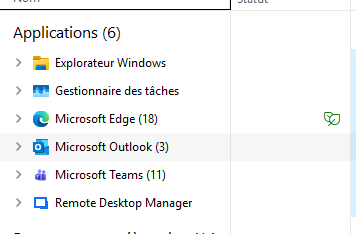
Best regards,
6a22a2fc-ab6f-47a4-9baf-4ff4d9901391.png
f26b5947-d198-4098-99d9-6ee520b50ea0.png
38789d01-57db-4ad4-8c01-21aa7a899d9d.png
883096b3-650a-47fa-a51e-36b80ac2e4fd.png
Hello Manuel,
Thank you for all the details and the screenshots, they are very helpful. We want to make sure we understood correctly when the shortcut fails, so could you please help us with the following?
1. With Remote Desktop Manager running and your RDP entry selected, press Ctrl + Shift + A in each of these three situations, and tell us what happens each time (the macro runs, nothing happens, or something else):
a) The focus is in Notepad (or another application, not RDM).
b) The focus is in the Remote Desktop Manager main window (for example in the navigation tree).
c) The focus is inside the RDP session.
2. When it worked in 3.12 and 3.13, from where did you press Ctrl + Shift + A (another application, the RDM window or the RDP session) and what happened?
3. We would also like to check whether another application already owns Ctrl + Shift + A on your computer (a global hotkey can only be owned by one application). Please follow these steps:
a) Close Remote Desktop Manager completely (also from the system tray). In the Task Manager, Details tab, check that RemoteDesktopManager.exe is not running.
b) Open the Windows Start menu, type "PowerShell" and open "Windows PowerShell". A normal window is enough, you do not need to run it as administrator. A blue window with a text prompt (PS C:\Users\...>) will open.
c) Copy the 4 lines below, right-click in the PowerShell window to paste them, and press Enter if they do not run by themselves. The script only tries to register Ctrl + Shift + A for a moment and releases it right away, it does not change anything on your computer:
Add-Type -Namespace Win -Name Hk -MemberDefinition '[System.Runtime.InteropServices.DllImport("user32.dll", SetLastError=true)] public static extern bool RegisterHotKey(System.IntPtr h,int id,uint m,uint vk); [System.Runtime.InteropServices.DllImport("user32.dll")] public static extern bool UnregisterHotKey(System.IntPtr h,int id);'
$ok = [Win.Hk]::RegisterHotKey([System.IntPtr]::Zero,1,0x4006,0x41)
$err = [System.Runtime.InteropServices.Marshal]::GetLastWin32Error()
if ($ok) { "FREE"; [void][Win.Hk]::UnregisterHotKey([System.IntPtr]::Zero,1) } else { "NOT available, error $err" }
d) The window will print one line, either FREE or NOT available with an error number. Please tell us which one (a screenshot of the window is also fine). You can then close the PowerShell window and start Remote Desktop Manager again.
We look forward to your feedback.
Best regards,
Alexis Geller Peiro
Hello
1. Remote Desktop Manager running and your RDP entry selected
a) The focus is in Notepad (or another application, not RDM) : Nothing
b) The focus is in the Remote Desktop Manager main window (for example in the navigation tree).: Nothing
c) The focus is inside the RDP session. : Example Edge start : 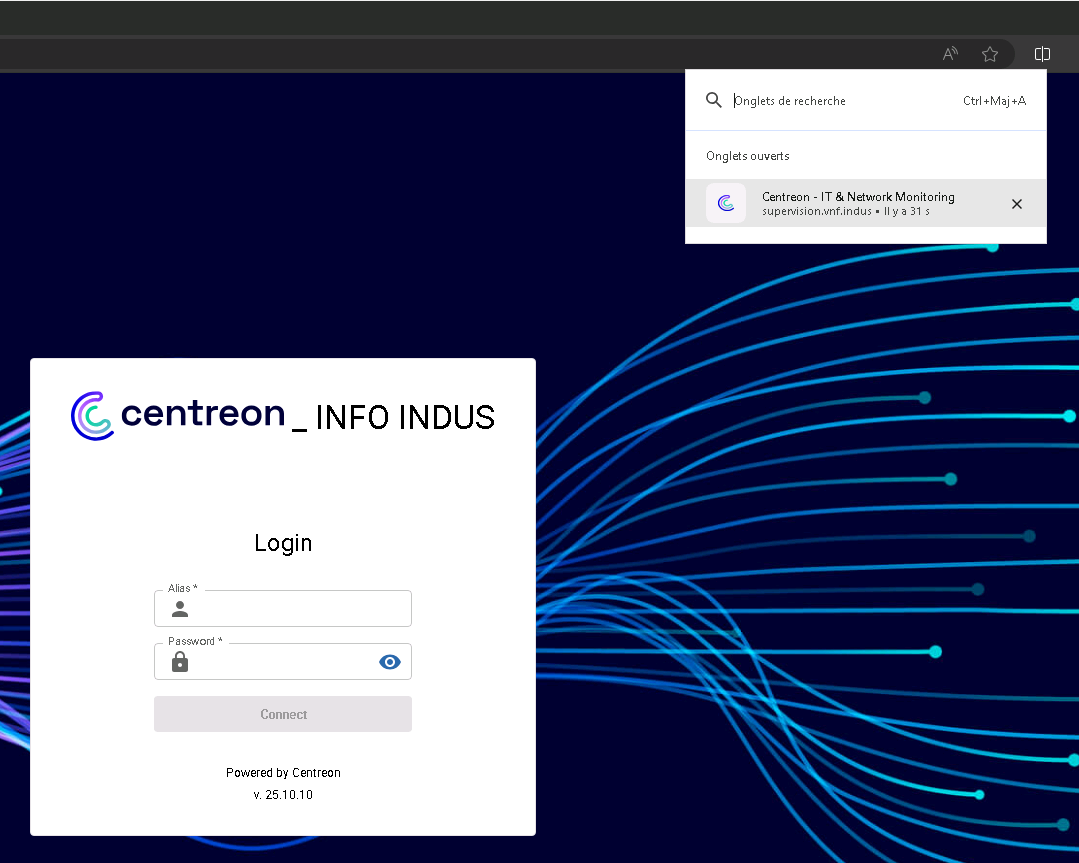
2. When it worked in 3.12 and 3.13, from where did you press Ctrl + Shift + A (another application, the RDM window or the RDP session) and what happened? Execute the event and pas the username and the password
3. We would also like to check whether another application already owns Ctrl + Shift + A on your computer (a global hotkey can only be owned by one application). Please follow these steps:
a) Close Remote Desktop Manager completely (also from the system tray). In the Task Manager, Details tab, check that RemoteDesktopManager.exe is not running.
b) Open the Windows Start menu, type "PowerShell" and open "Windows PowerShell". A normal window is enough, you do not need to run it as administrator. A blue window with a text prompt (PS C:\Users\...>) will open.
c) Copy the 4 lines below, right-click in the PowerShell window to paste them, and press Enter if they do not run by themselves. The script only tries to register Ctrl + Shift + A for a moment and releases it right away, it does not change anything on your computer:
Add-Type -Namespace Win -Name Hk -MemberDefinition '[System.Runtime.InteropServices.DllImport("user32.dll", SetLastError=true)] public static extern bool RegisterHotKey(System.IntPtr h,int id,uint m,uint vk); [System.Runtime.InteropServices.DllImport("user32.dll")] public static extern bool UnregisterHotKey(System.IntPtr h,int id);'
$ok = [Win.Hk]::RegisterHotKey([System.IntPtr]::Zero,1,0x4006,0x41)
$err = [System.Runtime.InteropServices.Marshal]::GetLastWin32Error()
if ($ok) { "FREE"; [void][Win.Hk]::UnregisterHotKey([System.IntPtr]::Zero,1) } else { "NOT available, error $err" }
d) The window will print one line, either FREE or NOT available with an error number. Please tell us which one (a screenshot of the window is also fine). You can then close the PowerShell window and start Remote Desktop Manager again.
Width RDM in case of :
Best regards,
b79a4638-4668-4b36-86f5-516594648c04.png
c88a2c5a-d83c-412f-ae12-8926050f2013.png
56d9cdf9-e738-494f-b597-7570cfa4035f.png
By the way i verify if Rdm set the hotkey :Yes it set but in my session non event pass
a3a4e071-203b-4c49-9f83-7241f2e6d039.png
Hello Manuel,
Thank you for your answers and screenshots. We did not understand clearly whether your last screenshot (the one with the second FREE result) was taken while Remote Desktop Manager was running, and this is the most important point for us, so we kindly ask you to run it again and confirm it.
1. Start Remote Desktop Manager normally and wait until it is fully loaded. Then, with RDM still running, open Windows PowerShell and run the following script (same as before):
Add-Type -Namespace Win -Name Hk -MemberDefinition '[System.Runtime.InteropServices.DllImport("user32.dll", SetLastError=true)] public static extern bool RegisterHotKey(System.IntPtr h,int id,uint m,uint vk); [System.Runtime.InteropServices.DllImport("user32.dll")] public static extern bool UnregisterHotKey(System.IntPtr h,int id);'
$ok = [Win.Hk]::RegisterHotKey([System.IntPtr]::Zero,1,0x4006,0x41)
$err = [System.Runtime.InteropServices.Marshal]::GetLastWin32Error()
if ($ok) { "FREE"; [void][Win.Hk]::UnregisterHotKey([System.IntPtr]::Zero,1) } else { "NOT available, error $err" }
Please tell us the result (FREE, or NOT available with the error number) and confirm that RDM was running. A screenshot showing both the RDM window and the PowerShell window would be perfect.
2. For comparison, we would like to test another key combination. In the Keyboard settings, on the same line as in your screenshot ("Exécuter la macro clavier"), change the shortcut to Ctrl + Alt + Shift + F9, keep the Mode as Global hotkey, click Save and restart Remote Desktop Manager. Wait until it is fully loaded and, with RDM running, run this script in Windows PowerShell:
Add-Type -Namespace Win -Name Hk2 -MemberDefinition '[System.Runtime.InteropServices.DllImport("user32.dll", SetLastError=true)] public static extern bool RegisterHotKey(System.IntPtr h,int id,uint m,uint vk); [System.Runtime.InteropServices.DllImport("user32.dll")] public static extern bool UnregisterHotKey(System.IntPtr h,int id);'
$ok = [Win.Hk2]::RegisterHotKey([System.IntPtr]::Zero,1,0x4007,0x78)
$err = [System.Runtime.InteropServices.Marshal]::GetLastWin32Error()
if ($ok) { "FREE"; [void][Win.Hk2]::UnregisterHotKey([System.IntPtr]::Zero,1) } else { "NOT available, error $err" }
Please tell us the result, and also whether pressing Ctrl + Alt + Shift + F9 runs the macro. You can set the shortcut back to Ctrl + Shift + A afterwards.
Best regards,
Alexis Geller Peiro
Hello
Without noting running i execute your powershell code and it return : Free
I run RDM, the powershell and it return : Free
I use Hotkey Detective and it confirm with Rdm in focus or not, in session or not the Ctrl + Shift + A it's catch by Rdm
2 no hotkey like Ctrl + Alt + Shift + F9 i use Ctrl + Alt + Shift + V
Add-Type -Namespace Win -Name Hk2 -MemberDefinition '[System.Runtime.InteropServices.DllImport("user32.dll", SetLastError=true)] public static extern bool RegisterHotKey(System.IntPtr h,int id,uint m,uint vk); [System.Runtime.InteropServices.DllImport("user32.dll")] public static extern bool UnregisterHotKey(System.IntPtr h,int id);'
$ok = [Win.Hk2]::RegisterHotKey([System.IntPtr]::Zero,1,0x4007,0x56)
$err = [System.Runtime.InteropServices.Marshal]::GetLastWin32Error()
if ($ok) { "FREE"; [void][Win.Hk2]::UnregisterHotKey([System.IntPtr]::Zero,1) } else { "NOT available, error $err" }
With Rdm running it return : NOT available, error 1409
i do something wrong because with Ctrl + Shift + A :
Add-Type -Namespace Win -Name Hk2 -MemberDefinition '[System.Runtime.InteropServices.DllImport("user32.dll", SetLastError=true)] public static extern bool RegisterHotKey(System.IntPtr h,int id,uint m,uint vk); [System.Runtime.InteropServices.DllImport("user32.dll")] public static extern bool UnregisterHotKey(System.IntPtr h,int id);'
$ok = [Win.Hk2]::RegisterHotKey([System.IntPtr]::Zero,1,0x4006,0x41)
$err = [System.Runtime.InteropServices.Marshal]::GetLastWin32Error()
if ($ok) { "FREE"; [void][Win.Hk2]::UnregisterHotKey([System.IntPtr]::Zero,1) } else { "NOT available, error $err" }
With Rdm running it return : NOT available, error 1409
d2eb9ff4-518d-408c-aa63-1725f4b366f6.png
Hello Manuel,
Thank you, this is very useful. Hotkey Detective and the 1409 result confirm that Remote Desktop Manager registers the shortcut correctly, so the problem is what happens after the key combination reaches RDM. We have two last questions:
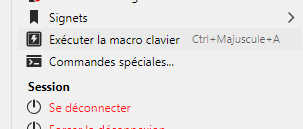
1. In RDM, right-click your RDP entry and use Execute typing macro > Execute in previous window, with a Notepad window open. Does the macro type the text in Notepad?
2. With the shortcut set to Ctrl + Alt + Shift + V (the one you tested), with the focus in Notepad and your RDP entry selected in RDM, does pressing it run the macro?
Best regards,
Alexis Geller Peiro
Hello Alexis
1)
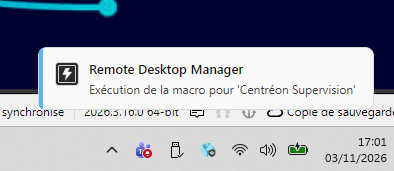 Nothing happen (the same for Ctrl + Alt + Shift + V)
2) Nothing happen
c75a3b29-b2cd-4a0e-a443-96384f165fb0.png
bfeb8bf3-c4b5-4171-a7d8-c48b697fe05d.png