Navigation Toolbar
1 vote

It would be helpful to create a toolbar in the Navigation section above where is says Name. Example, I tend to use the "collapse all" a lot, instead of right clicking and click on collapse all or Ctrl - adding a button to the toolbar would be helpful.
Or create a toolbar at the top which can be used globally to add a button for any feature RDM provides including custom buttons that can link to scripts, etc.
All Comments (5)
Hello,
In 2026.3, there is a Toolbar mode. It's the default when you don't have any prior configuration, otherwise you can switch to this mode in your user settings, here: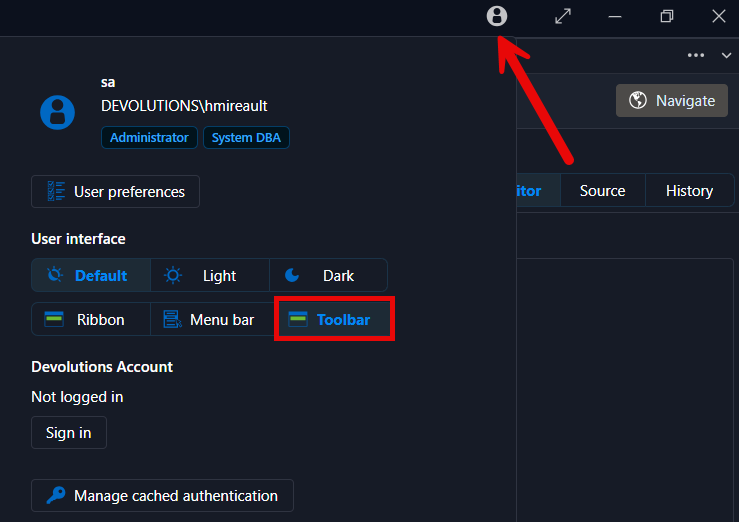
From there you can customize the toolbar by right click it and pressing "customize".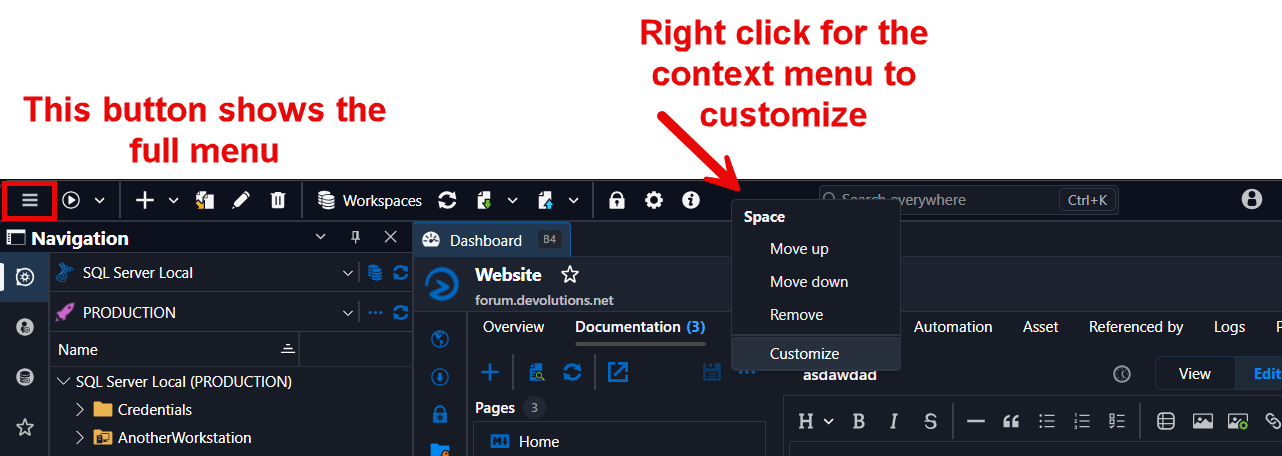
This allows you to put a lot of different actions in the toolbar for easy access.
At the moment there's no button for expanding/collapsing the navigation pane's tree in the toolbar, but there's quite the plethora of features you can add to it. Let me know what you would want that's not available and we'll see what we can do.
Regards,
Hubert Mireault
24050c7c-e9f0-4c4a-a240-2d67b9346ea2.png
6a2ac1e8-6332-462a-9857-81851f16a386.png
Hubert - thx. I added the toolbar and was able to add a few more icons.
- I added "Reconnect" and "Log off" icons as icons only and they do not show on the top bar
- Please ask to add "Collapse All"
thank you. much appreciated as always...Josh
Just RDP's into a server and both "reconnect" and "log off" appeared, that was confusing, I would have expected them to always show, all good.
I'll open a ticket so we can add the "Collapse all" and "expand all" buttons.
As for what you experienced with the "reconnect" and "log off", that's because certain buttons are not visible when they aren't relevant in that context. For these, you need to have an opened session like RDP opened for them to appear.
Regards,
Hubert Mireault
thank you