RDM macOS – Integrated FTP client fails to list remote directory (Pure-FTPd)
RDM macOS – Integrated FTP client fails to list remote directory (Pure-FTPd)

Hello,
I’m experiencing an issue with the Integrated FTP client in Remote Desktop Manager for macOS.
The FTP connection and authentication succeed, but the remote directory remains empty. The same server works perfectly using curl from macOS Terminal, including both FTP and FTPS.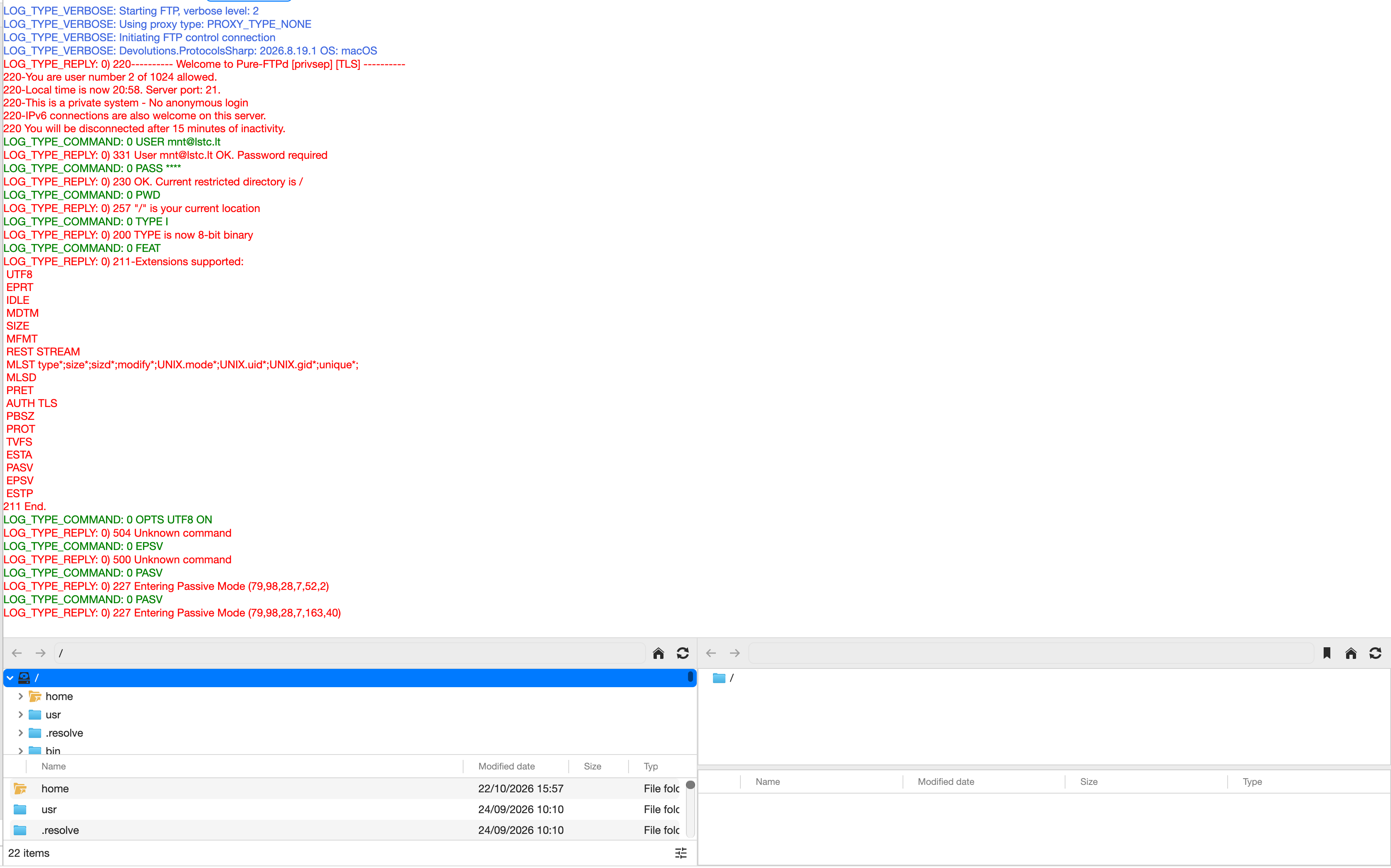 Environment
- RDM version: 2026.8.19.1
- OS: macOS
- FTP server: Pure-FTPd
- Host: krapas.serveriai.lt
- Port: 21
- Security: Explicit TLS or SSL
- Secure transfers: Enabled
- Passive mode: Enabled
RDM Log
Authentication and TLS negotiation succeed, but the directory listing never appears.
AUTH TLS
234 AUTH TLS OK.
USER [username]
331 User OK. Password required
PASS ***
230 OK. Current restricted directory is /
PWD
257 "/" is your current location
PBSZ 0
200 PBSZ=0
PROT P
200 Data protection level set to "private"
EPSV
500 Unknown command
PASV
227 Entering Passive Mode (79,98,28,7,246,100)
PASV
227 Entering Passive Mode (79,98,28,7,71,127)RDM sends PASV twice but never proceeds to LIST or MLSD.
Successful curl Test
Running the following command on the same Mac works correctly:
curl -v --ssl-reqd ftp://krapas.serveriai.lt/ --user 'USERNAME'Relevant output:
AUTH TLS
234 AUTH TLS OK.
SSL certificate verify ok.
EPSV
500 Unknown command
PASV
227 Entering Passive Mode (79,98,28,7,99,67)
Connecting to 79.98.28.7 port 25411
Connected 2nd connection to 79.98.28.7 port 25411
LIST
150 Accepted data connection
[Directory listing received successfully]
226 39 matches totalBoth LIST and NLST work correctly using curl.
Additional Tests
- Plain FTP without TLS: Same issue in RDM.
- Active Mode: Also fails (Mac is behind NAT).
- Passive Mode: Works correctly with curl.
- FTP port 21 and passive data connections are accessible.
- TLS certificate validation succeeds.
Questions
- Could this be a bug or compatibility issue in Devolutions.ProtocolsSharp 2026.8.19.1?
- Why does RDM send PASV twice without executing LIST or MLSD?
- Is there a way to disable EPSV and force PASV?
- Is this a known issue with the macOS Integrated FTP client?
Since curl works perfectly on the same machine with the same credentials, the issue appears to be specific to RDM.
Any suggestions would be appreciated.
Thank you!
CleanShot 2026-10-28 at 19.58.55@2x.png