How to remove menu bar?

I am trying to remove the menu bar (File/Home/Edit/View/etc) from RDM 2026.3.12 and I swear that Alt+F11 used to do that. Is it buried somewhere now?
All Comments (3)
Hello Mark,
Thank you for reaching out!
We can reproduce this in 2026.3.15.0. Alt+F11 is still listed as the shortcut in File > Settings > User interface > Keyboard, but pressing it now only shows the ribbon key tips instead of hiding the bar.
Can you confirm this is the same behaviour you are seeing?
Thank you in advance!
Best regards,
Just upgraded to 2026.3.16.0 and Alt+F11 does not change anything in RDM. I will click on the title bar, press Alt+F11 and nothing happens. If I click on

I will get File/Home/Actions, etc, and pressing Alt-F11 does nothing. Then I can't remember how to get rid of File/Home/Actions! I found it by right click at the very top, Layout Options, Ribbon. Uncheck and it removes File/Home/Actions. Then I get back to this
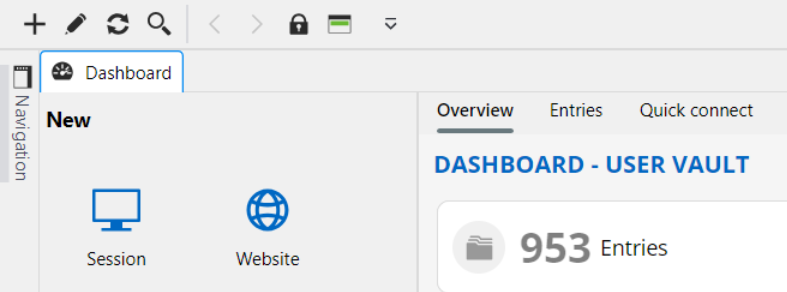
Did verify my Fn is locked on my keyboard so it is not trying to do some other function.
Not the end of the world....but I swear I would toggle it with Alt+F11 before. :)
Hello Mark,
Thank you for the feedback.
A correction to our earlier reply: when we looked into this again, the behaviour we reproduced came from a setting on our side, not from a change to Alt+F11. Sorry for the confusion.
RDM ignores its keyboard shortcuts while keyboard grab is not turned on. This is the magnet icon in the status bar at the bottom right of the RDM window:
Hover over the magnet. If the tooltip ends with "Click to grab the keyboard", click it once.
Then press Alt+F11. It should hide the ribbon, and pressing it again brings it back.
Please let us know if that works for you.
Thank you again!
Best regards,