BUG: Passdialog has not always focus - Password is entered in other windows/text fields
BUG: Passdialog has not always focus - Password is entered in other windows/text fields

Dear all,
in RDM the password dialog has not always the focus since a few versions in two ways:
Repro 1:
Start RDM
The launch takes several seconds. While no dialog / window of RDM is displayed click on the desktop
Wait until is displayed and the password dialog is visible and cursor is blinking
Type your password
Acutal:
The password is typed in some other window/app
Expected:
When the password dialog is displayed it should get the focus
Repro 2:
RDM is started but locked
In the task notification area make a double click on the RDM symbol
Password dialog is displayed
Type your password
Acutal:
The password is typed in some other window/app
Expected:
When the password dialog is displayed it should get the focus.
Info:
When you make only one click on the task-icon the password dialag has the focus
In both cases it happens several times that I entered my password visible e.g. in MS Teams meetings and I need to change it :(
All Comments (11)
Hello Rainer,
Thank you for contacting Devolutions Support, and for the clear reproduction steps.
To reproduce this on the same build, could you confirm the following?
The exact RDM version (Help > About), and the last version where the dialog always took focus, if you remember it.
How the application is secured: a local application password set in File > Settings > Security, or a setting enforced by your data source.
Your Windows version.
In the meantime, a single click on the tray icon is the safer way to unlock, as you noticed. At startup, clicking once inside the password field before typing will make sure the keystrokes go to RDM.
Once I have these details, I will try to reproduce both scenarios on our side and update you on this case.
Best regards,
Samuel Dery
Hey,
2026.2.19.0 64-bit (JIT)
Secured by a local application password
Windows 26H2 26300.9711
If necessary I can provide a video.
Best regards
Rainer
Hello Rainer,
Thank you for the details.
Could you let me know which workspace type you are using in RDM (for example a local file such as XML or SQLite, Devolutions Server, Devolutions Hub, or SQL Server)?
Could you also update RDM to the latest 2026.3 version and let me know if the password dialog still loses focus in both scenarios? Please note that if your workspace is on SQL Server or Devolutions Server, upgrading to 2026.3 would also require a database upgrade, so please check with whoever manages it before upgrading.
If the issue persists, a video would be helpful. Please record the click on the desktop during startup and the double-click on the tray icon, with the taskbar visible, and use a placeholder password rather than your real one.
Best regards,
Samuel Dery
Hey,
I updated to 2026.3 and the first behavior seems to be fixed.
I cannot test the second behavior because whenever the application is locked AND minimized I cannot reopen it via click or double click on the tray symbol => The password dialog doesn't not appear. I tested it in several ways. Not I had to kill the process and restart it again.
Best regards
Rainer
Hello Rainer,
Thank you for testing, I am glad the first behavior is fixed in 2026.3.
To reproduce the tray issue on our side, could you send the following?
The exact RDM version shown in Help > About.
The workspace type you are using (for example a local file such as XML or SQLite, Devolutions Server, Devolutions Hub, or SQL Server).
A screenshot of File > Settings > User interface > Taskbar/Tray icon.
Whether any error message appears when you click the tray icon.
Best regards,
Samuel Dery
Hey,
2026.3.16.0
Local datasource => SQLite
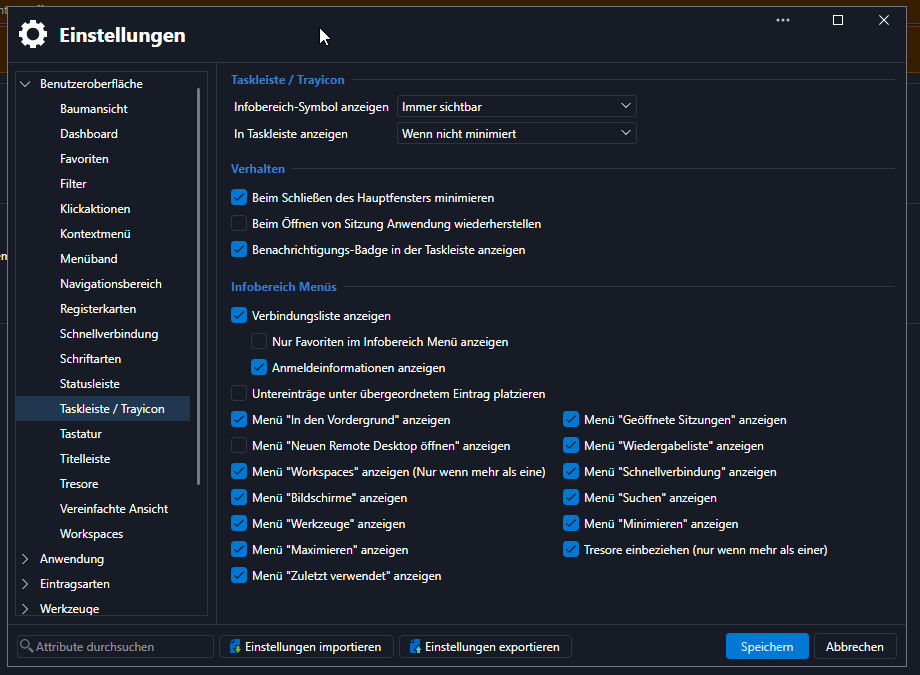
No Error Messages appear.
Repro is:
File -> Lock application
Press Minimize Button
Click one time or double times on tray icon => nothing happens. No dialog occur - never. Even if you click on the taskbar icon => no dialog occur. When I press Alt + Tab I can see the dialog but I cannot get it on the front. Only way is to kill the process and restart the app again.
FYI: I have three monitors
Hello Rainer,
Thank you for the detailed steps. I tested the same sequence on 2026.3.16.0 with a local SQLite workspace and an application password, and I was not able to reproduce the issue on my side.
Could you test the same steps with a portable instance of RDM 2026.3.16.0, available on our download page? Create a new local SQLite workspace, set an application password in File > Settings > Security, and keep all other settings at their defaults. This will help us confirm whether the behavior is related to your current settings or happens on a default configuration.
If the issue persists with the portable instance, could you send a short screen recording?
Please use the secure link below to send us the requested file(s):
Please name your file as follows so it can be easily identified:
SF-00134308
Best regards,
Samuel Dery
Hey,
same here with the portable version. I set only the password. I create a video and uploaded it.
Best regards
Rainer
Hello Rainer,
Thank you for the video.
The behavior you are seeing, where RDM stays locked and minimized and can’t be brought back from the tray or the taskbar, matches a similar issue our team has already identified. A fix for it should be included in RDM 2026.3.17.0.
Once that version is available, could you update and test the same steps again?
Please let me know the result once you have tested it.
Best regards,
Samuel Dery
Dear Samuel,
I can confirm that both issues are solved in 2606.3.17.0 - Thanks a lot :)
Best regards,
Rainer
Hello,
Thank you for your feedback. We're pleased to hear that everything is now working as expected.
Please don't hesitate to create a new thread if you need any further assistance.
Best regards,
Samuel Dery