RDM 2026.3.13 - jumping RDP tabs

Hello,
noticed it today: I have about 5 to 10 RDP tabs open and reboot some of them. When I reconnect, the tab that reconnects sometimes jumps to the end of the tab row. Is this already a known issue?
Brgds Andreas
All Comments (20)
A pinned tab also behaves weirdly and jumps to the end when I open another tab.
I upgraded today to 2026.3.15 and until now I have not seen this issue. But let´s investigate it a little bit longer...
Brgds Andreas
I have it in 2026.3.15 every time I reconnect a session.
not in my case - my RDP sessions tabs stay where they are. Yesterday wirh .13 they jumped to the far right end.
I also had it now again. I have about 10 RDP sessions open which are now locked. I quickls right-clicked some of them to login again, and then one of my RDP sessions jumped to the end of the list
EDIT: I just found out the difference. when I reconnect a RDP session that is connected via an RDP Gateway, the connection jumps to the end. A reconnect of a normal RDP session does not.
So yes - it is NOT fixed with 2026.3.15
Brgds Andreas
Hello Andreas,
Thank you for the details. We do not have a confirmed report that matches this exact behavior yet, so I would like to narrow down what triggers it. Could you please tell me:
1. Which Reconnect mode is used: in your global settings (File - Settings - Entry types - Sessions - Remote desktop (RDP)) and on the affected entries (Advanced section)? For example Default, "Reconnect in a new tab", or "Reconnect in the same tab".
2. How exactly do you reconnect: right-click on the tab and Reconnect, or the Connect button on the panel shown when "Keep tab on disconnect" is enabled?
3. Do you use the Microsoft RDP client or FreeRDP for these entries?
4. Is the option "Disable layout restoration" enabled in your settings (Advanced section)?
5. Is the navigation pane docked as a tab next to your sessions, or on the left side?
If you can reproduce it, a short screen recording showing the tab bar before and after the reconnect would be very helpful. (You can send it to me via DM.)
Best regards,
Alexis Geller Peiro
Hello Alexis,
I'm not Andreas, but I'd still like to respond on my own behalf. :-)
Reconnect mode is set to "Full". When I switch to "Legacy", the tabs no longer move to the end.
Right-click on the tab and Reconnect. Or “Connect” after the computer has restarted and the “Disconnect action” is set to “Keep tab open.”
Microsoft RDP (setting "Latest")
No
On the left side
Hello,
Standard
Right-click on the Tab and Reconnect
Ms RDP Latest
No
Left side
Brgds Andreas
Hello Andreas and Christian,
Thank you both for the details, they helped a lot.
Christian, your test explains it. With the Reconnect mode set to "Full", RDM closes the tab completely and opens the connection again in a new tab, which is why it appears at the end of the tab row. "Legacy" reconnects inside the same tab, so the position is kept. This is how the two modes are documented: https://docs.devolutions.net/rdm/knowledge-base/how-to-articles/rdp-session-entry/rdp-reconnect-mode/
Please note that "Full" is also the documented solution when an RDP session through an RD Gateway keeps asking for credentials on reconnect, so if that is why you use it, keep it for those entries and use "Legacy" for the others.
Andreas, with "Standard" the reconnect should happen in the same tab, so your case is different and I would like to understand it better. Could you please check:
1. The Reconnect mode on one of the affected entries and on the folder that contains them (Properties - Advanced). An entry or folder can be set to "Full" even if the global setting says "Standard".
2. Whether these entries connect through an RD Gateway or a Devolutions Gateway.
3. Whether the tab you right-click is already the selected tab, or whether you right-click tabs in the background while another tab is active.
If you can reproduce it, a short screen recording showing the tab bar before and after the reconnect would be very helpful. You can send it to me via DM.
Best regards,
Alexis Geller Peiro
Hi Alexis,
Thanks for the answer. Is this setting a new feature in 2026.3? If not, then I certainly haven't changed anything, and it didn't behave that way in 2026.2.
That said, “Legacy” sounds like this feature might be removed at some point. Is that planned?
Would it be possible for the “Full” mode to open a new tab, but in the same location?
And the other thing is that the “Pin tab” feature also causes the tabs to jump all over the place: If I pin a tab, it jumps all the way to the left. If I then click on another tab, the pinned tab jumps all the way to the right. If I unpin the tab again, it jumps all the way to the left once more. I don’t use this feature, so I don’t really care. But something seems fundamentally wrong with the tabs in the new GUI.
Hello Christian and Andreas,
Thank you both for your patience, and thank you Christian for the detailed answers.
Christian, I tested this on my side with several RDP tabs kept open after a disconnect, also with live sessions. With the Reconnect mode set to "Full", the reconnected tab moves to the end of the tab row in 2026.3.15. In 2026.2.20 the same test keeps the tab in its position. With "Standard" or "Legacy" the tab stays where it is, in both versions. So you are right that this behavior changed in 2026.3, and I have reported it to our development team. I cannot give you a date or a version for a fix yet, but I will update you here when I have news.
To your other questions:
- I am not aware of any plan to remove "Legacy", although I cannot make commitments about future versions.
- I also tried the option "Disable layout restoration" (File - Settings - Advanced - User interface), and it does not change the position of the tab in "Full" mode, so I do not recommend it as a workaround.
- Until there is a fix, please use "Standard" or "Legacy" on the entries or folders that are affected. Please keep "Full" only where you need it, for example for RDP sessions through an RD Gateway that keep asking for credentials on reconnect.
- The Pin tab behavior you describe has already been reported internally, and a fix is planned for an upcoming 2026.3 build. I cannot give you a date for that either.
Andreas, with "Standard" I could not reproduce the tab jumping, in several tests, so I would like to understand your case better. Could you please check:
1. The Reconnect mode on one of the affected entries and on the folder that contains them (Properties - Advanced). An entry or folder can be set to "Full" even if the global setting says "Standard".
2. Whether these entries connect through an RD Gateway or a Devolutions Gateway.
If you can reproduce it, a short screen recording showing the whole tab bar before and after the reconnect would be very helpful. You can upload the video here: insertar link
Best regards,
Alexis Geller Peiro
Thanks, that's fine with me.
Hello,
Reconnect Mode - I never changed anything:
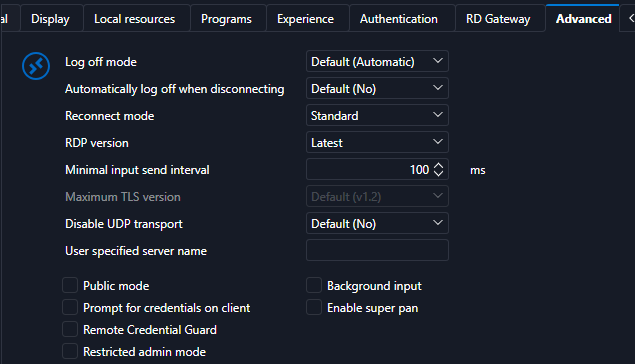
And as written I use a RD Gateway.
And it does not matter if the tab is active or not, or if I am logged on or not, if I right-click and select reconnect, the tab is moved to the end.
Brgds Andreas
Hello Andreas,
Thank you for the screenshot and the details, they explain your case.
The Reconnect mode on your entry is "Standard", but your entries use an RD Gateway. In RDM there is a setting called "Force full reconnect when gateway is used", which is enabled by default. When it applies, a reconnect closes the tab and opens the connection again in a new tab, whatever the Reconnect mode of the entry is. That is the same behavior as the "Full" mode, and it is why the tab ends up at the end of the tab row. In 2026.2 the tab was reopened in its previous position, so this is the same change in behavior that Christian described, and it is part of the report I sent to our development team. I cannot give you a date or a version for a fix yet, but I will update you here when I have news.
As a possible workaround, you can disable that setting: File - Settings - Entry types - Remote Desktop (RDP) - Global overrides - Gateway, and untick "Force full reconnect when gateway is used". Please note that this setting exists because some RDP sessions through an RD Gateway ask for credentials again when they are reconnected in the same tab, so please test it with a few sessions before relying on it, and let me know what you see.
You do not need to send the screen recording anymore.
Best regards,
Alexis Geller Peiro
Thanks for the info! I just have a few connections via an RDP Gateway. So I can live with it until it is fixed.
Brgds Andreas
Hello,
Thank you for your patience while our team looked into the issue you reported.
I'm happy to let you know that the latest version of Remote Desktop Manager (2026.3.16.0) includes a fix for this problem. You can download it from our website here:
https://devolutions.net/remote-desktop-manager/download/
Once you have installed the update, could you please test it in your environment and confirm that everything now works as expected? If the issue persists or if you notice anything unusual related to the same original problem, just reply to this message with a few details, and we will be glad to look into it further.
Thank you for your collaboration.
Best regards,
Maxim Robert
Hi Maxim,
For me it's fixed, thank you. :-)
Hello Andreas,
Thank you for your feedback. We're pleased to hear that everything is now working as expected.
Please don't hesitate to create a new thread if you need any further assistance.
Best regards,
Alexis Geller Peiro
Well, the feedback was not from me... ;)
But for me it is also working now! Thanks a lot for your help.
Brgds Andreas
Hello Andreas,
Sorry for the confusion!
Thank you for your feedback. We're pleased to hear that everything is now working as expected.
Please don't hesitate to create a new thread if you need any further assistance.
Best regards,
Alexis Geller Peiro