[2026.3.1.2] First RDP session opened with no tabs gets scrollbars (session size calculated before tab bar appears)
[2026.3.1.2] First RDP session opened with no tabs gets scrollbars (session size calculated before tab bar appears)

After updating to Remote Desktop Manager 2026.3.1.2, I'm seeing a regression with embedded RDP sessions.
Issue:
When I open an RDP session while the tabbed document area is empty, the session always shows scrollbars. It looks like the workspace size is calculated first, and then the tab bar appears and takes some space from that area, so the remote desktop no longer fits.
What works correctly:
- Opening a second RDP session while one is already open: no scrollbars.
- Opening an RDP session as the "first" one while any other tab (of any type) is already open: no scrollbars.
RDM version: 2026.3.1.2
OS: macOS 27.0.1, Apple M5
All Comments (4)
Hello,
Thank you for reaching out & apologies about the delay.
Could you please upload a brief video of the issue to the SharePoint link below so we can investigate further?
FOR - 56 740
Please let us know when it has been uploaded.
Thank you in advance!
Best regards,
Screen record uploaded.
Hello,
Thank you for the detailed description and the recording. It clearly shows the difference: when the RDP session opens into an empty document area, the tab bar appears after the session size has been set, which leaves a vertical scrollbar. When another tab is already open, the session fits exactly.
To match your setup, could you share the Screen sizing mode and Remote desktop size values on the affected RDP entry, under the Display tab? We will try to recreate the issue on our side.
Until there is a fix, opening any other tab before you launch the RDP session avoids the scrollbars, as you already noticed.
Thank you in advance!
Best regards,
Hi,
Thanks for confirming.
Settings on the affected RDP entry (Display tab):
Remote desktop size: Default
Screen sizing mode: Default
Colors: Highest quality (32 bit)
Optimize for Retina displays: Default (No)
Desktop scale factor: Default (100%)
Device scale factor: 100%
“Use all my monitors” / “Span multiple screens”: off
The same happens on all my RDP entries, which all use these defaults.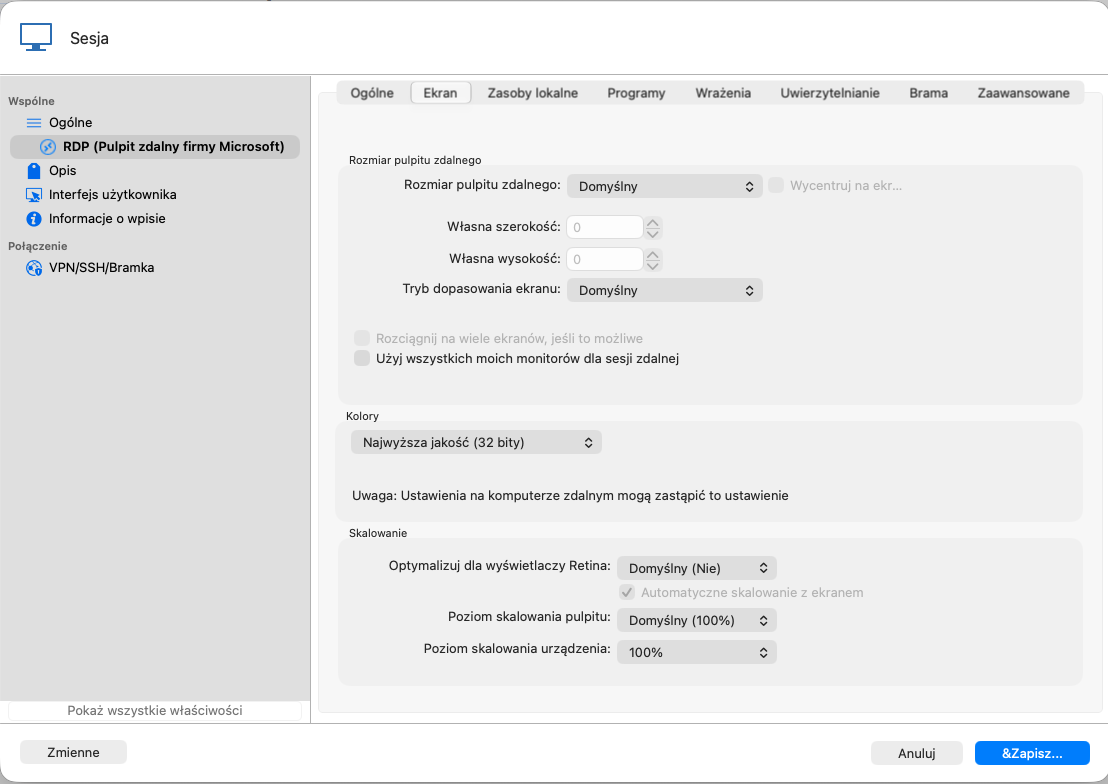
Additional testing: I switched Screen sizing mode to each of the other options:
Smart Reconnect
Smart Sizing
Dynamic Resolution
With every one of them, the first session opened into an empty document area fits correctly, with no scrollbars. The issue only occurs with Default.
c162333b-6934-4555-a35c-8532f01f89e5.png