WebAuthN / FIDO2 / Passkey redirection failure on RDM Mac OS
WebAuthN / FIDO2 / Passkey redirection failure on RDM Mac OS

I'm facing issues with passkey redirection from a RDP session in RDM to my macOS. It errors out entirely rather than redirecting the prompt to my local Mac.
The expected results are that the FIDO2 authentication is redirected from the session host to my local client, where macOS will prompt me to scan a QR code or use a physical security key.
Environment details:
- Client:
- Remote Desktop Manager 2026.3.05
- macOS Tahoe 26.7.1
- Session host:
- Windows Server 2025 Desktop (september 2026 patch level)
- No RD gateway used, direct connection to the host
Steps to reproduce:
In this example I attempt authenticate to Microsoft Entra where I want to use a passkey for authentication. Other passkey authentication prompts may follow different steps, but the concept should be the same
- Connect to the remote desktop session host through RDM
- Open Microsoft Edge and navigate to https://entra.microsoft.com
- Browser is redirected to https://login.microsoftonline.com
- I choose "Sign-in options" > Face, fingerprint, PIN or security key
- The login page errors out with "We couldn't sign you in. Something went wrong when trying to sign in with a passkey. Please try again"
- This failure occurs before macOS displays any local WebAuthN/passkey UI
I unfortunately am unable to find any relevant application logs / diagnostics in RDM that helps me troubleshoot my own issue further. Please let me know if there are any relevant logs/diagnostics I can capture and provide to help narrow down the root cause of the problem.
Control testing:
For comparison and context, this issue does not occur when using 1st party "Windows App" from Microsoft (although even in Microsoft's own implementation there are problems; I can only get physical USB YubiKeys to work, cross-device QR code flows to for example Microsoft Authenticator errors out in Windows App too, but that's outside the scope of RDM or this bug report)
All Comments (4)
Hello
Thanks for the issue report, although I fear this might actually be a feature request. WebAuthN redirection in embedded RDP on RDM Mac is supported through FreeRDP's WebAuthN stack.
Are you using an external FIDO2 authenticator like a USB/NFC/BLE security key (where the passkey is stored on the key)? Or are you using macOS's built in platform authenticator (i.e. TouchID / Cloud Keychain passkeys)?
I know you wrote about the issue with physical Yubikeys with Windows App, but I'm not sure if that's what you're trying with RDM.
Thanks and kind regards,
Richard Markievicz
Hello
Thanks for the issue report, although I fear this might actually be a feature request. WebAuthN redirection in embedded RDP on RDM Mac is supported through FreeRDP's WebAuthN stack.
Are you using an external FIDO2 authenticator like a USB/NFC/BLE security key (where the passkey is stored on the key)? Or are you using macOS's built in platform authenticator (i.e. TouchID / Cloud Keychain passkeys)?
I know you wrote about the issue with physical Yubikeys with Windows App, but I'm not sure if that's what you're trying with RDM.
Thanks and kind regards,
@Richard Markiewicz
Hi,
Thanks for your reply. I hope you can excuse my lack of knowledge surrounding what functionality is provided by RDM itself rather than underlying dependencies.
I'm using external FIDO2 authenticators, specifically I use a YubiKey 5C, and I also have Microsoft Authenticator Android app configured as a passkey provider. I am not using the macOS built-in TouchID / Cloud Keychain for this purpose. But as far as I can tell, the authentication request never reaches my Mac, and gets stuck within the RDP session.
Additionally, fwiw, I've now upgraded to RDM to version 2026.3.1.2, and the behavior is the same.
I have also of course under the Session Properties > General > RDP > Local resources enabled the setting for redirecting "WebAuthN (Windows Hello or security keys)", as well as the "Smart cards or Windows Hello for Business" options.
Best regards,
Viktor
Hello Viktor
Thanks, it's very clear.
Can you try the following for me:
- Close RDM completely and then re-open it
- Go to Help > Session Diagnostics and in the window that opens, click the red pill to enable logging
- Go to an RDP session and open it, and trigger a WebAuthN flow. This will fail as we've already seen.
- It would be best to use the Yubikey if possible as that matches my environment for comparison
- Close the RDP session
- Go back to the Session Diagnostics window and right-click the "RDP (Microsoft Remote Desktop).log and choose "Show in Finder"
- It will bring up the log file, please .zip it and send it to me by private message
- Disable logging again, or close and relaunch RDM to disable it
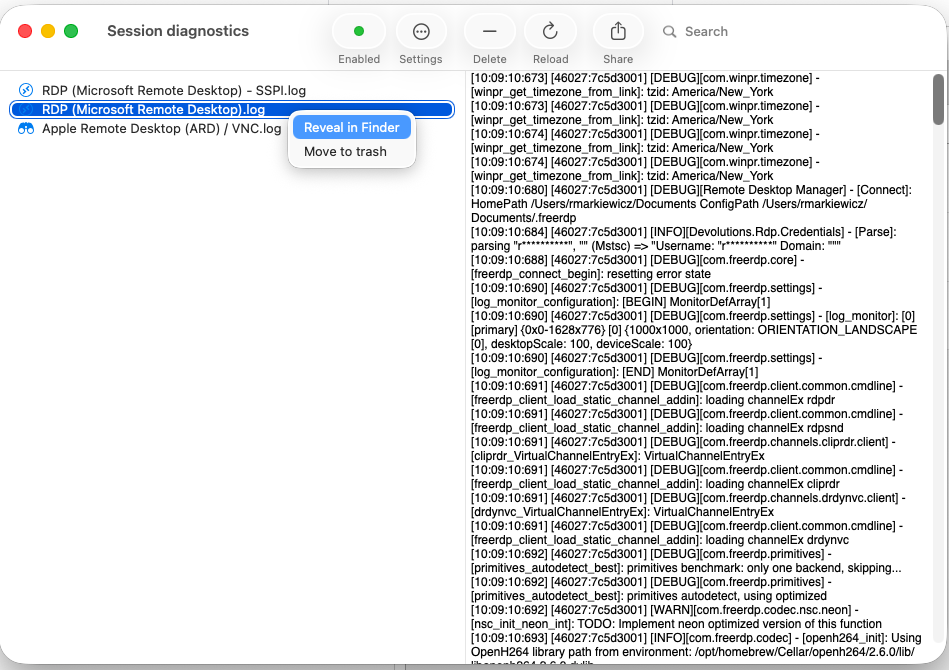
Please, let me know if you have a question or something isn't clear
Kind regards,
Richard Markievicz
Screenshot 2026-10-06 at 10.10.56.png
Thanks for the instructions, Richard!
I reproduced the scenario with logging enabled and it helped me better understand the situation myself.
Your initial reply seems to be correct as in so much that it's really FreeRDP's WebAuthN implementation rather than RDM:s redirection configuration
I traced it to being introduced in this PR: https://github.com/FreeRDP/FreeRDP/pull/12572.
FreeRDP implements the RDP WebAuthn virtual channel ( MS-RDPEWA ) and uses libfido2 to communicate with local FIDO2 authenticators. It does not appear to use Apple’s native AuthenticationServices APIs. In practice, the current implementation detects external authenticators, such as a USB YubiKey, that are present when FreeRDP enumerates devices for the request.
In my original test, no security key was connected. The log showed that the WebAuthN_Channel was created successfully, but FreeRDP reported:
IUVPAA: ndevs=0 available=0
This explains why it failed for me: RDM:s redirection was active but FreeRDP found no local authenticator. Unlike the native macOS WebAuthn experience, it did not display a system UI that allowed me to connect a security key after the request had begun or use cross-device authentication through the hybrid/QR-code flow.
When I connect my YubiKey before initiating authentication, RDM correctly prompts me for the key’s PIN and asks me to touch it. However, I encounter a second issue during a usernameless passkey flow.
My YubiKey contains multiple discoverable credentials for the same relying party ID. When I initiate authentication without first entering a username, I am not shown an account or credential chooser, and the authentication eventually fails.
If I first enter my username at login.microsoftonline.com and then select passkey authentication, the flow succeeds. In that username-first flow, Microsoft can include the credential ID associated with the account in the WebAuthn allowCredentials list, so FreeRDP/libfido2 does not need to support selection among multiple discoverable credentials.
So in summary my troubleshooting leads me to this conclusion.
The supported scenario is seemingly:
- An external FIDO2 authenticator is already connected and visible to FreeRDP/libfido2 when the WebAuthn request is processed.
- The relying party uses a username-first flow and supplies the applicable credential ID
Some unsupported scenarios are seemingly:
- Connecting an external authenticator after the WebAuthn request has already been processed.
- Cross-device authentication using WebAuthn hybrid transport, such as scanning a QR code and authenticating with a phone.
- Usernameless authentication when multiple discoverable credentials for the same RP ID are stored on a PIN-protected authenticator, because no credential/account selection UI is presented
Untested: macOS native platform passkeys stored in iCloud Keychain. this may also be non-functional and dependent on Apple's native API:s.
I can still provide logs to you if they are of interest, but I think as far as RDM:s involvement in this goes it's cleared up, and the limitations are mostly in the FreeRDP implementation.
Maybe RDM could catch the error logged regarding lack of available authenticators "[com.freerdp.channels.rdpewa.client] - [rdpewa_fido_is_uvpaa]: IUVPAA: ndevs=0 available=0" and prompt the user that an attempt was made but no authenticators were available, rather than failing silently. Or we're probably talking an entire override of the FreeRDP implementation and doing your own integrating with the platform/OS native API:s for passkey authentication instead.
Best regards,
Viktor