Entry Host -Event after opening dosn't work

In the latest version, events triggered upon opening no longer work.
this is example of configuration: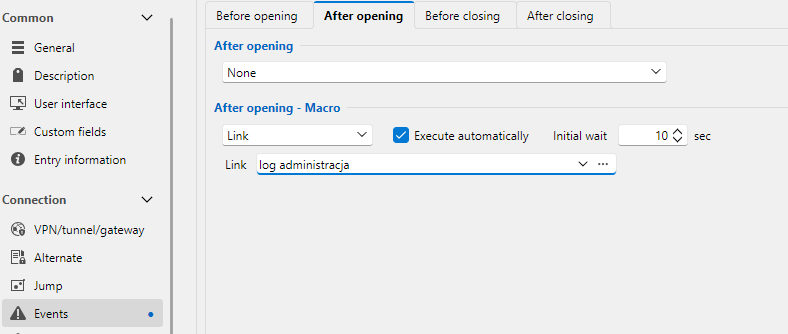
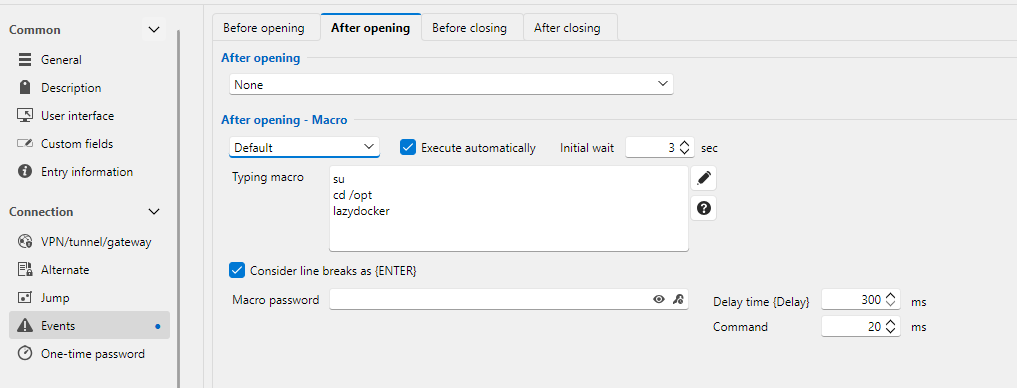
Remote Desktop Manager 2026.3.12.0 64-bit (PreJIT)
Runtime: .NET 10.0.3
Platform: Microsoft Windows 10.0.26200
Workspace: Local data source
Allocated memory: 1046 MB
15c95d44-e912-4e0c-b35a-c4ee3bf32b29.png
ab36476c-349a-41a8-93f6-28bb8d62280c.png
All Comments (5)
Hello,
Thank you for the details and screenshots.
Your configuration looks correct. What you describe matches a known regression in Remote Desktop Manager 2026.3.11 and 2026.3.12, where events under Events, After opening, do not run when an entry is opened. A fix is planned for version 2026.3.13.0.
To confirm your entries are covered by that fix, could you tell us:
- The entry type of each of the two entries (for example, SSH Shell, RDP, Website)
- What "Session events execution" is set to under File, Settings, Security
Thank you in advance!
Best regards,
Hello,
Thank you for the details and screenshots.
Your configuration looks correct. What you describe matches a known regression in Remote Desktop Manager 2026.3.11 and 2026.3.12, where events under Events, After opening, do not run when an entry is opened. A fix is planned for version 2026.3.13.0.
To confirm your entries are covered by that fix, could you tell us:
- The entry type of each of the two entries (for example, SSH Shell, RDP, Website)
- What "Session events execution" is set to under File, Settings, Security
Thank you in advance!
Best regards,
- SSH Sell
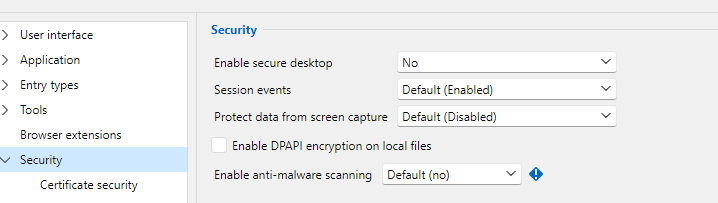
Best reagards
7037cb2e-06fb-4ba1-9821-4f67bee4d33e.png
Hello,
Thank you for the update.
I can confirm this is the same bug, and a fix will be included in the next minor version release 2026.3.13.0 which will be available very soon.
We will update you once it's been released.
Thank you again!
Best regards,
Hello,
Thank you for your patience while our team looked into the issue you reported.
I'm happy to let you know that the latest version of Remote Desktop Manager (2026.3.13.0) includes a fix for this problem. You can download it from our website here:
https://devolutions.net/remote-desktop-manager/download/
Once you have installed the update, could you please test it in your environment and confirm that everything now works as expected? If the issue persists, or if you notice anything unusual related to the same original problem, just reply to this email with a few details, and we will be glad to look into it further.
Thank you for your collaboration.
Best regards,
Érica Poirier
Thank you, It works very well.
Best regards.