RDM sometimes loses the "Check for updates" menu item in Help
RDM sometimes loses the "Check for updates" menu item in Help

Sometimes when I open my computer in the morning and would like to check for updates of RDM, the Help menu doesn't have the item anymore. I think it occurs when the computer is put to sleep and later woken up, but I'm not too confident about that. It's the screen from RDM 2026.3.10 but this issue occurred for a long time. Please fix to make it always appear. Thanks in advance.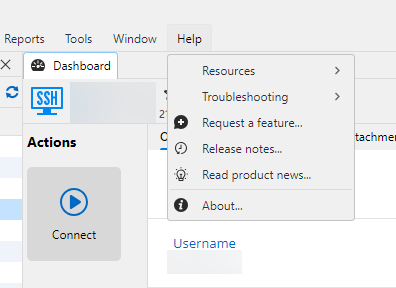
e6467dd2-b4ee-4712-b614-db76cb77e52e.png
All Comments (3)
Hello,
Does the button reappear if you try again, let's say 30-60 seconds later?
I looked at the code and the button doesn't show if the application detects you don't have internet access, as well as a few other conditions which you aren't hitting, that being a GPO and a local setting.
After coming back from sleep, it's possible the network services on your computer are taking a bit of time to get back to work. Additionally, there's a 5 seconds cache on this check in RDM, meaning this value is not recalculated unless at least 5 seconds has passed since the last verification.
Regards,
Hubert Mireault
Thanks for your response. That I didn't check. But it's quite strange :-) Instead of completely deleting the menu item it'd be more intuitive if it was just visible but disabled. Then I could infer that it may be something to do with internet connectivity. Or it could just be enabled and in case I click it and it is unable to contact Devolutions servers to check for updates, it could show the warning dialog "Unable to check for updates. Verify your network connectivity." When the menu gets deleted and later reappear, it seems like it's unstable.
Thanks!
I think what you're asking for makes sense.
In general, the reason why we hide menus in those circumstances is to make the UI a little neater. For a core feature like checking for updates, I agree that always having it there would make more sense. We could instead handle the lack of detected internet connection on click, letting you know clearly why the update can't be done. I'll open a ticket so we can improve this.
Specifically for the GPO and the "no internet connection" settings, I think hiding it still makes sense, as either an administrator or you yourself would have configured this.
Regards,
Hubert Mireault