2026.3.10.0 display issue

Just upgraded to 2026.3.10.0 and now all of my entries in the Navigation pane are truncated and 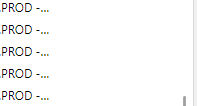 end in ...
This is new to this version as previously everything displayed normally. There is plenty of room for the server names to display, they just don't.
Any assistance in getting the full name to show as it previously did would be great, thanks!
RDM truncation.png
Recommended Answer
Ok, figured it out. If this helps anyone else here is the issue. There is a separate 'resize' than is independent from the size of the panel and affects how the entries are displayed. It is not the most obvious and took me a while to realize it was even there. I'm attaching a picture just in case anyone else trips over this.
RDM truncation pt 2.png
All Comments (2)
Ok, figured it out. If this helps anyone else here is the issue. There is a separate 'resize' than is independent from the size of the panel and affects how the entries are displayed. It is not the most obvious and took me a while to realize it was even there. I'm attaching a picture just in case anyone else trips over this.
RDM truncation pt 2.png
Hi leimerm,
Thank you for following up and sharing how you resolved the issue. We’ll pass your feedback about the resize control’s visibility along to our team. We’re glad to hear everything is displaying correctly now!
Best regards,
Alexis Geller Peiro