Display bug with 2026.3.9.0

I have several issues with the new display rendering, and I think 20+26.3.50 (?) and forward has been a huge step back in quality :(
Currently on 2026.3.9.0. If I set the navigation pane on the vault to auto-hide, which I always do because I want the screen real estate, then I can't access the naviagation bar and I'm stuck on the current connected client. Here you can see I try to bring up the Navigation pane, and with the colored border it is easy to see that it tries to render the menu on top of the connected client, but ends up behind it and inaccessible. In order to reach the navigation pane, I must sign out of all connected clients.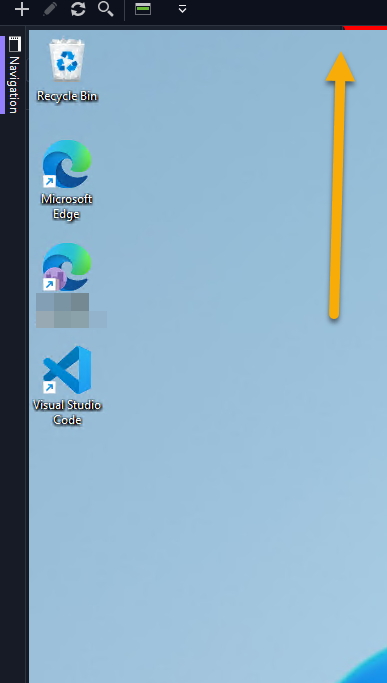 second issue, it looks like I no longer get a list of tabs of the connected clients for quick and easy switching between them! This is a great example of a small details that makes a big difference.
I'm very frustrated with the recent updates you've made to this otherwise reat prooduct.
43103f61-b605-412b-8081-07a21cedf376.png
All Comments (7)
Hi Torben,
Thank you for reporting this issue.
This bug has already been identified, and our team is currently working on a fix. As soon as it is fixed and the release is available, we will let you know.
Thank you for your patience.
Best regards,
Alexis Geller Peiro
Hello,
As I mentioned in your other thread, the issue with the navigation pane rendering should be fixed in the next minor version update.
For the issue with the tabs, we'll be investigating.
Regards,
Hubert Mireault
v2026.3.8 and 2026.3.9
I am impacted by this bug too. Navigation bar display issue and general RDP rendering issues. No issues before updating. RDP windows are often solid white when switching between tabs. If i click or push button I can force parts of the window to render.
Hello PaulS,
We should also have a fix for the RDP screen going white when switching between tabs in the upcoming 2026.3.10.0.
Best Regards,
Michaël Beaudin
Hello,
Thank you for being so patient!
If possible, could you update your RDM to the latest version (2026.3.10.0) and see if the problem persists? This version should resolve your issue.
Latest Version: Download RDM
If the problem persists after the update, please let us know so we can inform our development team.
Best regards,
Maxim Robert
Updates to .3.10 and the naivagion bar bug seeems to be fixed, thank you
Hello,
Thank you for your feedback. We're pleased to hear that everything is now working as expected.
Please don't hesitate to create a new thread if you need any further assistance.
Best regards,
Alexis Geller Peiro