[Regression] Sub-entries missing / cannot be expanded in navigation tree when filter is applied (v2026.3.9.0)
[Regression] Sub-entries missing / cannot be expanded in navigation tree when filter is applied (v2026.3.9.0)

RDM Version: 2026.3.9.0 (also observed in 2026.3.8.0; worked as expected in 2026.2.18.0)
OS: Windows
Description
After updating to version 2026.3 (specifically reproduced in 2026.3.8.0 and 2026.3.9.0), sub-entries no longer appear under their parent host entry when a quick search/filter is active in the Navigation pane.
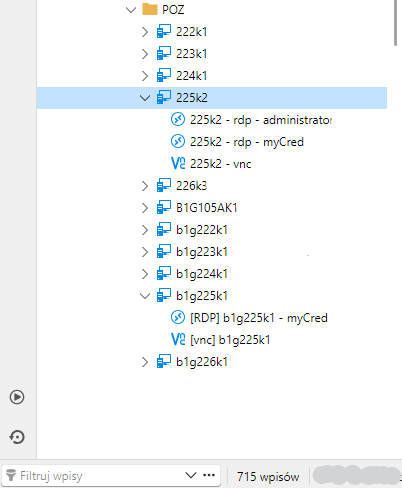
In version 2026.2.18.0, filtering by name displayed matching parent entries with an expand arrow (>), allowing us to quickly expand the host and launch sub-entries (such as RDP or VNC connections) directly from the tree view.
In 2026.3.9.0, when the tree is filtered ((Filtered) state):
- The parent entry is displayed as a flat item without an expand icon.
- Sub-entries are completely hidden from the tree.
- To launch a sub-entry, we now have to click the parent host, open the Sub-entries dashboard tab, locate the item, and launch it via the context menu or double-click.
Steps to Reproduce
- Create a parent entry (e.g., Host type) containing two or more sub-entries (e.g., RDP and VNC).
- Type a search query in the Navigation tree filter to locate the host.
- Observe the filtered tree result: the expand arrow is missing, and sub-entries cannot be viewed or expanded under the parent node.
Expected Behavior
The navigation tree should retain t
he expand toggle for matching parent items during filtering, allowing immediate access to its sub-entries (matching the behavior of 2026.2.x).
(I have attached two screenshots demonstrating the issue: one showing the sub-entries visible in the full tree view, and the other showing the missing expand toggle and sub-entries once the tree is filtered).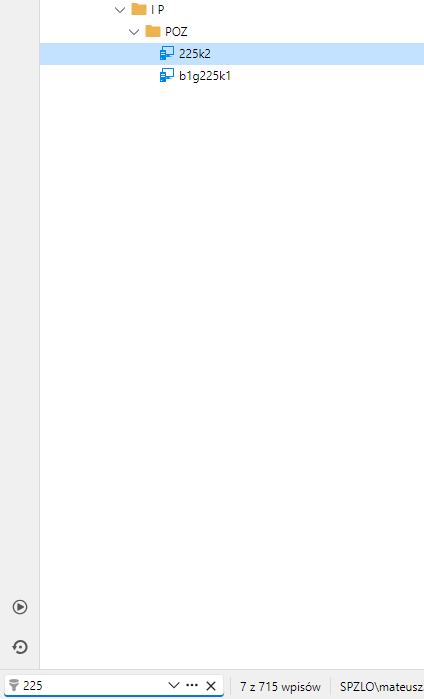
2026-09-23 160529.png
2026-09-23 160430.png
All Comments (1)
Hello,
We've found and fixed the issue. You can expect this with the upcoming 2026.3.10 version.
Regards,
Jafran Majeau