RDM 2026.3.9: High priority: Auto-type doesn't work

Hello,
After the upgrade to 2026.3 (2026.3.9) in particular, password auto-type stopped working. It's a critical function for me, because some contexts I use it in don't allow/don't handle password copy-paste through clipboard, and the passwords are generated, thus very difficult and long.
It looks like RDM has no focus on the target session. It should type the characters not on the focused window, but on the target session.
Repro:
- Open an RDP session to a target Windows machine.
- Open a notepad, or other app that would receive the keystrokes.
- Use the auto-type -> paste password on a credential entry
- Observe password is not typed
- If you click on the RDP session, so it gets focus, the last letters of the password may get typed, but not the whole password.
I am attaching screen recording showing the issue. Please fix it. Thanks in advance!
2026-09-23_09-25-41_RemoteDesktopManager.mp4
All Comments (8)
I can confirm the same behavior on my end. Same upgrade path too.
Hello,
Thank you for the detailed report and the screen recording.
I followed your steps on 2026.3.9 and saw the same thing: when you trigger Auto-Typing on an RDP session, the keystrokes don't reach the session. Once the session gets focus, only the last few characters come through.
This is a known regression that started in version 2026.3.8. Our development team is already working on it.
It only affects RDP sessions: auto-typing still works in other session types such as SSH Shell, Website and ARD.
I've linked your case to that issue.
Until a fix is released, you can try to click inside the RDP session right after triggering Auto-Typing. This gives the session focus sooner.
I'll let you know as soon as a fix is included in a release. I'm sorry for the disruption. Please let me know if you have any questions in the meantime.
Best regards,
Alexis Beauparlant
Hello,
Thank you for being so patient!
If possible, could you update your RDM to the latest version (2026.3.12.0) and see if the problem persists? This version should resolve your issue.
Latest Version: Download RDM
If the problem persists after the update, please let us know so we can inform our development team.
Best regards,
Maxim Robert
Hi Maxim,
Just updated and it finally works again. 🥳
Thank you so much!
Edit:
Type clipboard still doesn't work. 🥲
Auto-typing username/domain/password started working for me in 2026.3.12. "Type clipboard" is also working, albeit differently, it doesn't make pauses between keystrokes in the same way "Type password" does.
While we're at it, please consider moving "Type clipboard" to "Auto-typing" submenu. It just doesn't make sense in the main menu next to "Force log off" (dangerous) and it would help make main menu a little shorter. Thanks!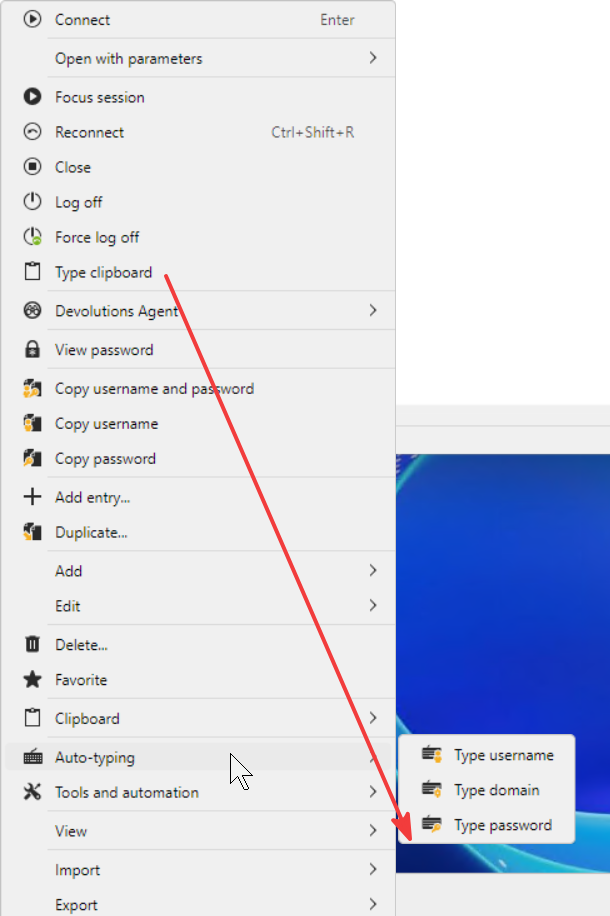
89a4d6f6-3d64-42a3-982c-8e5b6759cd0c.png
@PenguinLover
Thank you for your feedback!
We are aware of this issue and the development team is currently working to resolve it.
I've linked the investigation to this thread and we will let you know as soon as a version with the fix is available.
@RDMTinkerer2
Great idea. I've created the feature request. You can follow it here and vote for it: https://forum.devolutions.net/topics/56654/move-type-clipboard-to-autotyping-submenu
Best regards,
Alexis Beauparlant
Hello,
Thank you for your patience while our team looked into the issue you reported.
I'm happy to let you know that the latest version of Remote Desktop Manager (2026.3.13.0) includes a fix for this problem. You can download it from our website here:
https://devolutions.net/remote-desktop-manager/download/
Once you have installed the update, could you please test it in your environment and confirm that everything now works as expected? If the issue persists, or if you notice anything unusual related to the same original problem, just reply to this email with a few details, and we will be glad to look into it further.
Thank you for your collaboration.
Best regards,
Érica Poirier
Hello Erica,
thank you for following up. It indeed seem to be fixed. Thanks!