Navigation pane blank unless pinned

I have just upgraded to Remote Desktop Manager 2026.3.9.0 64-bit (JIT), this morning and found that when I have the navigation pane unpinned, when I click on it from above as in previous versions, it does not expand and appears hidden behind the tabbed window already open. If I pin it, it works as normal
Version info:
Remote Desktop Manager 2026.3.9.0 64-bit (JIT)
Runtime: .NET 10.0.12
Platform: Microsoft Windows 10.0.26200
Workspace: Local Data Source
Allocated memory: 570 MB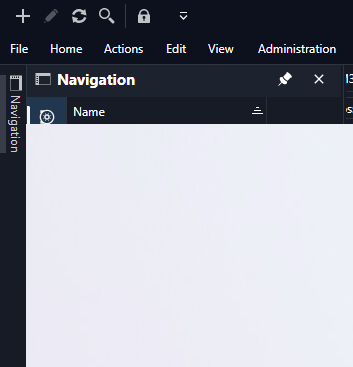
2026-09-23 09_11_03-2026-09-21 14_32_22-FRITZ!Box 7490 — Mozilla Firefox.png.png
All Comments (6)
I had same issue, more like Navigation put into wrong layer.
Same issue here after upgrading to 3.9.0
Plus, i can see that when i click on the top menu, the drop down is shown lower than normal, beneath the Navigation left menu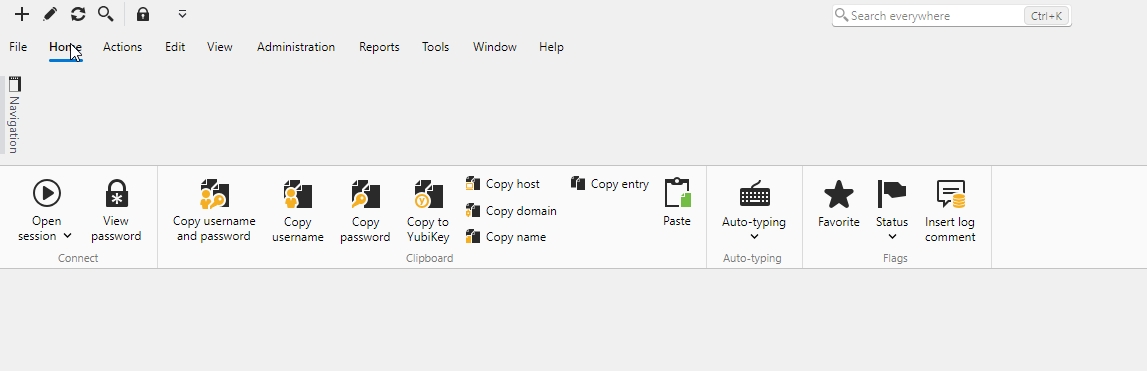
RDM issue.jpg
Hello,
We have been able to reproduce the issue and a ticket has been sent to the Engineering Team.
Best regards,
Antoine Mauger
Hello,
Thank you for being so patient!
If possible, could you update your RDM to the latest version (2026.3.10.0) and see if the problem persists? This version should resolve your issue.
Latest Version: Download RDM
If the problem persists after the update, please let us know so we can inform our development team.
Best regards,
Maxim Robert
I can confirm the issue has been fixed in 3.10 version. Thank you for your quick support.
Hello,
I'm glad to hear that the problem has been resolved!
Thank you for your feedback. I am now closing this case.
Best regards,
Alexis Geller Peiro