filter on status bar

Hi
When I put filter on status bar, I cannot see any result, it not worked like before, But it works when I put it into Navigation panel bottom, it can works.
Also I noticed, it have no more "user search options and operators" in filter.
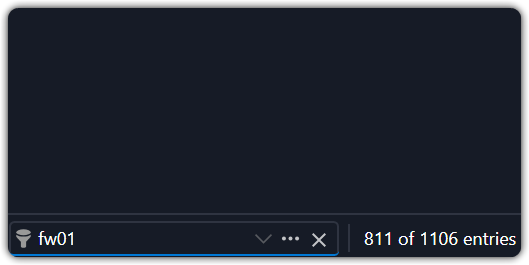
91bfeeba-7b04-48bd-b5c5-0f768cf65c43.png
47894896-f78f-4d8c-9c67-53afc04e91b7.png
All Comments (9)
Same issue, I tried to to a clean uninstall and reinstall, but navigation panel does not open anymore when searching using the bottom-left filter.
Hi,
Thanks for the details and screenshots.
To help narrow this down, could you confirm a couple of things?
1. Is your Navigation Pane currently hidden or unpinned (auto-hide)? We'd like to check if the status bar filter behaves differently depending on whether the Navigation Pane is docked/visible versus hidden.
2. Before this started happening, when you used the filter, did it open a popup window showing the results, or did the results simply appear inline in the same view? Just want to confirm what the previous expected behavior looked like for you specifically.
Best regards,
Samuel Dery
Hi
To answer your question:
1. Is your Navigation Pane currently hidden or unpinned (auto-hide)? We'd like to check if the status bar filter behaves differently depending on whether the Navigation Pane is docked/visible versus hidden.
Yes, my Navigation panel is auto-hide.
2. Before this started happening, when you used the filter, did it open a popup window showing the results, or did the results simply appear inline in the same view? Just want to confirm what the previous expected behavior looked like for you specifically.
Yes, it shows popup window showing the results in early version.
Hello,
in my case the results appeared in the same view, with navigation pane unpinned.
Now I tried again and the results appear in the same view but the navigation pane is hidden.
Never used the search popup, only a few times and it shows the results fine.
Below the diagnostics, it started with 3.5.0, before that version the results in the same view was working both with navigation hidden and unpinned.
Remote Desktop Manager 2026.3.8.0 64-bit (PreJIT)
Runtime: .NET 10.0.12
Platform: Microsoft Windows 10.0.26200
Workspace: Area di lavoro locale
Allocated memory: 370 MB
Same here. My navigation is unpinned and now I need to open it to see the filter results.
This is how it behaved before (Screenshot from version 2026.2.16)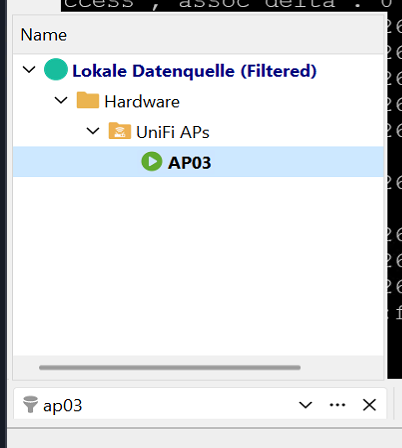
ff5844f5-4bcb-4f32-bec0-3ceef158b022.png
Hello,
Thanks for confirming. Our development team has made a fix that should help with this, and it will be included in the upcoming 2026.3.9.0 release.
We will let you know once it is available.
Best regards,
Samuel Dery
Hello,
Thank you for being so patient!
If possible, could you update your RDM to the latest version (2026.3.9.0) and see if the problem persists? This version should resolve your issue.
Latest Version: Download RDM
If the problem persists after the update, please let us know so we can inform our development team.
Best regards,
Maxim Robert
Hello, updated and tried: the fix worked.
Hello,
Thank you for your feedback. I am now closing this case.
If you would like to open a new case with us, please send an email to service@devolutions.net
Want to get even more out of your Devolutions products? Explore our free Masterclasses and unlock advanced workflows at your own pace.
Best regards,
Samuel Dery