Using arrow keys & enter after filter entries doesn't work anymore
Using arrow keys & enter after filter entries doesn't work anymore

Since 2026.3.5.0 the functionality of the search has changed slightly.
You used to be able to use the filter entries to search and then you could use the up and down arrow keys to navigate through entries and then use enter to launch a session. Since the update you are unable to use arrow keys/enter directly after typing something into the filter entires anymore
All Comments (10)
Hello,
I have created a ticket to fix this issue. We will keep you updated on any progress.
Best Regards,
Michaël Beaudin
Hello,
Thank you for being so patient!
If possible, could you update your RDM to the latest version (2026.3.10.0) and see if the problem persists? This version should resolve your issue.
Latest Version: Download RDM
If the problem persists after the update, please let us know so we can inform our development team.
Best regards,
Maxim Robert
Hi, this issue is now fixed, thank you!
I'm using 2026.3.10.0 and when editing filter in navigation pane, up & down arrows still change filter according to filter history (making search results disappear, which is very annoying) instead of moving selected entry like before.
Did I miss some other option?
Hello,
A few questions for you.
- Do you use the auto-hide mode of the navigation pane or not?
- If you pop up the "..." menu of the filter do you have the "All vaults" checked or not?
- When you search is your navigation pane collapsed or not?
Best Regards,
Michaël Beaudin
- Yes, I use auto-hide so I can maximize space for tabbed rdp sessions (especially with jump hosts).
- There is no "All vaults" option in this "Filter options" menu. I'm talking about the filter in Navigation pane (bottom):
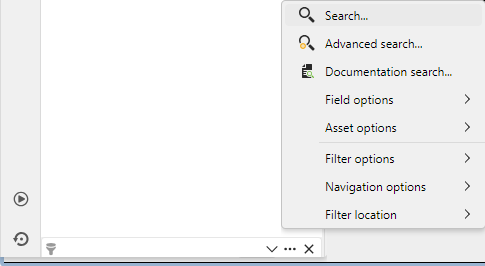 It's not. When the navigation pane is collapsed, its bottom filter is hidden with it.
nav_filter.png
Hello,
I see, I was able to reproduce. I didn't get it in the first post that you meant your filter location is set to be in the navigation pane instead of the standard status bar location.
I will open a ticket to fix this issue and we will keep you updated on the progress. In the meantime, you could put your filter location in the status bar to have the arrow functionnality work properly
Best Regards,
Michaël Beaudin
Putting the filter location in the status bar works much better with auto-hide navigation pane. It'll definitely stay there :)
Thanks for the tip!
Great to know that that works for you :). We'll still update here once we have a fix for the other filter location just so anyone reading this forum can see it.
Best Regards,
Michaël Beaudin
Hello,
I've fixed the issue with the filter using arrow keys while located inside the navigation pane. This will take effect with the upcoming 2026.3.13 version
Regards,
Jafran Majeau