RDM not resolving localhost

I have a situation where I connect to customer sites using AnyDesk making use of its TCP tunnelling feature (it is tons more stable than their big name VPN). The TCP tunnelling allows mapping a local port to a remote host port, then locally I connect to localhost and a custom port number. The custom port number isn't a requirement, but I have created a register of customer servers I connect to and assigned a unique local port number so that I can connect to multiple sites at the same time, i.e., instead of mapping 3389 on the remote host to 3389 locally I map local ports in the range of 10000-11000 to 3389 for the different servers.
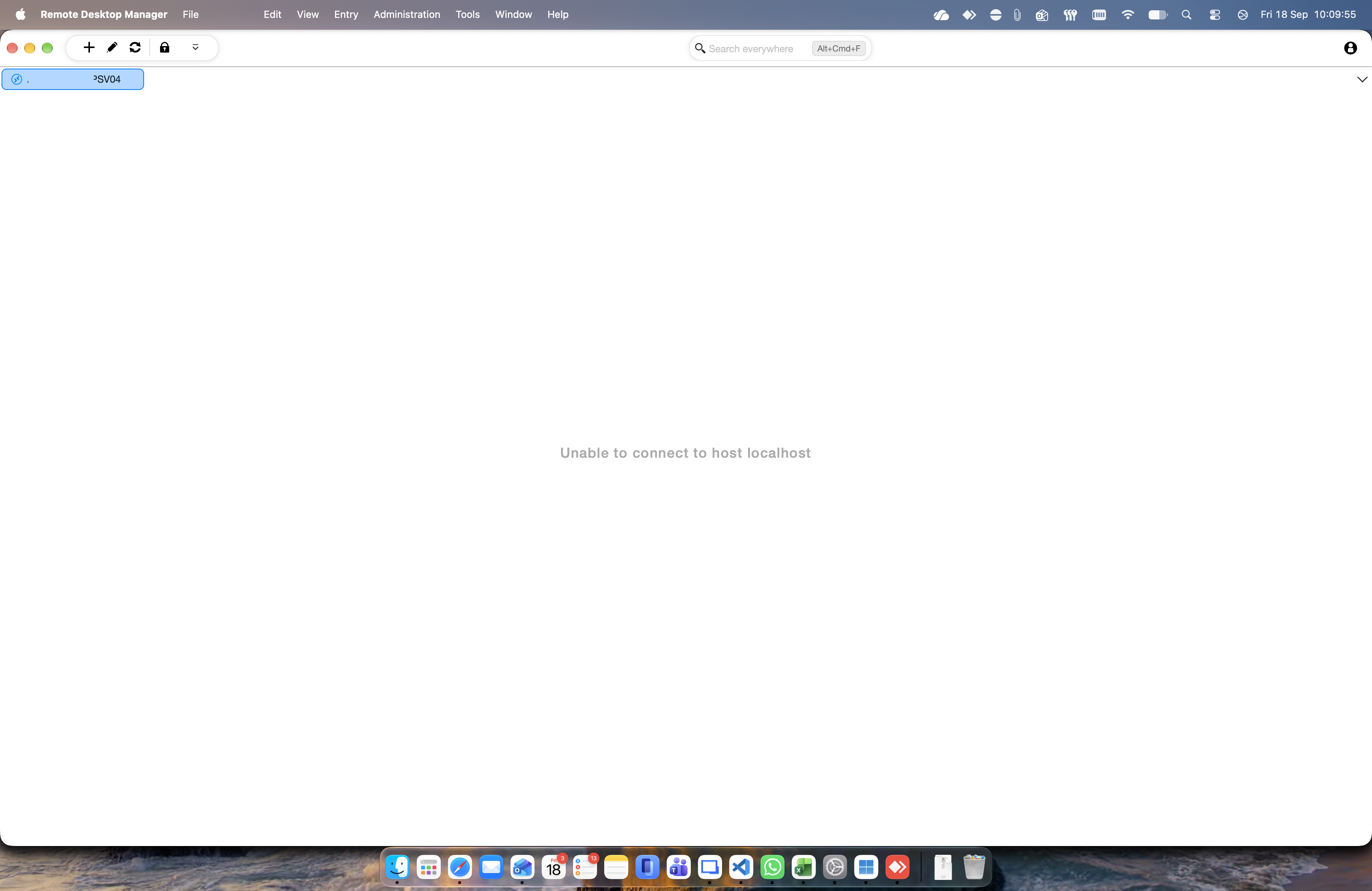
This has all been working great until either of Mac OS 27 or the new RDM Mac version (2026.3.0.5) where now RDM is stating Unable to connect to host localhost, however a test connection to the same is working fine and the backup RDP tool (Windows app for just in case) is connecting just fine.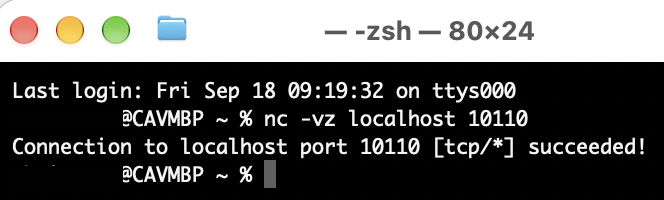
105f11af-4bd6-4fe1-b7e8-9e98ca892efd.png
976ce187-10a0-45e1-ab84-608ded229f4c.png
Recommended Answer
Hi
I'm glad it's working again. I have to guess an issue with TCC after the macOS update, the feature has been consistently half-baked since they introduced it all that time ago and Apple seems to regress something on networking with every major update. Do you have any third party network extensions installed? When I saw this in the past, it was also something to do with a misbehaving VPN extension.
Anyway, the last time this came up I prototyped a test inside RDM that would show if the problem was TCC but never took it past the prototype stage. I think it will be good to finish that work and at least have something we can run inside RDM to understand if we effectively have local network access, despite what the system settings is saying. The trouble is that it's not something you can just ask to the OS like accessibility, you actually have to probe the network in a specific way. Anyway, I'll get on and make a ticket for that and try to get it finished. These scenarios are super frustrating.
Please, let me know if you have some other questions or comments
Kind regards,
Richard Markievicz
All Comments (8)
Update: it looks like anything requiring name resolution is not working properly.
Hello
My gut feeling is that this might relate to the Local Network Access permission for the application; although unless Apple changed something here in 27 (I didn't see it in the release notes) it shouldn't gate access to the loopback address. However it would affect DNS because if the app is denied permission here, it can't get responses from mDNSResponder.
- Can it be a network ordering issue? Because, localhost resolves both 127.0.0.1 and ::1, and ::1 is usually first. If the AnyDesk tunnel is only binding IPv4 that could definitely have got broken "somewhere". The simplest test is, does it work if you use 127.0.0.1 instead of localhost?
- In System Settings > Privacy and Security > Local Network; I guess that Remote Desktop Manager is listed and enabled? It would be worth toggling it off and on again, and relaunching the app.
- When you talk about broken name resolution, is it .local / short hostnames specifically or also fully qualified public names?
Please, let me know if something isn't clear or you have further questions
Kind regards,
Richard Markievicz
Hi Richard,
This is most definitely looking like a "my machine" problem now - it has gotten worse as it is not connecting to local IP as though it does not have access to the network. I had looked at the local network permissions and RDM is enabled there. I closed RDM and disabled it though, restarted my Mac (overkill), then re-enabled network for RDM, and still the same.
I tried 127.0.0.1, it didn't work, but as with how I started my reply, it is now not connecting to a (local) IP address. Toggling the local network access has now changed the message to Connection failed (0x00020006), and this is trying to RDP to a local IP address.
I'm at a loss as to what is going on.
Ok, the local IP one was false positive... the machine had been shutdown by someone. So we're back to the rest of what I posted.
Hello
Wait, this is weird: your original screenshot shows the error message in the tab, but there's no RDP hex code there.
Just to confirm, based on your last message; an RDP connection to a local IP address is working, right?
Kind regards,
Richard Markievicz
Everything has started functioning again, the only thing I did was toggle Local Network Access off and on again. I did this on its own with RDM closed and it still didn't work, I did it with a restart after toggling off and after toggling things back on again after the restart it still didn't work so tried a restart with it too... still no joy. I must've cycled this three times and then randomly while try try trying again and again it just came right. I'm confused as all hell about it, as I'm sure you are too... but it is all working again. The timelines are too tight for me to separate in my mind between Mac OS update to 27, the update of RDM, and things working and not working again. So for now I'm considering it resolved.
Oh, and thank you for the quick reply @Richard Markiewicz, it is appreciated. I was busy losing my mind 😅
Hi
I'm glad it's working again. I have to guess an issue with TCC after the macOS update, the feature has been consistently half-baked since they introduced it all that time ago and Apple seems to regress something on networking with every major update. Do you have any third party network extensions installed? When I saw this in the past, it was also something to do with a misbehaving VPN extension.
Anyway, the last time this came up I prototyped a test inside RDM that would show if the problem was TCC but never took it past the prototype stage. I think it will be good to finish that work and at least have something we can run inside RDM to understand if we effectively have local network access, despite what the system settings is saying. The trouble is that it's not something you can just ask to the OS like accessibility, you actually have to probe the network in a specific way. Anyway, I'll get on and make a ticket for that and try to get it finished. These scenarios are super frustrating.
Please, let me know if you have some other questions or comments
Kind regards,
Richard Markievicz