2026.3.5.0 Filter entries not popping unless Navigation pane is pinned
2026.3.5.0 Filter entries not popping unless Navigation pane is pinned

Summary: Regression: Filtered navigation pane does not pop up when typing in Status Bar search while set to Auto-Hide.
Description:
I am experiencing a UI bug in Remote Desktop Manager version 2026.3.5.0. Typically, I run my Navigation Pane configured to Auto-Hide to save screen space, and I use the Filter entries box located down in the status bar to find my connections.
In this current version, when I type text into the filter box, the filtered results no longer automatically pop up or slide open like they did in previous versions. To actually see my search results, I am forced to manually click on or pin the Navigation Pane.
If my Navigation Pane is set to Auto-Hide, typing into the status bar search does absolutely nothing visually until I manually force the pane to show.
Steps to Reproduce:
- I set my Navigation Pane to Auto-Hide.
- I type search criteria into the Filter entries box in the bottom Status Bar.
- I observe that no results window or tree popover appears automatically.
Expected Result:
The Navigation Pane should automatically slide open or display the filtered results popover as soon as I begin typing, matching the behavior of previous RDM versions.
Actual Result:
The filtered results remain hidden until I activate the Navigation Pane.
Environment:
- Product: Remote Desktop Manager (RDM)
- Version: 2026.3.5.0
All Comments (3)
Hello,
Thanks for reporting this issue. We will open a ticket to fix this and keep you updated on any progress.
Best Regards,
Michaël Beaudin
As a side note, the search in the title bar is now a search everywhere that could be used to search your entries while we fix this.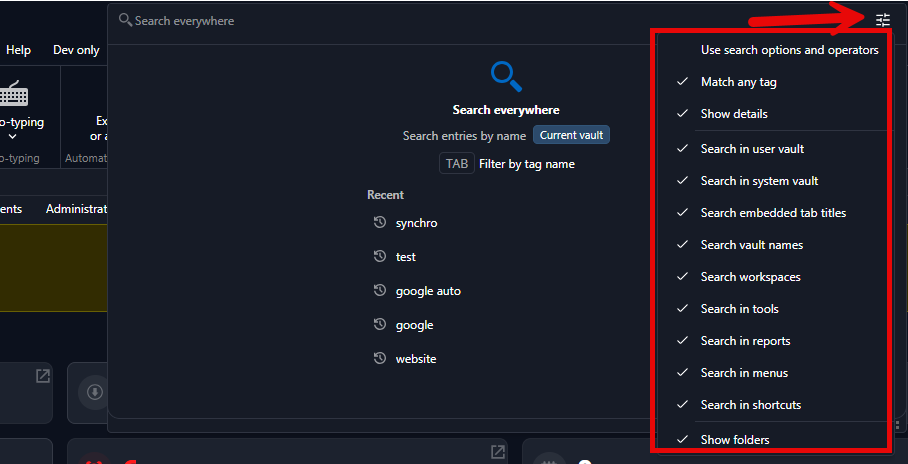
Best Regards,
Michaël Beaudin
c9d3a994-fadd-4e88-9a4b-7342c557726c.png
Hello,
Thank you for being so patient!
If possible, could you update your RDM to the latest version (2026.3.9.0) and see if the problem persists? This version should resolve your issue.
Latest Version: Download RDM
If the problem persists after the update, please let us know so we can inform our development team.
Best regards,
Maxim Robert