Customizable Ribbon Button Order
1 vote

Hello,
I would like to request a feature that would allow users to customize the ribbon and rearrange certain actions based on their workflow.
Specifically, I would like the ability to swap the positions of the "Copy one-time password" button and the "Copy to YubiKey" button.
Since I used "Copy one-time password" because I don't have a YubiKey,
having the option to place it in a more prominent or easily accessible position would improve usability and efficiency.
Ideally, this could be implemented as a customizable ribbon configuration where users can reorder, hide, or prioritize ribbon buttons according to their preferences.
Thank you for considering this enhancement.
Best regards,
Martin
Screenshot 2026-09-16 085449.png
All Comments (2)
Hello Martin,
Thanks for the request. We will see what we can do for the ribbon mode.
Something that might interest you in the mean time, with version 2026.3, we have a new toolbar mode that's fully customizable. This mode allows you to customize what buttons are shown in the toolbar, and you also have access to the complete suite of features by clicking the "hamburger" button.
You can switch to the toolbar mode here: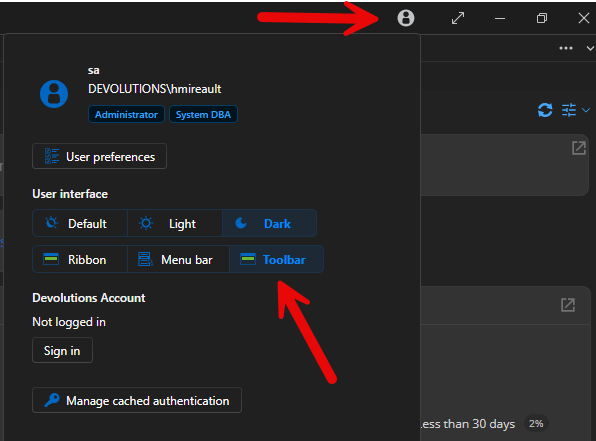
From there you will see a toolbar instead of the ribbon. If you right click the bar and press customize, you will be presented with a menu where you can change what buttons appear in said toolbar, whether the text, icons or both appear, etc.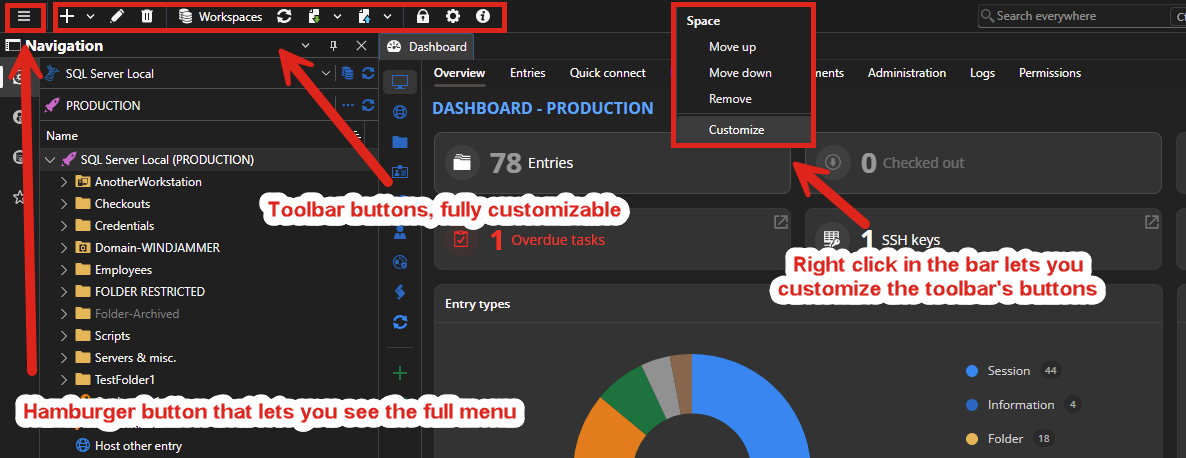
Regards,
Hubert Mireault
ddc1e87e-ac2f-4397-be3c-2105464d6698.png
0e077b10-b1f2-41cc-8298-8d164bfbfdfe.png
Hi, thanks for the quick reply. Yes, it's an interesting option. I will try it.
Martin