Hyper-V Embedded broken with KB5124008

resuming the conversation from:
the setup:
https://forum.devolutions.net/topics/30791/trying-to-configure-connection-to-local-hyperv-machines?message=218074#218074
the post where the problem discussion started:
https://forum.devolutions.net/topics/30791/trying-to-configure-connection-to-local-hyperv-machines?message=241627#241627
@rmarkiewicz,
Thank you kindly for your time.
Would you be willing to try one more test?
In my env, I run my primary user as excluded from the workstation administrators group. So its much more restricted.
Elevation takes place with a different user entirely. The only group it is added to is the Hyper-V group.
Would you be willing to try that?
Setup a user that is not a member of Administrators, but added to the windows Hyper-V group.
Login to desktop as this user.
Run RDM, but not elevated. Connect to localhost hyperv using this user, which is only granted by the Hyper-V group.
It may be my registry settings.
Would you be willing to export the registry settings you have?
Thanks again,
Bryan
These are mine:
AllowDefaultCredentials = Microsoft Virtual Console Service/*
AllowDefaultCredentialsDomain = Microsoft Virtual Console Service/*
AllowFreshCredentials = Microsoft Virtual Console Service/*
AllowFreshCredentialsDomain = Microsoft Virtual Console Service/*
AllowFreshCredentialsWhenNTLMOnly = Microsoft Virtual Console Service/*
AllowFreshCredentialsWhenNTLMOnlyDomain = Microsoft Virtual Console Service/*
AllowSavedCredentials = Microsoft Virtual Console Service/*
AllowSavedCredentialsDomain = Microsoft Virtual Console Service/*
AllowSavedCredentialsWhenNTLMOnly = Microsoft Virtual Console Service/*
$keys = "AllowDefaultCredentials","AllowDefaultCredentialsDomain","AllowFreshCredentials","AllowFreshCredentialsDomain","AllowFreshCredentialsWhenNTLMOnly","AllowFreshCredentialsWhenNTLMOnlyDomain","AllowSavedCredentials","AllowSavedCredentialsDomain","AllowSavedCredentialsWhenNTLMOnly"

foreach ($key in $keys) {
    $path = "HKLM:\SYSTEM\CurrentControlSet\Control\Lsa\Credssp\PolicyDefaults\$key"
    $value = (Get-ItemProperty -Path $path -Name "Hyper-V" -ErrorAction SilentlyContinue)."Hyper-V"

    if ($null -ne $value) {
        "$key = $value"
    } else {
        "$key = <not present>"
    }
}Recommended Answer
Hello again
I don't know if this is relevant to your case (it seems related to domain infrastructure, I don't know if you're using domain accounts at all), but there are reports of that KB breaking logon scenarios for a number of users: https://endpointweekly.com/blog/kb5124008-machine-secure-channel-break-windows-11-25h2.html.
Kind regards,
Richard Markievicz
All Comments (7)
Hello
I did try it: I logged in as my "TestUser" account directly, opened RDM, configured the entry as written and it still worked fine.
The TestUser is a only a member of: Users, Hyper-V Administrators and Remote Desktop Users (needed because my workstation is headless).
And this is a workgroup environment. I also checked my registry and every key is <not present>.
Hopefully this helps to narrow it down?
Kind regards,
Richard Markievicz
I will try removing the registry keys as soon as I can. Thank you for the quick feedback.
Hello
Let us know how you get on. From reading the original post, it seems that change is only required when HyperV is running on a remote host which doesn't seem to be your case. It's also 12 year old information which may or may not be relevant (who knows what Microsoft has changed...)
Best regards,
Richard Markievicz
Hello again
I don't know if this is relevant to your case (it seems related to domain infrastructure, I don't know if you're using domain accounts at all), but there are reports of that KB breaking logon scenarios for a number of users: https://endpointweekly.com/blog/kb5124008-machine-secure-channel-break-windows-11-25h2.html.
Kind regards,
Richard Markievicz
Interesting find. Is workspace just as you tested.
I’ve removed the registry keys. I just have to get around to reinstalling the KB and testing.
Apologies for they delay.
After seeing reports that this KB resulted in a good amount of regressions, I've decided to just hold off until the next set of fixes come out.
Hello again,
So, the windows update was finally forced on me after i delayed it. RDM can no longer authenticate to the local Hyper-V machine. VMConnect works.
This is the output from a event viewer security event around the time of the rdm login attempts:
```
An account failed to log on.
Subject:
Security ID: NULL SID
Account Name: -
Account Domain: -
Logon ID: 0x0
Logon Type: 3
Account For Which Logon Failed:
Security ID: NULL SID
Account Name: Username
Account Domain: Local-PC
Failure Information:
Failure Reason: An Error occured during Logon.
Status: 0x8009030C
Sub Status: 0x0
Process Information:
Caller Process ID: 0x0
Caller Process Name: -
Network Information:
Workstation Name: Local-PC
Source Network Address: ::1
Source Port: 0
Detailed Authentication Information:
Logon Process: NtLmSsp
Authentication Package: NTLM
Transited Services: -
Package Name (NTLM only): -
Key Length: 0
```
So, it shows an error 0x8009030C.
RDM also can no longer browse VM's on localhost.
.....
Now.. however, I got it to work by clearing out login creds and using "Connect with current user credentials".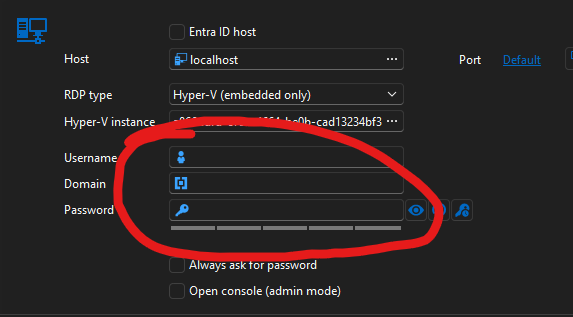
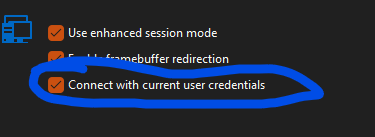
Perhaps something has changed with network logon policies, vs local.
I'm trying to find what is different on my workstations side, because it seems to work fine for you. For me the only thing that changed was the WU.
For now, I have a workaround. If I find the true cause I will post it.
2fb92045-0539-4847-bf22-e62cc6d497c0.png
d1ff2233-5c6d-430a-9a99-ac5ae4f9aede.png