"View only" can not be added to Quick Access bar.

Hi,
why can't I add "View only" to the Quick Access bar? The menu point has no context menu... ...like other commands like "Hide":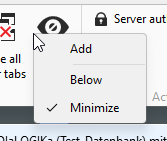
Screenshot10492.png
Screenshot10491.png
All Comments (6)
Hello,
Thank you for reaching out!
That behaviour is by design: View only (input ignored) is a per-session toggle. Its state belongs to whichever session tab is currently focused, so RDM doesn't allow it to be pinned to the Quick Access Toolbar, which is always visible whether a session is open or not. The same applies to the other session-input commands next to it (Send Ctrl+Alt+Del, etc.), which is why none of them show the Add option on right-click.
The easier way to reach View only without going to the ribbon is directly from the session itself:
Right-click the open session tab → Special commands → View only
That toggles it on and off for that specific session, and it's a lot quicker than travelling up to the Actions ribbon each time.
If you have further questions, we would be happy to help!
Thanks again & Best regards,
Ah, ok,
I'm a software developer myself and would have implemented it a little bit different:
I would disable the icons in the quick access bar, if the context is not preset where they can interact with.
b.r.
Dirk B.
:-)
Hello,
I will verify what we can do, but as a software developer, you must know that, unfortunately, we often use third parties for the UI, and we don't have full control over it.
Regards
David Hervieux
Hello Dirk,
Thank you for your feedback. I am working on resolving this issue. Our next beta build of 2026.3 will include the ability to better customize the Quick Action Toolbar as well as add Session Action buttons like the "View only" mode button and toggle buttons to the Quick Action Bar. We also added a new Toolbar bar mode which is even more powerful.
Thanks,
Paul
I'm glad that someone is actually responding to suggestions — I'm used to such ideas always being silently ignored ;-) Nice!
Hello,
Thank you for the message. You are very welcome.
We will notify you once the next beta build has been released.
In the meantime, we wish you a great week!
Best regards,