Navigation > Recent > no names show
1 vote

A few months ago there was an update that broke my recent panel. In specific, someone decided it'd be a good idea to make it noisy by including the Icon and a 'time last connected' status, which makes the name impossible to see if you use a slim navigation bar.
Is there a way to have it just show me the name and not this other noise?
I couldn't find any complaints in the forum about this which surprises me greatly.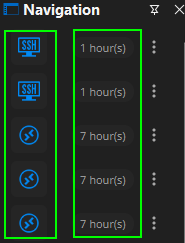 You can see that this is where the name should be... in the other two panels these are much smaller and don't have the 'last connected' thing to them.
0e2839c8-302d-45a8-a20a-5dcbbccc6a8d.png
All Comments (2)
Hello,
Thank you for getting in touch with us.
Unfortunately, after running some tests on my end, I found that it's currently not possible to change this. The only configurable options for "Recently opened" are its position and its behavior (how it opens).
I've moved your thread to the Feature Request section so our development team can review this request and assess whether it could be implemented.
Feel free to add any further details here if needed, and don't hesitate to reach out if you have any other questions.
Best regards,
Maxim Robert
Hello,
Starting from the upcoming 2026.3 major version of RDM, the recently used section has been changed to a popup menu that does not get rid of the names even when you size it down the its minimum allowed size 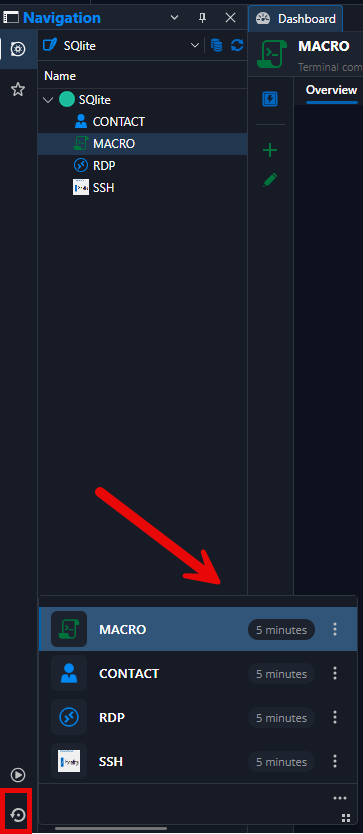
This way, it also wont be impacted by the size of your navigation pane and you don't need to switch off of your current vault tab in your navigation pane to see your recently used sessions.
You'll be able to resize this popup by dragging the 4 squares icon if you wish to do so. Please let us know if anything still doesn't work properly after the 2026.3 comes out of BETA and you upgrade to it.
Best Regards,
Michaël Beaudin
e30ce117-faad-4630-8fc9-11f102bb9f28.png