Selected Folder Name Not Shown in Dashboard

Hello,
Minor UI issue, but it seems that in RDM v2026.1.24 (using SQL Server data source), when we select a folder in tree view, the dashboard doesn't show the selected folder's title but rather the title of some entry under it (presumably the first entry it finds under it, or the first entry under a subfolder of the selected folder if the selected one doesn't have any entries directly under it). You can see in the screenshot, I have a folder selected named iDRAC, however the title shown in the dashboard tab is not iDRAC but rather "<redactedMachineName> iDRAC Console" which is the name of one of the entries within the "console" subfolder under iDRAC (iDRAC only has two subfolders, no entries live under it directly).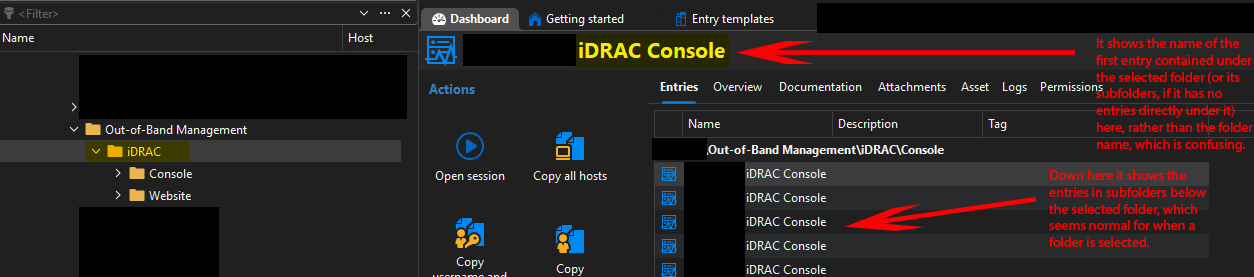
The entries under the subfolders are shown in the main portion of the dashboard tab which makes sense, so I think that part is fine - it's just the wrong title that is misleading as it gives the impression we are working on that item as opposed to the selected folder itself. I think it would be helpful to display the selected folder name at the top of the dashboard tab instead for clarity.
Best regards,
David Willis
FolderNameNotShownInDashboard.jpg
Recommended Answer
Hello David,
Good news, there's already an option for this. In the "entries" tab of your folder dashboard (exactly where your screenshot is), there's a button for a few options: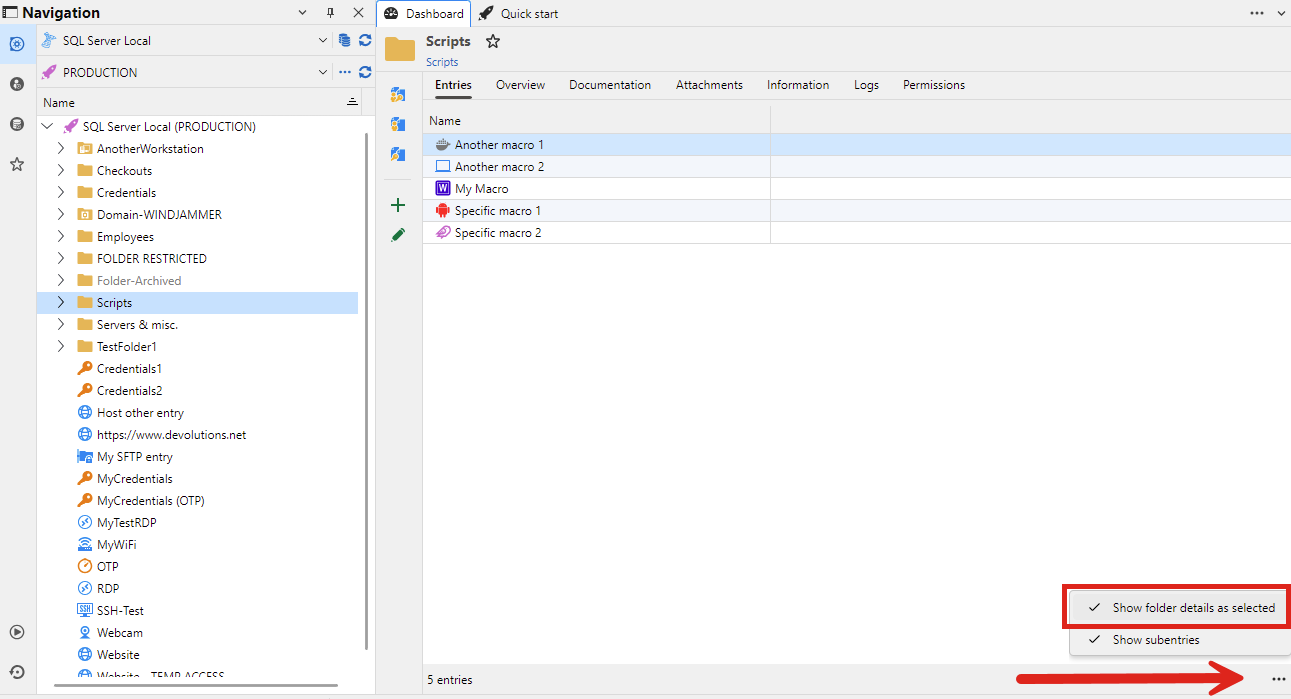
In your case you want "Show folder details as selected". Pardon the screenshot, it's from our 2026.3 version but the option has been there for a long time and it's definitely located in the same spot for 2026.1.
We also changed the default value of this option in 2026.3, as we think this is a more logical behavior for a user.
Regards,
Hubert Mireault
20f2e3d0-3e0d-48ee-b842-16972a9d0caf.png
All Comments (3)
Hello David,
Good news, there's already an option for this. In the "entries" tab of your folder dashboard (exactly where your screenshot is), there's a button for a few options:
In your case you want "Show folder details as selected". Pardon the screenshot, it's from our 2026.3 version but the option has been there for a long time and it's definitely located in the same spot for 2026.1.
We also changed the default value of this option in 2026.3, as we think this is a more logical behavior for a user.
Regards,
Hubert Mireault
20f2e3d0-3e0d-48ee-b842-16972a9d0caf.png
Hi @Hubert Mireault
Nice, thanks! That's perfect, exactly what I wanted. Now that you mention it - I believe I may have come across this setting before at some point, but had forgotten about it (and I guess it got reverted somehow). Does changing it on any folder apply for all folders automatically? (that seems to be the case, since I changed it on one, and now a few others I've checked seem to be showing the same)
I agree I think having the option checked (to show folder title at the top of the Entries tab on the Dashboard) is the more intuitive default.
Best regards,
David Willis
Does changing it on any folder apply for all folders automatically?
Yes that's correct, this is a global setting so changing it will apply to all folders.
Regards,
Hubert Mireault