v3.21, all servers unusable after restart

I updated RDM from version 3.12 to 3.21; I created a new .rdm file and deleted/recreated the folder in %AppData%. I re-entered all servers and re-saved the credentials. Despite this, the connections only work as long as RDM is running. If I close and restart the application, all connections report "disconnected," and no further connections can be established. Every single server has to be re-entered, and again, it only works for the duration of the current RDM session.
Has anyone encountered this? Does anyone have any advice?
All Comments (5)
Hello,
Thank you for the detailed description. Since the connections work after being recreated but stop working only after Remote Desktop Manager is restarted, this appears to be related to how the local workspace or its credentials are saved and reloaded, rather than to all remote servers failing simultaneously.
Could you please provide the following information so we can investigate further?
- What are the complete old and new RDM version numbers shown under Help → About?
- What type of workspace are you using—SQLite, XML, or another type—and what is its actual filename and extension?
- After restarting RDM, are the host and username still present, with only the password unavailable, or are other connection properties also missing?
- Which credential mode is configured on an affected entry: Username and password, Linked, Inherited, My personal credentials, local/user-specific settings, or an external credential provider?
Please do not recreate all entries again or post the workspace, database, .enc files, or any credential-containing export publicly. We recommend first making a backup copy with RDM closed.
Could you also reproduce the issue with one harmless test entry using dummy credentials and submit the resulting application logs? The procedure is documented here:
https://docs.devolutions.net/rdm/knowledge-base/how-to-articles/send-application-logs
The active configuration-file locations are documented here:
https://docs.devolutions.net/rdm/getting-started/installation/client/configuration-file-location
These results will tell us whether the complete workspace is not being saved or whether only the encrypted credential data fails to reload.
Best regards,
Stephan
Hi Stephan, thanks for taking the time to speak with me.
It only affects connections where a "Restricted User" from Windows AD is specified as the login - specifically, an admin account.
Connections using standard user accounts from the Windows domain (no restricted user tag) work fine.
The login credentials are stored within the RDM-group and allways visible, recognizable as such.
If I re-add a server that has stopped working - using the same name and the same group - it works again, but only until the next time RDM is restarted.
There is no visible difference between the two entries (which share the same name) in the RDG file; the one from yesterday remains "Disconnected," while the one from today works.
I performed a clean uninstall of the old version (3.12) and removed all configuration files. I also created a completely new RDG file. The behavior remains unchanged. This affects all the admins here at our company; however, all our admins are also "Restricted Users" in the Windows domain, so the issue is almost certainly linked to that.
Your Questions:
1. only 3.21
2. internal, filename default.rdg, or 2026.rdg, or... .rdg
3. All login credentials are visible.
4. Windows Domain user with password
Cheers.
reck
Hi Reck,
Thank you for the detailed information. We have a strong suspicion about what might be going on here.
Could you please share a screenshot of the Help > About section so we can verify this?
Best regards,
Stephan
With pleasure. :-)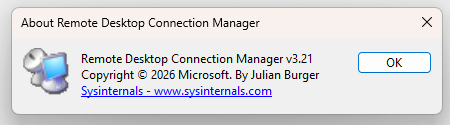 Cheers.
94120fb8-cdae-47f8-8ff0-9c84f2eb6d2e.png
Hi Reck,
Thank you for the screenshot — that clears up the mystery. 🙂
It turns out that the application you are using is Remote Desktop Connection Manager (RDCMan) from Microsoft, rather than Remote Desktop Manager (RDM) from Devolutions.
The similar names certainly do not make this an easy distinction to spot 😉
Since RDCMan is a Microsoft application and is not developed or maintained by Devolutions, unfortunately we are not able to troubleshoot its behavior or provide support for the issue you are seeing after the upgrade.
We would recommend reaching out through Microsoft's support channels or checking Microsoft's documentation/community resources for RDCMan.
Sorry we cannot take this one any further from our side.
Thank you again for your patience and for helping us get to the bottom of it.
Best regards,
Stephan