right click make screen active

Ok, when i copy a command from the a active session in split screen and i right click to paste the command, that window should be come active. But it doesn't it keeps the active session from the copy window so when i press enter it inputs on the wrong screen. Not so good.
43f37da0-de3f-407c-90fc-668b4c5e966a.png
All Comments (15)
Hello,
Thank you for reporting this. In my opinion this is more of a bug than an improvement/feature, so I'll move this to the bug report forum. I've opened an internal ticket so we can track this.
Regards,
Hubert Mireault
Any update on this bug? Like approved or denied?
Hello,
The ticket is still awaiting review by our development team. Would you like me to ask them to review its priority?
Regards,
Carl Marien
No it doesn't need to be a priority, just a solution at some point. Thank you.
It's assigned to one of our developers, it's definitely something we want to address.
Regards,
Hubert Mireault
So i found something interesting. when in a ssh session and i alt+tab to go to a different screen I am no longer in that session when i come back. but if I alt+tab and come back again i am in the session and can type directly in the session which is what I prefer. So the first alt+tab causes the cursor to leave the session. hope this helps
I have fully confirmed, if the cursor is not in the window, i can just alt+tab and get it back. We certainly need to improve this process. When you right click the window it should be come active. If you alt+tab away and come back to the window the session should automatically become active. If you leave RDM with the cursor active it should return active, if the session is not active it should return no active. Hope this helps.
Thank you for the additional information, I've added this to our ticket. I'll see if we can raise the priority, currently the developer in charge is on vacation but he should be back next week.
Regards,
Hubert Mireault
No hurry, just a solution down the road will be great!
Any update on the right click and just atl+tab?
If I alt+tab away 2x I can get the cursor to be active in the window. Not a solution for sure.
I'll check with the dev team, I see it's in development and a fix might have been made. We'll update this ticket with more information as soon as we can.
Regards,
Hubert Mireault
I found another flow that seems to be similar to this issue. When I RDP to a system my keyboard strokes don't work, if I hit the windows and to bring up my start menu and then do it a second time then it will open in my remote session.
Just notice 2026.3.10 was released, seems this is fixed in this version. Wished RDM would notify of these new releases, maybe because this is beta?
All this said, RDP is still acting up. Maybe this should be separated from the ssh issue?
So the right click and alt+tab seems to be fixed in 2026.3.10. Now it is just the RDP issue. Should this stay on this link or a new topic?
Hello,
Just notice 2026.3.10 was released, seems this is fixed in this version. Wished RDM would notify of these new releases, maybe because this is beta?
I'm glad to hear 2026.3.10 improved the behavior.
As for the notifications, at the moment the "auto update" on our side is not activated for version 2026.3 yet, we are waiting to make sure the application is stable enough before we enable it. So RDM will not automatically show you that version just yet, but you can still manually check for these updates. Usually it's enabled sooner but the 2026.3 release had many more issues than the norm. I apologize for that.
In the mean time, you could subscribe to the announcement forum to be notified for new threads, a post is automatically made there when a new version becomes available: https://forum.devolutions.net/forums/20/announcement
For your RDP issue, I assume this is what you described here:
When I RDP to a system my keyboard strokes don't work, if I hit the windows and to bring up my start menu and then do it a second time then it will open in my remote session.
I checked with the QA team and as far as we're aware, we haven't seen this issue reported before. I would advise to make a separate thread and add the most information you can just to avoid us asking you for more details. It will help us reproduce and address it more quickly:
- Version of RDM used
- Steps to reproduce the issue
- Is it any key stroke, or just keys like windows?
- Any keyboard settings you may have changed from the defaults?
- What RDP version is your RDM entry configured to use? You can see this in the advanced tab (see my screenshot)
- What is the OS of the machine you RDP into? Is it an older OS?
- Does this happen no matter the entry/host you connect to?
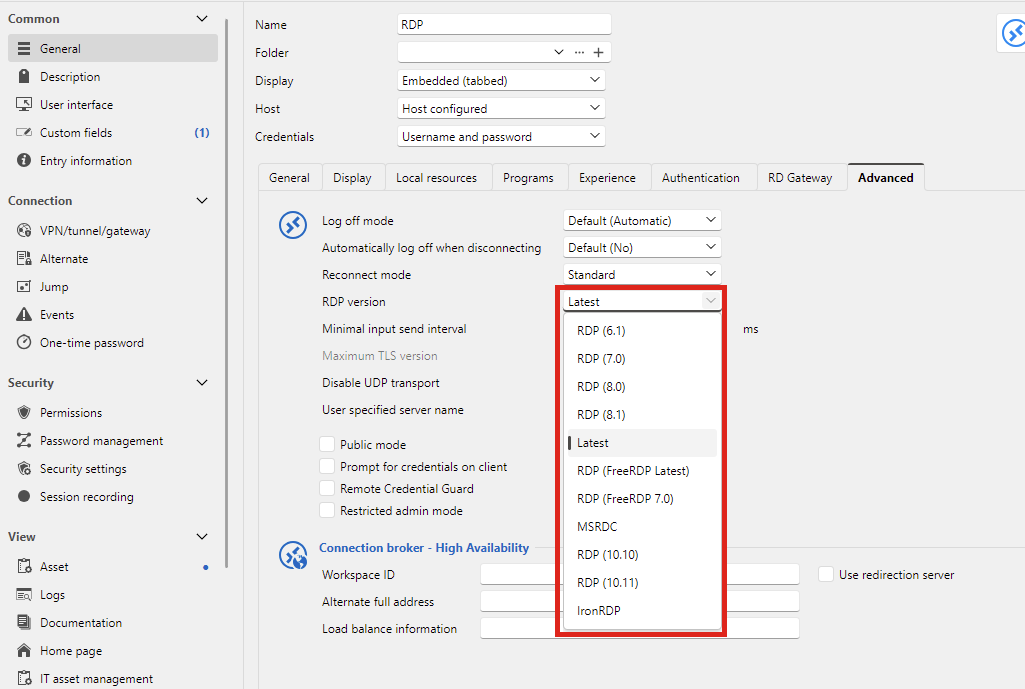
I tried to reproduce this on my end and I wasn't able to, so I suspect I either don't understand the steps, or it takes a specific configuration/environment to have this issue reliably.
Regards,
Hubert Mireault
0c0ca247-6abc-467a-85b9-57cc2d36f556.png