SSH Terminal with personal SSH Key (stored in Bitwarden)
SSH Terminal with personal SSH Key (stored in Bitwarden)
1 vote

Hello. It looks like there’s currently no way to save an “SSH Terminal” entry with my personal username and SSH key (in Bitwarden).
I’ve tested the following options:
Scenario A:
“Global” section: Login credentials: My personal login credentials (this includes a connection to Bitwarden + selecting login credentials with the username “Custom Field” -> sshuser (which is stored as a custom field in Bitwarden and reflects my login name))
“SSH Keys” tab: No private key (since it’s already stored in the login credentials).
Result: I’m prompted for a password.
Scenario B:
“Global” section: Login credentials: My personal login credentials (which include a connection to Bitwarden + login credential selection with username “Custom Field” -> sshuser (stored as a custom field in Bitwarden and reflects my login name))
“SSH Keys” tab: My personal SSH key -> Entry type “Privileged Account” (This also uses Bitwarden + Custom Field.
Result: I am prompted for a password.
Screnario C:
"Global" section: "Login with priveleged Account."
"SSH Keys" tab: tried both (no key + my personal ssh key)
Result: I am prompted for a password.
So here’s my question: What exactly do I need to configure, and where, so that both my username (Custom Field in Bitwarden) and my SSH key come from Bitwarden, and I don’t have to store any additional information locally or in the RDM vault?
All Comments (10)
Hi Michael,
Thanks for the detailed write-up, it makes this easier to diagnose.
A couple of things before I can point you to the exact fix:
- Which RDM version and platform (Windows, Mac, or Linux) are you running?
- What workspace are you using (Team, DVLS, SQL, Cloud)? If it's DVLS, which version?
A bit of context: fetching SSH keys directly from Bitwarden (not just login credentials) is a newer capability in RDM. On older versions, linking an SSH Terminal entry to a Bitwarden item only pulls username/password, not the key itself, which is why you keep getting a password prompt. Once we know your version, we can confirm whether you have that capability and walk you through the correct setup for the SSH key and the username.
Also, the Privileged Account option you tried in Scenarios B and C is unrelated to Bitwarden. It pulls PAM accounts from Devolutions Server, so it only works if you have DVLS with PAM configured.
For reference:
- SSH terminal entry settings: https://docs.devolutions.net/rdm/knowledge-base/knowledge-base-articles/entry-settings/ssh-terminal
- SSH key entry settings: https://docs.devolutions.net/rdm/knowledge-base/knowledge-base-articles/entry-settings/ssh-key
- Bitwarden integration: https://docs.devolutions.net/rdm/knowledge-base/knowledge-base-articles/entry-settings/bitwarden
Looking forward to your reply.
Best regards,
Alexis Geller Peiro
Hi Alexis,
RDM-Version is 2026.2.17.0 64-bit
DVLS (self hosted) is: 2026.2.15.0
If i use specific ssh keys for specific connections (like dedicated shared users in our team) it works ; But not for my personal ssh key for personal conenctions.
Hi Michael,
Thanks, that confirms your version isn't the issue: Bitwarden SSH key support has been available since well before 2026.2.17.0 / DVLS 2026.2.15.0.
The fact that your shared/dedicated SSH keys work but your personal one doesn't points to a difference in how the entry is set up, not a version problem.
One clarification: "Privileged Account" (which you tried in Scenarios B and C) pulls PAM accounts configured in DVLS. It's unrelated to Bitwarden, so it won't work for a personal Bitwarden-backed key.
Could you tell us how the working shared SSH key entries are set up? Specifically, in the SSH Keys tab, what Entry type is selected, and if it's Linked (vault), whether the picker is set to SSH key mode rather than Credential mode when you select the Bitwarden entry. If you set up your personal key the same way (instead of through My personal SSH key or Privileged Account), it should behave the same as the shared ones.
Reference:
- SSH key entry settings: https://docs.devolutions.net/rdm/knowledge-base/knowledge-base-articles/entry-settings/ssh-key
- My account settings: https://docs.devolutions.net/rdm/ribbon-menu-bar/file/my-account-settings
Best regards,
Alexis Geller Peiro
Of course:
Here is a working example. We're using this setup cause we've specific users who should run the connection by one specific user (with key).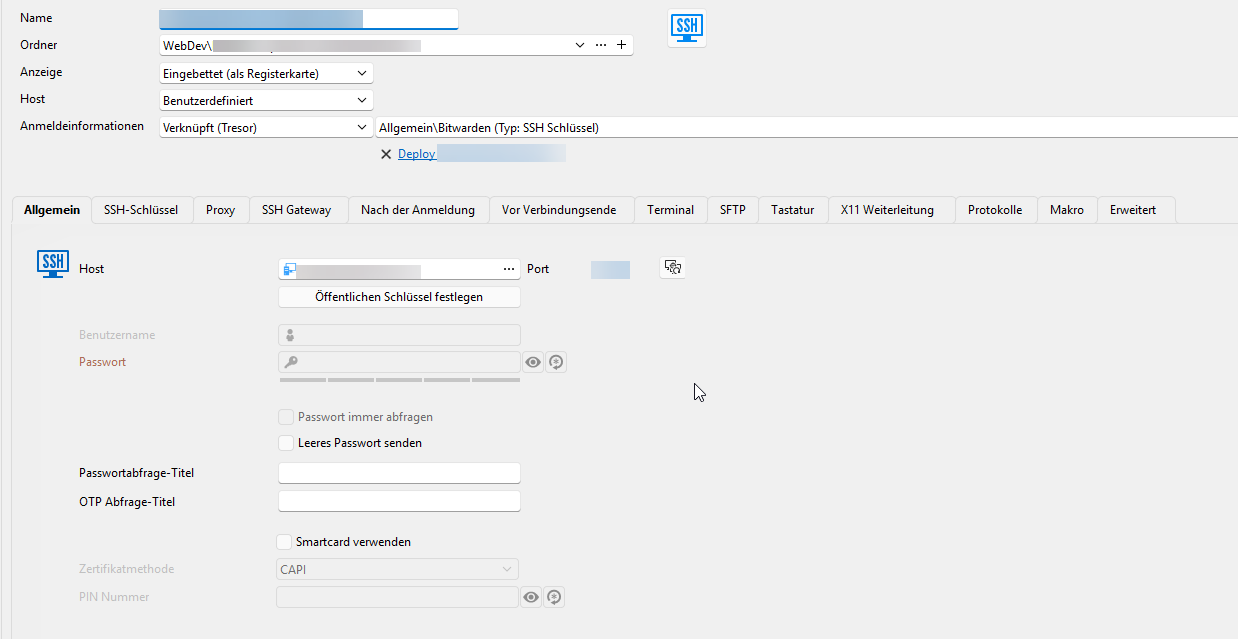
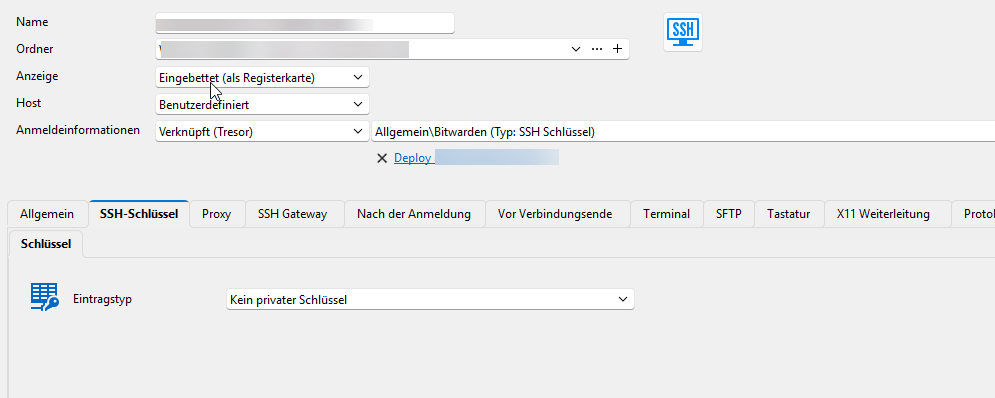
For the "username"-part we've defined the Username by a custom field in our global Bitwarden-Connection: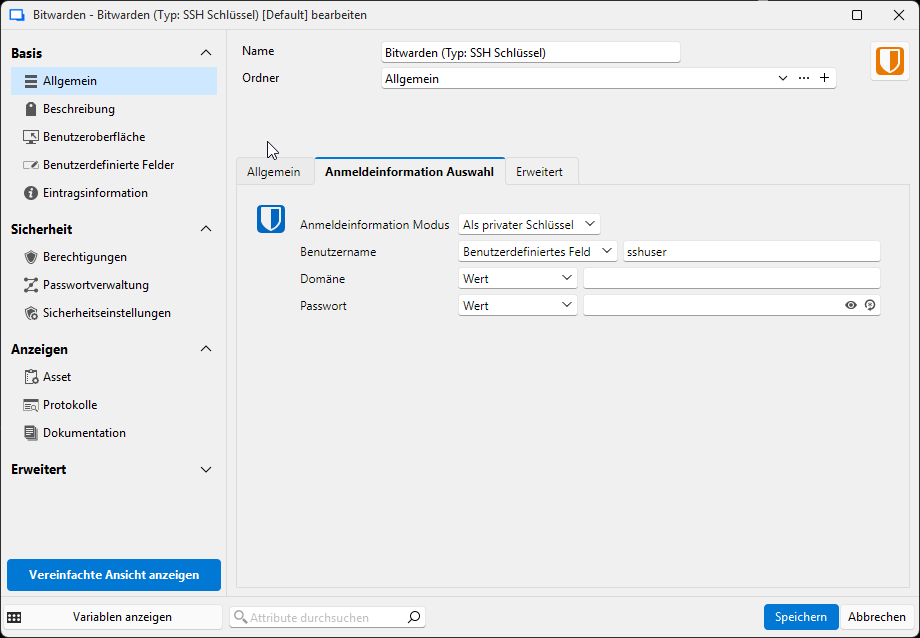
This works really well.
As written, the problem exists withhin my personal access to some SSH Terminals where everybody has it's own Username and SSH Key. It work's if i place the ssh key in the Bitwarden tresor or link it to a local file on my notebook (with passphrase ;)). But to get more secure here i would like to have also my own SSH key in my bitwarden vault incl. my personal username.
I think the best would be if i could select the bitwarden entry at this point: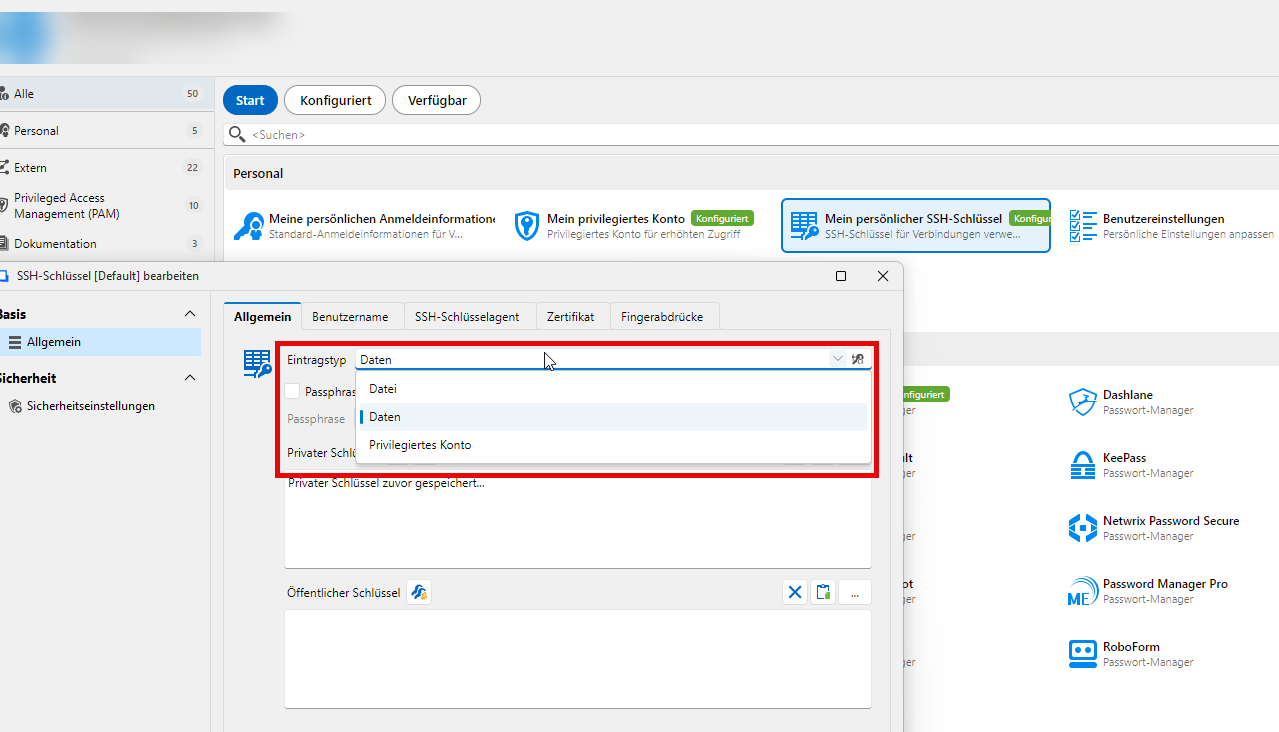
e6eec65b-2b26-478f-9334-771e4d7bc26c.png
2658e7df-961d-44f6-b62c-178fd406fbcd.png
b4e034f3-149c-49c0-bf7b-1d0b40483c2e.png
d8390edc-c379-4a0d-a3b3-5be2595fd2c2.png
Hi Michael,
Thanks for the screenshots, this makes it very clear.
Your working example is actually the answer: the SSH key and username aren't coming from the SSH Keys tab or from "My personal SSH key". They're coming from a dedicated Bitwarden entry (Credential Management type) that is linked at the Global level of the SSH Terminal entry.
Looking at your screenshots:
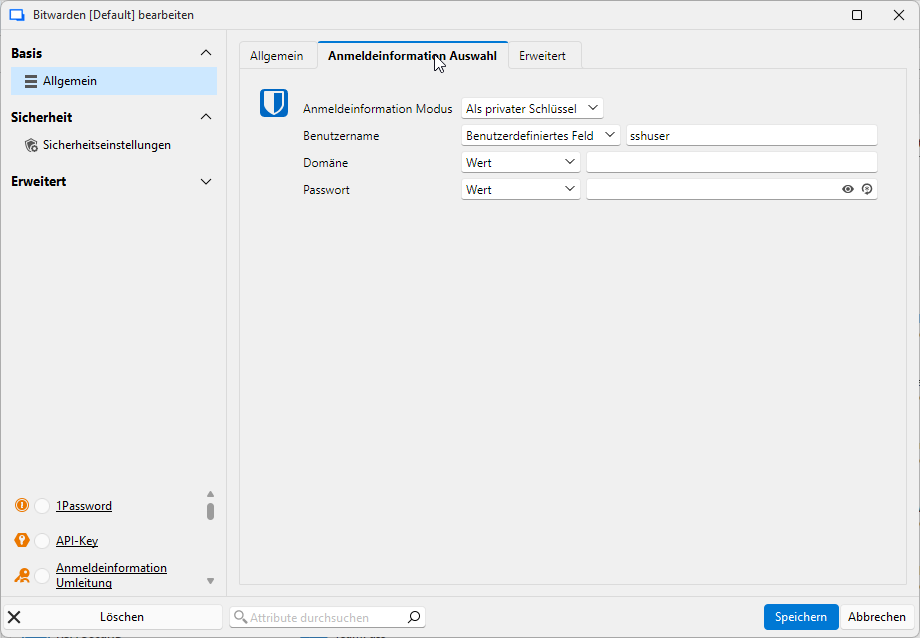
- The Bitwarden entry has Credential mode set to "As private key" and Username mapped to Custom Field (sshuser). That's what pulls both the key and the username together.
- That Bitwarden entry is linked in the SSH Terminal's Global "Login credentials" field (Linked (vault)), not in the SSH Keys tab.
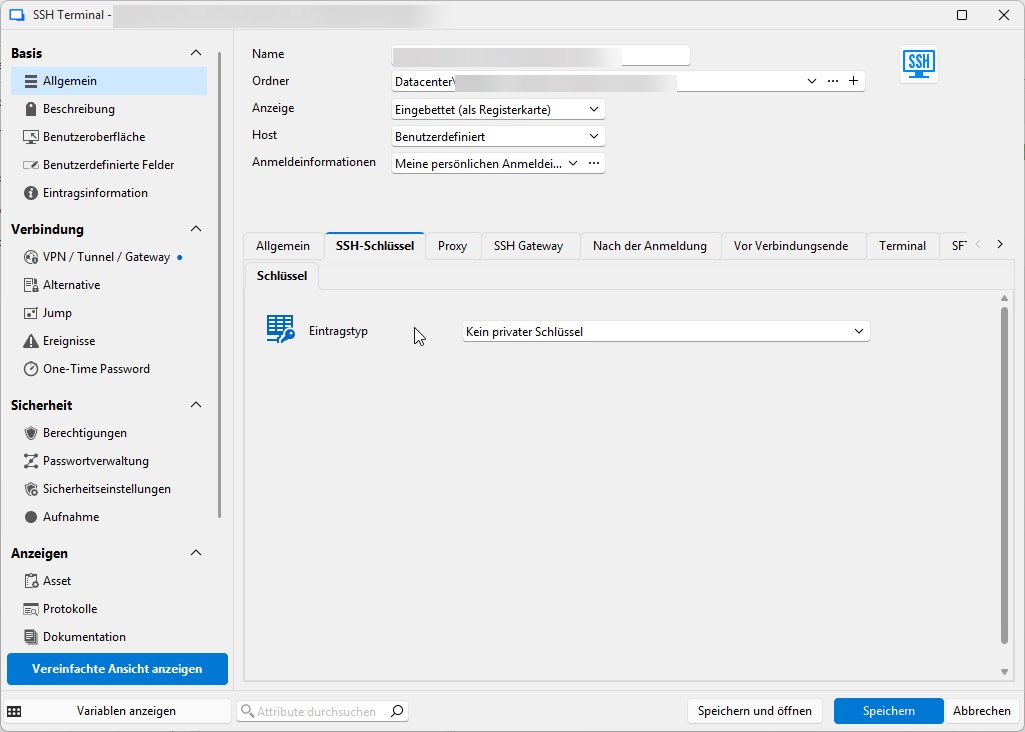
- The SSH Keys tab is simply set to "No private key", since the key already comes from the linked entry above.
The reason "My personal SSH key" never worked for you: as your last screenshot shows, its Entry type only offers File, Embedded data, or Privileged Account. There's no Linked (vault) option there, so it can never pull a key from Bitwarden. Same for Privileged Account, which is DVLS PAM, unrelated to Bitwarden.
So for your personal connections, you'd want to:
- Create your own Bitwarden entry (Credential Management), same as the working example: Credential mode = "As private key", Username = Custom Field pointing to your personal username field, and select your own SSH key item in Bitwarden.
- In your personal SSH Terminal entry, set the Global "Login credentials" to Linked (vault) and select this new entry.
- In the SSH Keys tab, set Entry type to "No private key".
That should give you the same result you're already getting with the shared entries, just pointed at your personal Bitwarden vault item.
Let us know how it goes.
Best regards,
Alexis Geller Peiro
Hi Alexis,
thank you for your feedback and your try to help me out.
We've disabled the permission to setup "own bitwarden entries" (on the user side). JFYI, we are over 30 ppl using RDM: Every person would have to setup it's own "bitwarden entries" entry. But beside this, there is another problem:
"In your personal SSH Terminal entry, set the Global "Login credentials" to Linked (vault) and select this new entry." -> We're dont use personal SSH Terminal entries. The entries are shared all over our specific teams. So: If i set the SSH Connection to Global "Login credentials" it would only work for me, but not for my collegues cause the entry is linked beween RDM and Bitwarden by ID, not by a "Name" or somethink like this ; So other collegues wouldn't be able to connect.
Feature Request: Add the possibility to set a linked (vault) account + username for "My personal SSH key" <3
Hi Michael,
Thank you for explaining how your infrastructure and permissions are set up, that context is very helpful. With shared entries across teams and personal Bitwarden entry creation disabled for users, there isn't currently a way to have each person's own key and username pulled individually through "My personal SSH key".
We're moving this forum post to a feature request, so it can be properly evaluated by the team.
Thanks again for taking the time to document this so thoroughly, it made it much easier to pinpoint.
Best regards,
Alexis Geller Peiro
Hello,
I believe what you need is already available in RDM.
You can configure a Bitwarden entry as "my personal credentials". From there, you need to ensure that:
- The entry is set in "Private key" mode
- The username field is either filled with the username you need, or points to the field in the Bitwarden data that contains the username
In my RDM, I have configured my Bitwarden entry to use the private key mode, and set the username to check the field "MyUsername" in Bitwarden: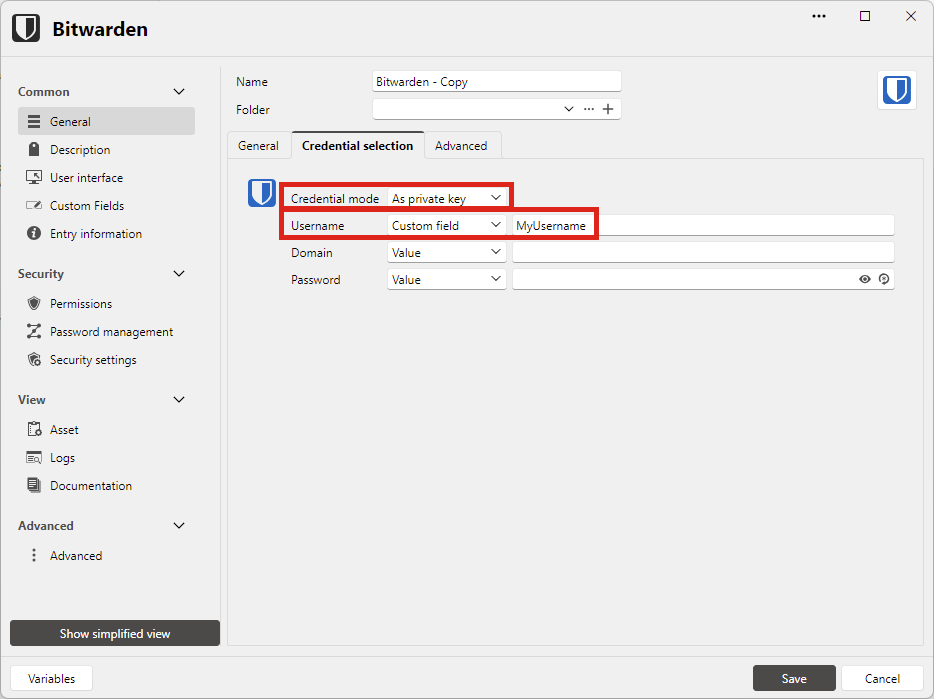
You could also keep the username field in "Value" mode, and simply enter your username there.
In Bitwarden, I ensured that the "MyUsername" field was filled the user associated with my private key: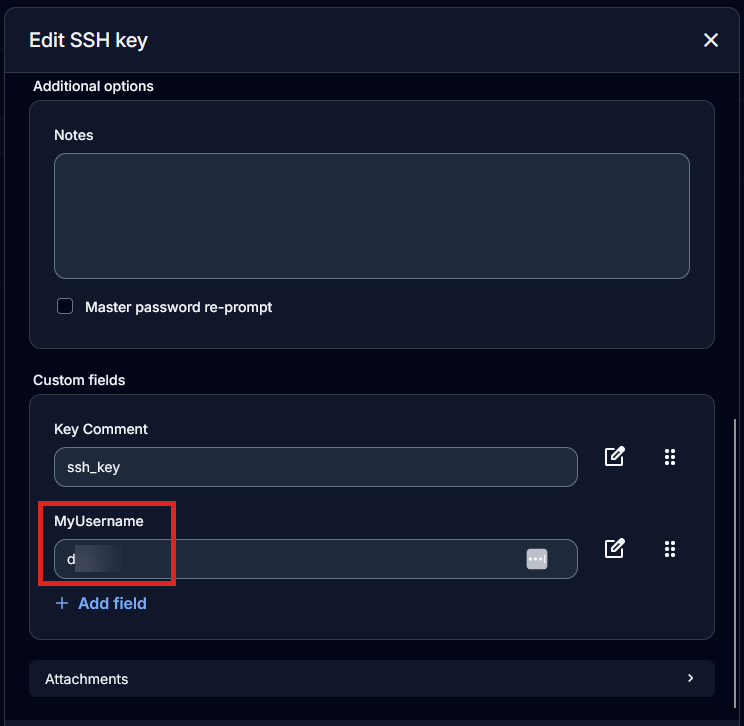
And from there, in your SSH shell entry in RDM, you just need to set the main credential as "my personal credential". You don't need to touch the SSH key section, as it will be taken automatically from the main credential's information due to putting the Bitwarden credential in "private key" mode.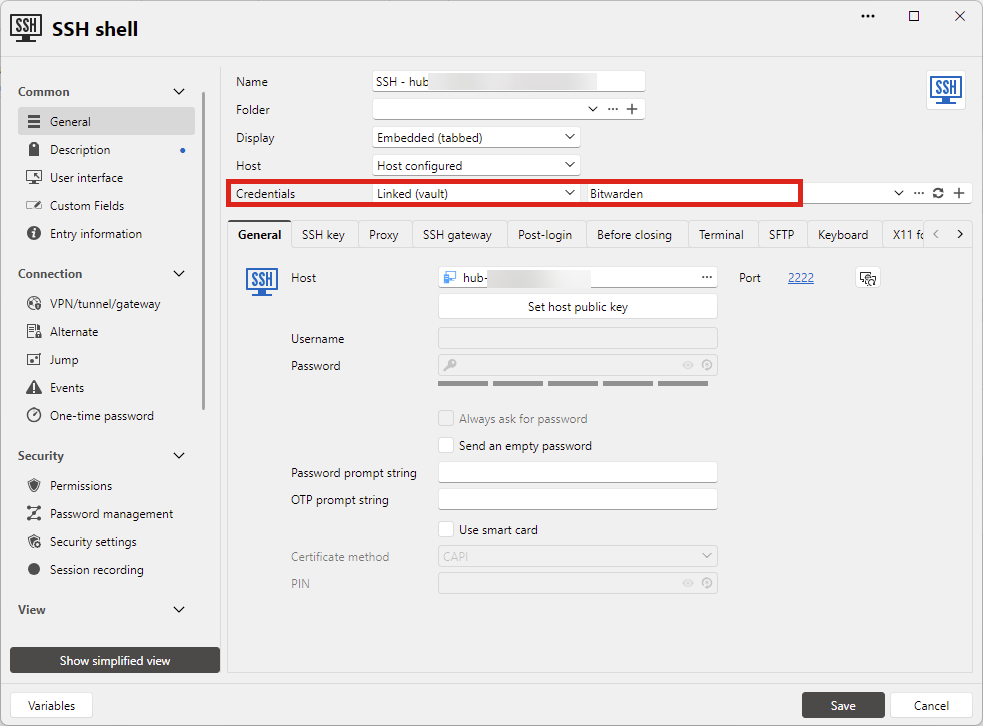 In my last screenshot I did my test with the "Linked (vault)" mode but the "my personal credentials" mode should work just as well.
Can you let me know if, following these steps, you're able to connect? Does this answer your needs?
Regards,
Hubert Mireault
1c5cf082-bd69-4c87-9037-3e686604d61a.png
14b62696-78e0-4be9-a40d-3647d4c5d077.png
874c369a-e902-4e7b-8e3d-f4cddeb52d1e.png
Hi Hubert,
your way is the right one - If only one person works with SSH Terminal Sessions. In our case:
- Each developer has his own Username and SSH Key, currently stored als File on their system (we want to move to bitwarden with this)
- Multiple Developers are using the same single "SSH Terminal" Entry in RDM. And here comes the Problem:
- Of course, i can set the linked (vault) version but this only works for one single developer. If we have multiple users here it wouln't work.
My first trought was the same as yours: Let's use "my personal credential" and from there on i can link the bitwarden personal ssh key and define my own username. BUT/AND: After a second try i've got good news: It works. I was confused by the "passwort promt" (interactive mode) when a user dosn't exists on the target VM (in my opinion it should ask me for a username and not for a password).
Here the final working example (Thank you Alexis & Hubert)
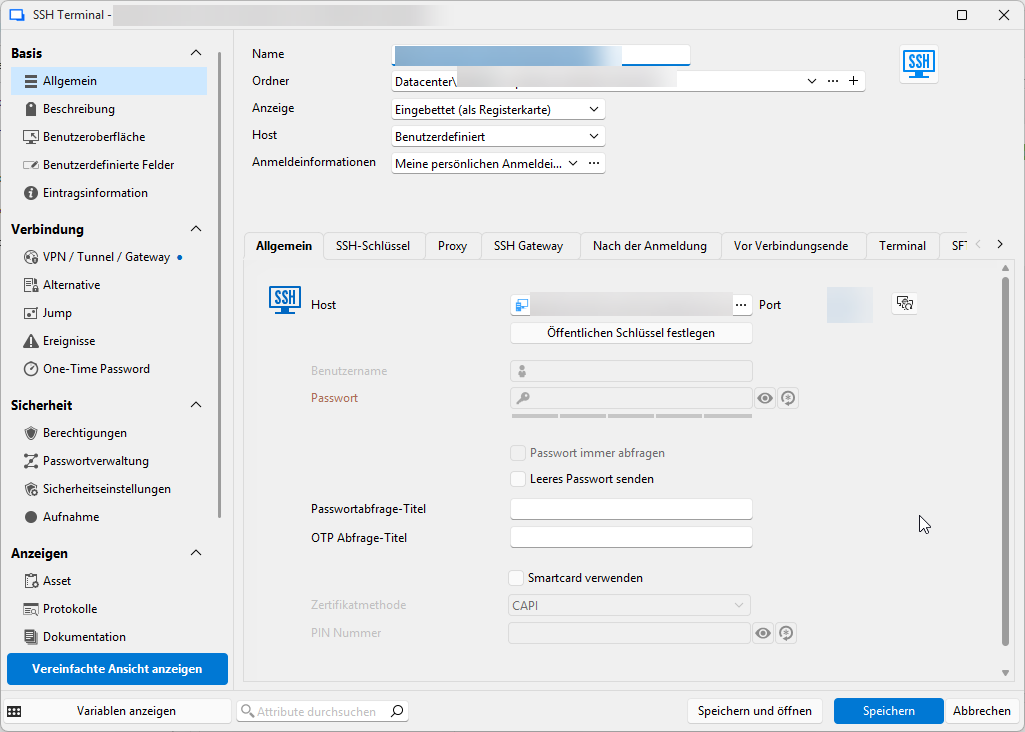
- Personal -> Meine persönlichen Anmeldeinformationen (Allgemein)
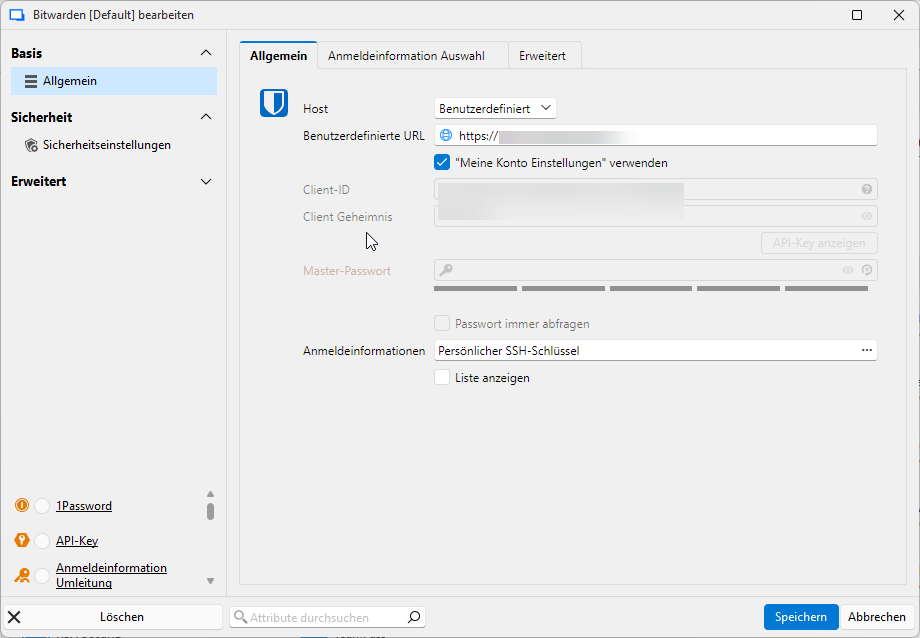 Personal -> Meine persönlichen Anmeldeinformationen (Anmeldeinformationen Auswahl)
 Eintrag "SSH Terminal" (Allgemein)
 Eintrag "SSH Terminal" (SSH-Schlüssel)
8a426096-d176-452e-911b-a6953102a885.png
28584444-e91d-457e-85b6-32769563a22e.png
b70e37ca-3199-428d-8f40-0f2c8e4b4cc1.png
2d976e42-c10a-473b-ace2-e373031beb8d.png
I'm glad to hear you were able to make this work! For now I'll mark this thread as "will not implement" as there's already a flow to support this. If you find this lacking, please do contact us and we'll see what we can do.
Regards,
Hubert Mireault