2026.2.17.0: Can No Longer Log in with Passwordless Account

Hello,
RDM has been working excellently for me. Thank you for building such a great product.
After installing 2026.2.17.0 I can no longer log in with a Microsoft Account into my Windows 11 RDC. It shows the user and a password, but of course I do not have a password as it is a passwordless account.
Is there a new setting I can apply to make this work with my passwordless account? Everything has been working for months now without this issue, and I just ran into it today.
Thank you for any assistance you can provide,
Michael
All Comments (5)
Hello,
Could you please :
- Send us your RDP logs. Follow this doc https://docs.devolutions.net/rdm/knowledge-base/troubleshooting-articles/rdp-session-troubleshooting#generate-and-send-rdp-api-hooking-log-files. You can securely send us a file following this thread https://docs.devolutions.net/resources/customer-support/securely-send-a-file-to-our-team
- Give us screenshots of how your various "General" settings tabs are configured in your problematic RDP session's properties. Make sure to blur any sensitive data that could appear in the screenshots
Best Regards,
Michaël Beaudin
Hi Michael (hey, nice name!) ... I have uploaded the requested information into the folder. Please let me know if any further information is needed and I will assist you.
Also, while I still remember ... it appears that the documentation you are referring users to is out of date. My settings look different from documentation so it was a little difficult to get to the settings as required. Thank you for any consideration in updating this for future reports.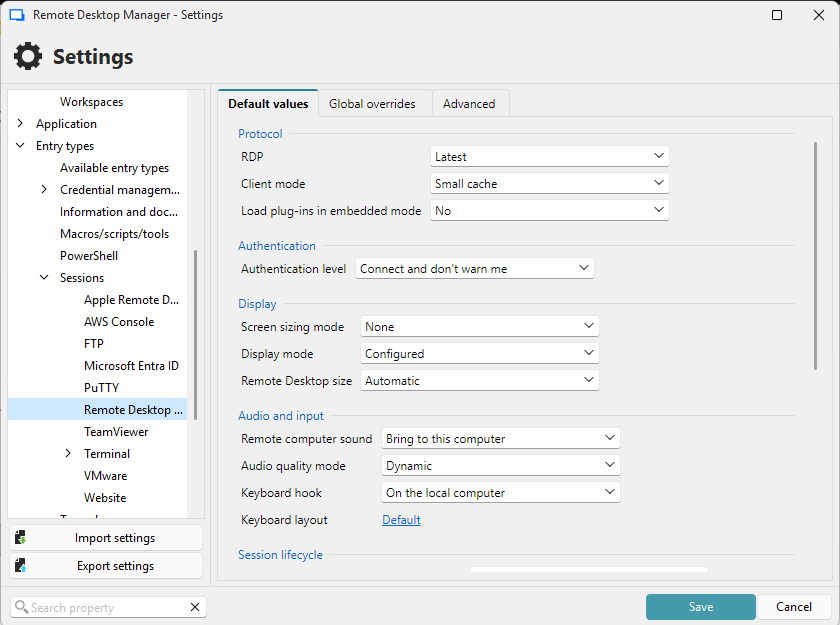
2026-08-13_02-39-14.png
Hello,
Great name indeed, same to you.
I have created a ticket for your case with the logs and forwarded it to someone that's more well versed in RDP among our staff. He should get back to you shortly after he has some time to investigate.
Best Regards,
Michaël Beaudin
Hello
I have to admit, I'm a bit confused around this issue; I'm also not well versed in Microsoft Accounts, passwordless or otherwise.
As I understand your scenario (which is not Entra, domain-joined, Kerberos; any of the usual suspects), RDP NLA authenticates before the RDP session starts. There's no logon screen yet; the client must present something usable (a password, a certificate and PIN, a delegated token). Windows Hello doesn't count; its PIN unlocks key on the physical machine, it can't be replayed on a remote host.
It shows the user and a password, but of course I do not have a password as it is a passwordless account.
What shows the user and password? RDM? Is it a "Windows" style credential prompt? Or are you seeing this on the logon screen of the remote system?
One thing that would be really telling: if you download an older version of RDM (not sure what version you updated from), does it start to work again?
Because I would guess that your account was never actually passwordless from Windows' point-of-view. When a PC is setup with a Microsoft Account, Windows creates a local account and stores a local password verifier derived from the MSA password. If you later removed your password from your MSA online, the online credential is gone, but the local verifier can survive. That would keep satisfying local NLA even if it no longer exists as far as Microsoft is concerned. How would it work without a password in RDM? Presumably the same credential was cached as a TERMSRV entry in the Windows Credential Manager (you could look, actually, and see if an entry for this machine exists). If something invalidated that local cached verifier (Windows update, MSA credential sync, Microsoft's own enforcement reaching the device) then you might experience this as "it broke", and since you removed the password you reasonably call it "passwordless".
There's no RDM setting here, because RDM can't manufacture a secret that doesn't exist. That presumes a working passwordless path that, in fact, may not have ever been offered.
So, please check:
- Does it work with an older version of RDM?
- Does it work with mstsc.exe?
- Do you have stored credentials for the machine in the Windows Credential Manager (TERMSRV entries)?
Please, let me know if you have some questions or something isn't clear
Kind regards,
Richard Markievicz