Use Events "Before opening" as same User as Command-Line run

Hello,
I am using a Command-Line (External Application) entry that is configured to launch an application under a different user account.
Before the application starts, I need to execute a script that performs some user-specific modifications.
I configured the script in the "Before opening" event, but it appears to run in the security context of the user who launched Remote Desktop Manager, rather than the user account configured for the external application.
Is it possible to execute the "Before opening" event script in the security context of the external application's configured user account?
All Comments (9)
Hello Lukas,
Thank you for reaching out.
Could you provide a bit more detail:
- What version of Remote Desktop Manager are you running?
- How is the Run As user configured on the Command-Line (External Application) entry (linked credential, manually entered, etc.)?
Best regards,
Samuel Dery
Hello Samuel,
I am using Version 2026.2.12.0.
The setting is configured as "Find by Name (User Vault)".
Hello Lukas,
Thank you for the additional details.
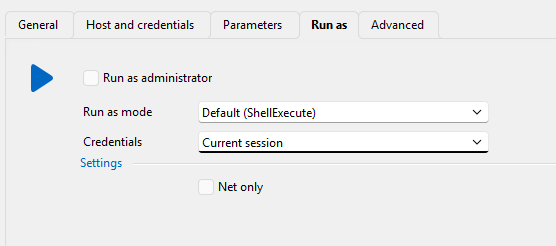
Could you provide a screenshot of the Command-Line (External Application) entry's configuration, specifically the General section and the Run As section?
Best regards,
Samuel Dery
Samuel Dery
Hello Samuel,
Sure, I can.
I want to open the SCCM Console with an add-in. To configure the add-in, I need to copy some files before the console starts, so I am using the "Before opening" event for that purpose.
I have already configured the credentials in the Run as section and set them to the same credentials used by the entry.
If I copy the files and then launch the console using a CMD command, the SCCM Console is not embedded in RDM.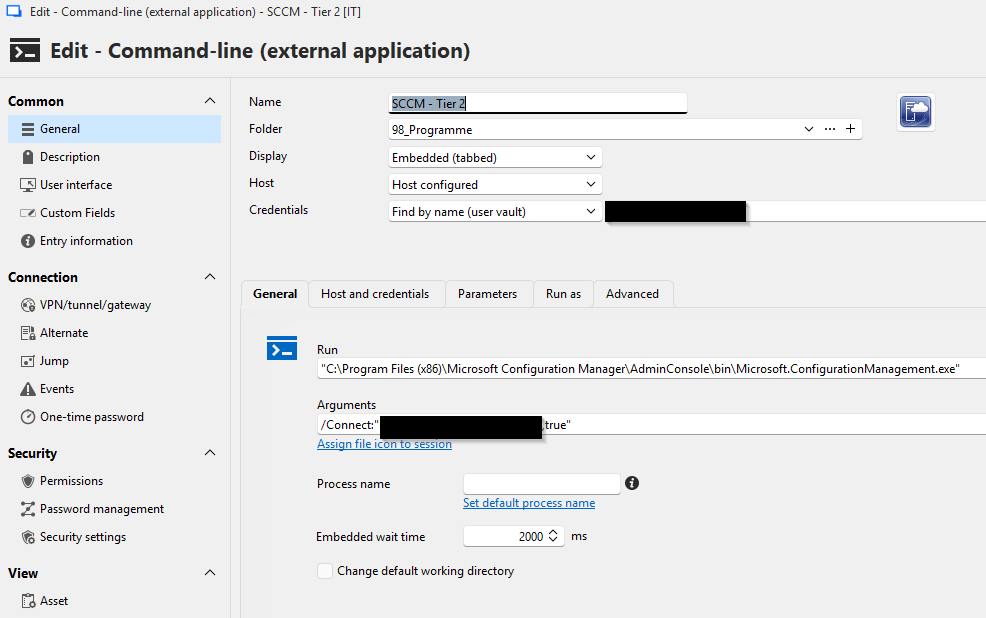

89290e39-edc7-4343-a78b-82bf59348f9b.png
d15c1d96-1e5f-4e65-bdf7-96729eeed336.png
946c1b8e-6f81-4efa-984a-be1428d96236.png
Hello Lukas,
Thank you for the screenshots, that confirms the setup.
From my understanding, this is expected behaviour. When RDM launches and embeds a session, the embedding only works for the process RDM itself starts and manages according to the entry's configuration. Once the "Before opening" event hands off to a separate cmd process, that process runs outside of RDM's control, which is why the SCCM Console launched that way is not embedded.
The "Before opening" event itself always runs in the security context of the account that started Remote Desktop Manager, regardless of the Run As configured on the entry.
A quick clarification, are you using the dedicated SCCM 2012 Console entry type in RDM, If it is the SCCM 2012 entry type, please note that it only supports External display mode, so it would not embed in RDM regardless of how the "Before opening" step is handled.
Best regards,
Samuel Dery
Hello Samuel,
I start the SCCM console via a command prompt. After opening, the console is embedded and works without any issues.
I use several consoles that normally work in embedded mode, but at the moment they are running on as external display because some adjustments need to be made before they are launched.
So far, I have not found a solution to perform these adjustments under a different user account via CMD or PowerShell and then open a management console in embedded mode.
Maybe you have an idea.
Thank you.
Hello Lukas,
Thank you for the additional details.
Before going further, Would it be possible for you to record a short video showing the behaviour from your side? Ideally, it would show the entry being launched, what happens with the console, and which part does not work as expected.
Also, could you tell me what C:\Settings\SCCM\runConsole.cmd actually contains?
Best regards,
Samuel Dery
Hello Samuel,
I don't think a screen recording would really show much, and I would need to redact a lot of sensitive information.
Let me explain in more detail what I am trying to achieve:
I want to launch the SCCM Console embedded within RDM, including the loaded Recast Right Click Tools add-in.
The add-in requires certain settings that can be configured by copying files into the user profile:
C:\Settings\SCCM\runConsole.cmd
xcopy "C:\Settings\SCCM\84562933-54eb-412b-91f4-c1df2a7d0668.license2" "%AppData%\Recast Software\Licenses\84562933-54eb-412b-91f4-c1df2a7d0668.license2*" /Y
xcopy "C:\Settings\SCCM\configuration.xml" "%AppData%\RecastRCT\configuration.xml*" /Y
reg add HKCU\Software\Sysinternals\PsExec /v EulaAccepted /t REG_DWORD /d 1 /f
RDM itself is started as a non-administrative user. The entry, however, is configured to run as a different user (an administrator account).
As a result, the files copied by runConsole.cmd are being copied to the profile of the non-admin user, because %AppData% resolves to that user's profile. However, the files need to be copied to the profile of the administrator account that is actually used to run the SCCM Console.
Hello Lukas,
Thank you for your reply,
Would you be available for a remote session so that I can have a look at the issue?
If yes, I will send you a private message so you can schedule something with me.
Let me know,
Best regards,
Samuel Dery