ctrl + tab move to last active session
1 vote

Please implement feature where CTRL + TAB switches to last recently used active session.
Currently: with multiple open sessions, CTRL + TAB keyboard shortcut will always switch (forward) to the next session in opened order. CTRL + SHIFT + TAB always switches (backward) to the previous session in opened order.
We are looking for common feature (SecureCRT, Remote Desktop Manager, Sublime Text, VSCode) where the CTRL + TAB keyboard shortcut will first switch to the most recently used active session tab first (regardless of the opened session tab order) for quick back and forth session navigation.
This is very helpful when you need to quickly move back and forth between two specific sessions when you have many sessions open.
All Comments (3)
Hello,
I believe you're interested in the "Back" and "Forward" keyboard shortcuts:
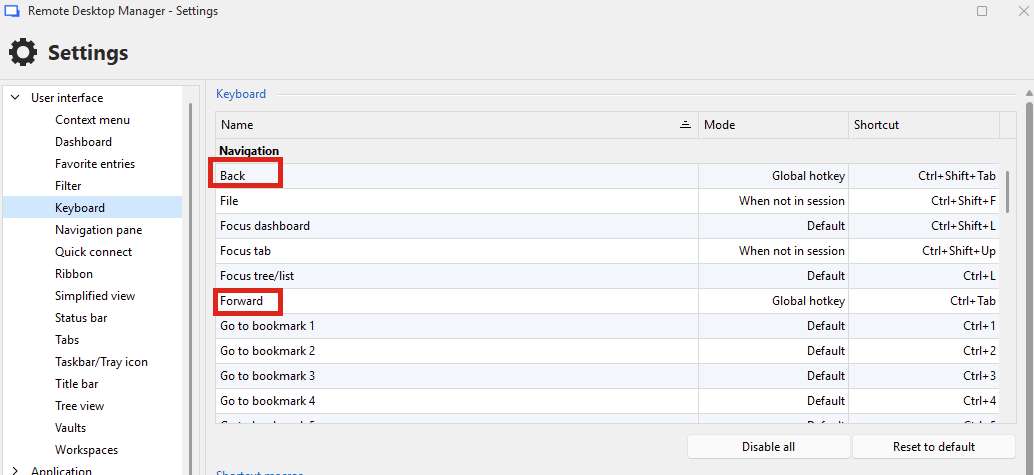
They aren't bound by default. Can you try binding them to the key bindings you prefer? You may want to have them in "Global hotkey" or "Default" mode as well, as otherwise when you're in a session, they will not work. I tried these shortcuts on my end in 2026.2, and they work how you describe. The other keyboard shortcuts are for previous/next tab, which are bound to Ctrl-Shift-left and Ctrl-Shift-Right by default respectively, I believe.
Let me know how these work for you.
Regards,
Hubert Mireault
Thank you for pointing out the distinction - I was unaware of the two different ways to navigate tabs.
I would like to persist with my initial request however, that you can cycle through tabs with a single shortcut, CTRL + TAB:
The behavior would be to cycle between the last two opened tabs; Initially CTRL + TAB moves to next tab. Fully releasing then pressing CTRL + TAB again would cycle back to the previous tab regardless of tab order. Holding the CTRL key while repeatedly pressing the TAB key will continue to move through open tabs in order from first opened to last opened.
To see this behavior in action, you can look at SecureCRT, or VSCode.
In this case then I believe you'd be interested in the "Previous/next tab" shortcut, which is bound by default to Ctrl-Shift-left and Ctrl-Shift-right. You could remap them to Ctrl-Shift-Tab and Ctrl-Tab respectively to achieve this. You might need to set them as global shortcuts so they work despite having the focus in your session (for example, your RDP entry).
Also, could you let me know what version you're currently using? A lot of the UI has been reworked in 2026.3 and I think Ctrl-Tab now helps you change tabs more easily, though from testing it on my side it seems to not be done as a global shortcut which means it doesn't work when you have the focus in certain embedded sessions. We would need to improve this because I think it's not very usable at the moment.
In short, I think the feature you need is already here on 2026.3, but may not work perfectly and we should improve it.
Regards,
Hubert Mireault