RDM SSH Terminal fonts vs Putty

Hello Folks,
I am looking for tips on tackling "fuzzy" fonts when comparing RDM SSH Terminal and PuTTY.
OS: Windows 11
RDM: 2026.2.17.0
I've tried every option in RDM under SSH > Terminal > Display (Font Quality, Size ..etc). I both RDM and Putty I've selected the font "Courier New", size 11. If you look at the attached picture, the fonts in Putty are nice and crisp, and kind of "fuzzy" in RDM. I RDP into my Windows 11 machine and run RDM there.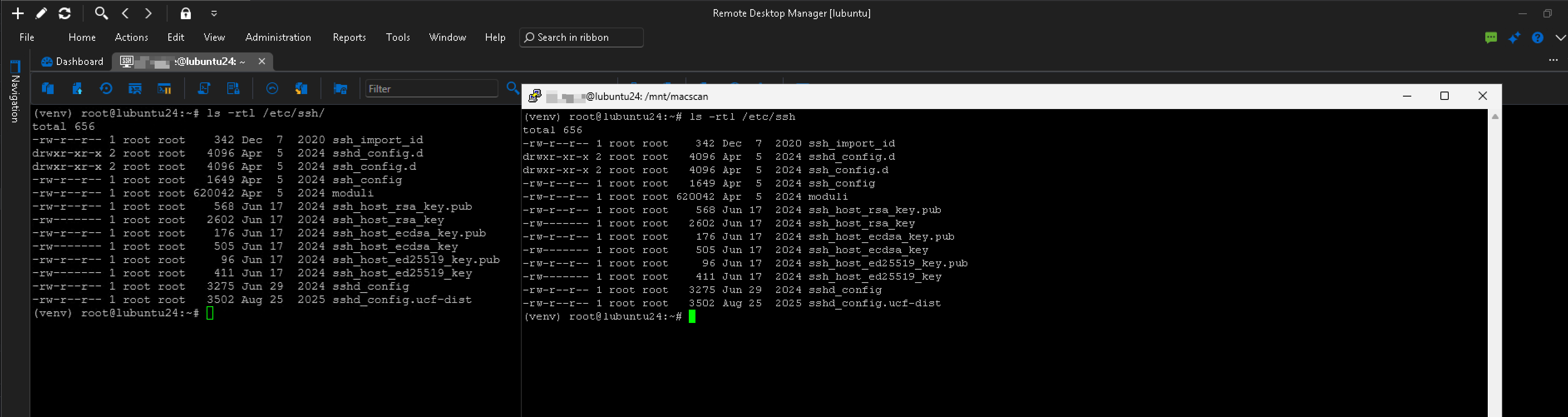
Any thoughts/suggestions?
Thank you
SCR-20260807-mzna-2.png
All Comments (4)
Is it true that in the 2023 version, you could select a different "type" of terminal, IE ..use PuTTY? If yes, is it possible to download 2023 from somewhere?
Hi,
Thanks for the details.
To adjust the theme, go to File > Settings > User Interface > Theme, where you can choose between System, Light, and Dark. Could you try switching to Light mode and reopening an SSH Terminal session to see if that changes how the fonts look for you?
To answer your other question: yes, PuTTY used to be available as a terminal type in RDM, and that entry type still exists today, but it is marked as deprecated. If you would prefer to keep using PuTTY, you can enable deprecated entries in RDM's settings and create a session using the PuTTY entry type instead of SSH Terminal. That lets you keep the PuTTY rendering without needing to install or run an older version of RDM.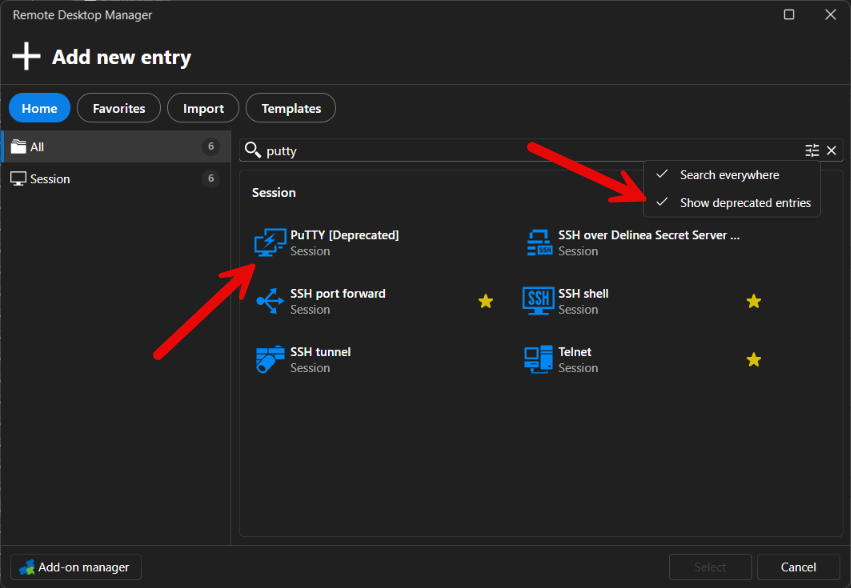
Keep in mind that deprecated entries, including the PuTTY entry type, will eventually be removed from RDM and will stop working. There is no confirmed date for this yet, but when it happens you will need to migrate any PuTTY entries over to SSH Terminal, so it's worth planning for that ahead of time.
Let us know if switching to Light mode changes what you're seeing on your end.
Best regards,
Alexis Geller Peiro
202ca553-63c8-4596-8aa9-5c1e723e70e8.png
Hello Alexis,
Thank you for getting back to me regarding my question. I've enabled the light theme, and unfortunately, it did not make any difference. I enabled "deprecated entries" and configured a Putty session to the same server. The fonts look nice and crisp.
I am using the following settings in both the native SSH entry and Putty
Font: Courier New
Size: 12
Font Quality: Default (I did try alias, non-alias, Clear Type ...same outcome where the fonts are not crisp)
Are you able to reproduce the same outcome on your system? If you zoom into the attached image, you will see the difference.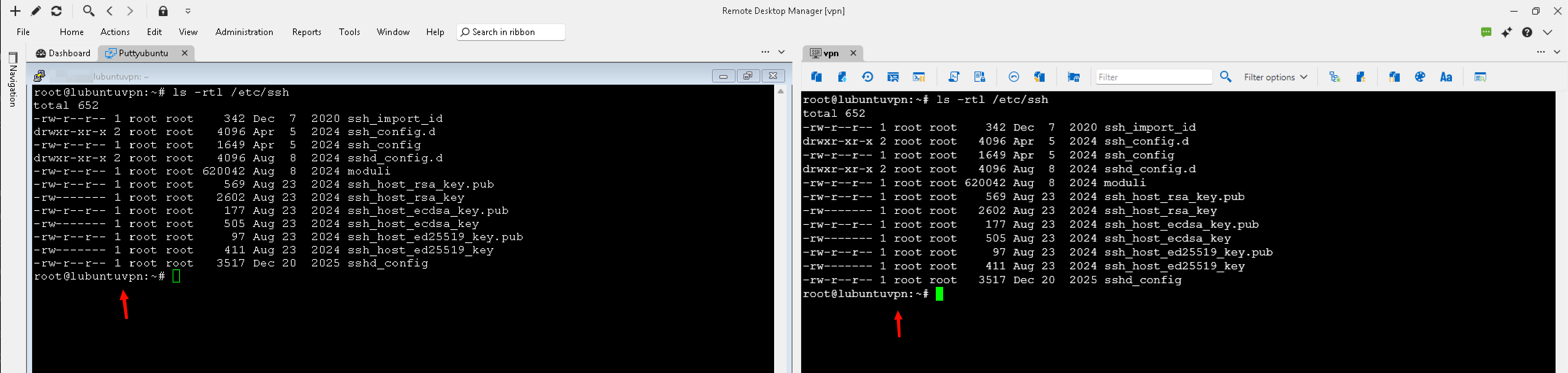
Thank you so much for your help.
SCR-20260814-hlsk-2.png
Hi,
Thank you for testing this so thoroughly and for the detailed comparison, it made it much easier to pin down.
We were able to reproduce the difference in font rendering between the native SSH Terminal and the PuTTY entry on our end. Good news: a fix for this is already done and will be included in version 2026.2.18.0.
In the meantime, if you would rather keep using the PuTTY entry until that version is out, feel free to keep the deprecated entry enabled as you have it now. Just remember that deprecated entries, including PuTTY, will eventually be removed from RDM, so once 2026.2.18.0 is out we'd recommend switching back to the native SSH Terminal.
Thanks again for your patience and for the clear reproduction steps, they were a big help.
Best regards,
Alexis Geller Peiro