Quick connect deactivates when choosing favorites tab

Why is it that the quick connect box deactivates when I'm on the favorites tab ?
I have to go to "User vault" to activate it again.
Did I miss a setting somewhere ?
Version: 2026.2.17.0 64-bit on Windows 11 25H2
Recommended Answer
Hi Henrik,
Thank you for the video, and for trying the favorites removal and the full local reset even though neither one changed the behavior.
Looking at the video, we noticed a red cross next to "My Personal Cloud" in the vaults list, that lines up with what you mentioned about the migration not being fully completed yet. We'd like you to try the following:
- Go to the Devolutions Cloud web interface, then Administration > Vaults.
- Create a shared vault (a test one is fine).
This should clear the red cross currently shown next to My Personal Cloud.
Once that's done, please remove your workspace from Remote Desktop Manager and add it back.
After that, let us know whether Quick Connect still deactivates when you switch to the Favorites tab.
Best regards,
Alexis Geller Peiro
All Comments (10)
Hi,
Thank you for reaching out, and sorry for the inconvenience with Quick Connect.
To help us investigate further, could you please provide a few more details:
- Which workspace/data source are you using (Devolutions Server - DVLS, a SQL Server data source, Devolutions Cloud, or another type)?
- Does the same behavior occur if you test with a portable installation of RDM? You can find the steps to set one up here: https://docs.devolutions.net/rdm/kb/how-to-articles/portable-rdm-installation/
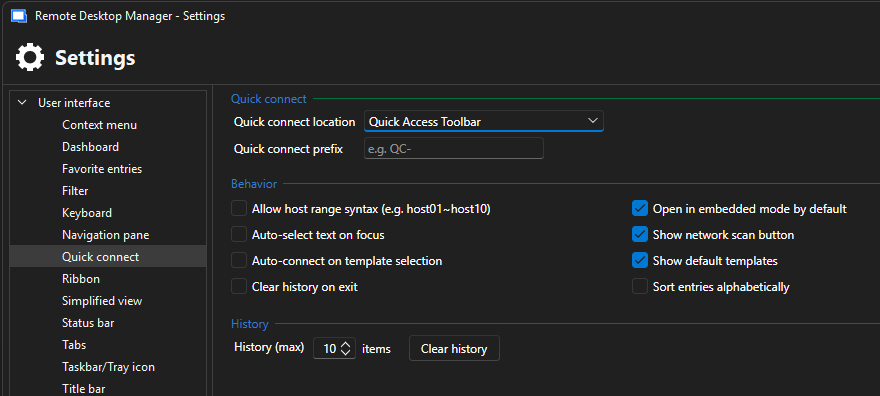
- What settings do you currently have under File > Settings > User Interface > Quick connect?
- Would you be able to send us a short video via DM showing the behavior? That would help us see exactly what happens when you switch to the Favorites tab.
This information will help us reproduce the issue and figure out what's causing Quick Connect to deactivate when you switch to the Favorites tab.
Looking forward to your reply.
Best regards,
Alexis Geller Peiro
Hi
- Devolutions Personal Hub
- Same happens on the portable version.
- See picture. If I set location to "Status bar" it disappears when I am not on the "User Vault" tab.
 I'll se what I can do about recording. But these 2 pictures shows is pretty well:
 Above, I'm on the User Vault tab and you see quick connect is enabled.
Below I switched to "Favorites tab" and quick connect got disabled.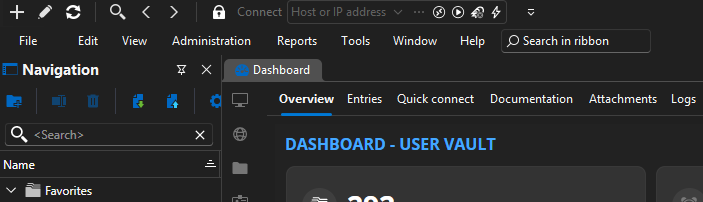
Kind regards
Henrik
5190a3a1-7dc6-44ef-aef6-3999610d15f5.png
8784def0-b4cc-4727-9b4d-eb00dd8663d0.png
a3cdfff8-9c2a-4599-b11a-4d0b4be2bc07.png
And just for some more info.
Here Im on the "User Vault tab" with the quick connect set to status bar:
And here I just switch to Favorites tab, and quick connect disappears: 
e38b793a-febe-4140-9d2d-a95b71c9c546.png
1120b46e-35ff-4f75-86f2-ff1e54e53488.png
Hi Henrik,
Thanks for testing this on the portable installation and for the screenshots, that's exactly the kind of detail we needed. The fact that Quick Connect works on the User Vault tab but disappears on Favorites, reproduces on both the installed and portable versions, and happens whether it's set to Quick Access Toolbar or Status bar, points to your local UI layout state rather than a Quick Connect setting itself.
Could you please try resetting your Remote Desktop Manager layout completely? We'd like you to do the full manual reset rather than just the one-click Window > Reset layout option:
- Close Remote Desktop Manager.
- Open File Explorer and go to %localappdata%\Devolutions\RemoteDesktopManager.
- Delete the RemoteDesktopManager.ext file and all RemoteDesktopManagerLayout.lyt files.
- Launch Remote Desktop Manager again.
Full steps here: Reset layout | Devolutions RDM | Product guides & reference
After that, please check again whether Quick Connect still deactivates when switching to the Favorites tab, and let us know how it goes.
Best regards,
Alexis Geller Peiro
I tried a few different things and found some new informations.
First I tried to follow the reset procedure from above, but that didn't change anything.
I then tried to run the portable version on a completely different machine, and from the first run it worked perfect.
But.. when I logged in to my workspace on the Devolution cloud (Personal Hub), it was back to not working again.
I can switch back to the default workspace and it works again.
So looks like something in the cloud workspace triggers it.
Hi Henrik,
Thanks for digging into this further and sharing that last finding, it's a very useful lead.
On our side, I tested this using Devolutions Cloud (formerly Personal Hub) and was not able to reproduce the issue. Given that you've now narrowed it down to something related to your cloud workspace, I'd like to dig a bit deeper into what's different about your setup.
A few questions to help us narrow this down:
- After migrating from Personal Hub to Devolutions Cloud, have you created any shared vaults, even just a test one? If so, could you tell us a bit more about how they're set up?
- If you don't have too many favorites, could you try removing all of them and adding them back one by one? This would help us see if a specific favorite (or the way it was created) is triggering the behavior.
If it's not too much to ask, and Devolutions Cloud is your only data source, could you also try a full local reset? This clears the local installation completely rather than just the layout, so it's a bigger step than what we tried before:
- Close Remote Desktop Manager.
- Open File Explorer and go to %localappdata%\Devolutions.
- Delete the entire RemoteDesktopManager folder.
- Launch Remote Desktop Manager again and add your Devolutions Cloud workspace back.
Most importantly, would you be able to send us a short video via DM showing the full behavior, from the User Vault tab working correctly to switching to Favorites and Quick Connect disappearing? Seeing the behavior directly would help us confirm what's happening, and if needed, we can open a deeper investigation from there.
Looking forward to your reply.
Best regards,
Alexis Geller Peiro
I sent you a DM with a video.
I dont' know if my Personal Hub is migrated yet, as I get a message it will happen automatically in a newer version, but no shared vaults.
I did also remove all my favorites and delete the RemoteDesktopManager folder in %localappdata%\Devolutions, but still no joy.
And even with all Favorites removed the quick connect bar disappears.
Hi Henrik,
Thank you for the video, and for trying the favorites removal and the full local reset even though neither one changed the behavior.
Looking at the video, we noticed a red cross next to "My Personal Cloud" in the vaults list, that lines up with what you mentioned about the migration not being fully completed yet. We'd like you to try the following:
- Go to the Devolutions Cloud web interface, then Administration > Vaults.
- Create a shared vault (a test one is fine).
This should clear the red cross currently shown next to My Personal Cloud.
Once that's done, please remove your workspace from Remote Desktop Manager and add it back.
After that, let us know whether Quick Connect still deactivates when you switch to the Favorites tab.
Best regards,
Alexis Geller Peiro
Bingo! :)
After creating the shared vault, RDM updated within 2-3 seconds and it worked straight away, without needing to re-add the workspace.
And for good measure, I tested it again with deleting the shared vault, and it went back to not working.
Hi Henrik,
Thank you for your patience throughout this, and for the discovery, your testing (creating and then deleting the shared vault) is exactly what helped us confirm the cause.
We'll report this internally to our development team, but I'm glad we were able to get it resolved for you.
Best regards,
Alexis Geller Peiro