Logging Options

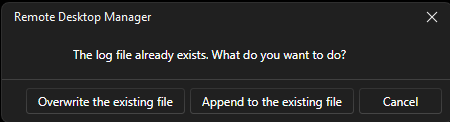
Yes I am bringing this up again. this needs to be matured. this weekend we had to get into a device to troubleshoot. We needed to do a second connection but didn't need to log but you can only do the first two options as cancel drops the connection. I have asked to have cancel to just NOT log the session. This question is about logging. Logging cannot only apply to one session to the same file.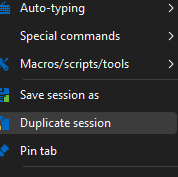
3e1f4635-bad1-4612-b852-3eb581222977.png
1c5ae80e-866e-42ee-ab0a-5f87971f339a.png
All Comments (19)
Hello,
I've linked your thread to our opened internal ticket, and I will check with the dev team if we can raise the priority on this.
Regards,
Hubert Mireault
Hello,
I've made the change and you can expect it to be available starting with version 2026.2.18.0. The window will look like this, with the "cancel" button instead being "proceed without logs".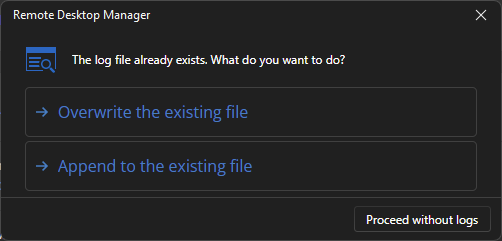
I hope that with this change the workflow is more what you'd expect. Please let me know if you have any additional feedback once you're able to try this version.
Regards,
Hubert Mireault
dae89d71-87d2-4773-bd8f-bb1c74236f85.png
that is great! I can still connect to a second instance without logging or any session with the option to log or not but still connect.
When is .18 coming out?
actually what about 2026.3? This should include both of my request.
I will be beta for a bit if needed ;)
I checked with the team and at the moment, both the beta of 2026.3 and the minor update 2026.2.18.0 are planned for next week, if all goes well in the QA test cycle.
Regards,
Hubert Mireault
Nice, would it be possible for me to get on the beta when released and then move back to the standard version down the road.
It really depends on the type of workspace you're using.
On workspaces that aren't backed by a "proper" database like XML or SQLite, you can try out 2026.3 and go back to 2026.2 no problem.
On SQL Server and Devolutions Server, updating to a new major version will usually imply database script upgrades, and while we try to keep things retro-compatible, it's usually best to stick to that major version once you've upgraded the database. For Devolutions Server specifically, you will also want the beta version of the server that matches RDM.
For our Cloud service, once the beta releases, the online service will be compatible both with RDM 2026.2 and 2026.3, so either version will work.
One clarification too, if you go on the RDM 2026.3 beta version, once we eventually release the stable version of 2026.3, you can simply update to that version as a "minor update" of your beta install, and you'll now be on the stable version. The beta version is not a continuous release channel, it's temporary for 2-3 weeks for every major version.
I hope this helps clarify the process if you're interested in trying out a beta release.
Regards,
Hubert Mireault
This is what I was trying to say:
One clarification too, if you go on the RDM 2026.3 beta version, once we eventually release the stable version of 2026.3, you can simply update to that version as a "minor update" of your beta install, and you'll now be on the stable version. The beta version is not a continuous release channel, it's temporary for 2-3 weeks for every major version.
Thank you!
Perfect, happy I could help! Once these versions release, let us know if there's anything that doesn't quite answer your needs and we'll make sure we address it.
Regards,
Hubert Mireault
I saw 26.2.18 was available, looking for 26.3, but validated the change is in fact working!
Thank you!
Thanks for the feedback, I'm glad to hear it works!
We're currently hoping to release the beta wednesday.
Regards,
Hubert Mireault
When you press the X, the connection continues. Not sure if it logs, overwrites or does not log, but can we make the X be cancel the process?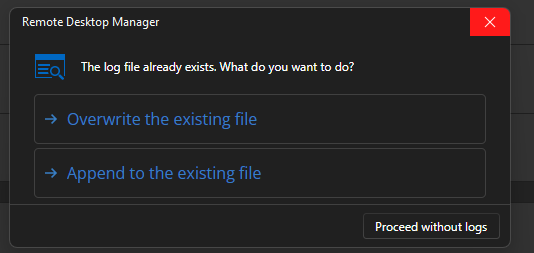
6508117c-aeb9-475c-893d-be2e62607556.png
At the moment the X does the same as "proceed without logs". But I could have both cancel and proceed without logs as buttons for clarity, with X being cancel. I'll do this next week.
Have a nice weekend!
Regards,
Hubert Mireault
Up to you, not sure a cancel button matters since the X would be standard to most X functions like, close, cancel or exit. Don't want the menu to get too dirty.
Thank you though.
I've made some additional changes to this and it will be available with our 2026.3 release.
Regards,
Hubert Mireault
what changes did you decide to go with
I went with the simplest option for now, which is to add the "Proceed without logs" as a full choice, with "cancel" as the smaller button and the X button doing the same as cancel: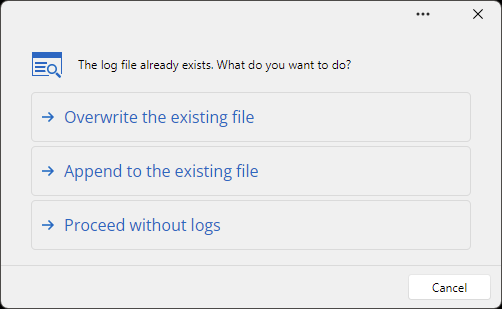
Eventually we'll probably rework these windows to be prettier (it's not the only place in RDM we use this specific prompt), but the way it's currently presented is aimed to be the clearest in behavior. No ambiguity between the choices by using more complete labels for non-cancel actions.
Regards,
Hubert Mireault
3fa7cdc9-094a-4cd7-9413-d534370d43fd.png