OTP Prompt String not working on macOS (RDM Free) - still prompting for OTP
OTP Prompt String not working on macOS (RDM Free) - still prompting for OTP

Hi everyone,
I'm currently facing an issue with Devolutions RDM Free on macOS (version 2026.2.4.4).
I have a host configured with a username, password, and OTP. I have also correctly filled in the OTP Prompt String.
The problem is that on macOS, despite having the OTP Prompt String configured, the application still manually prompts me for the One-Time Password.
This exact same configuration works perfectly fine on Windows for the exact same host (the OTP is injected automatically). It only seems to fail on the macOS version.
Has anyone else experienced this issue, or is there an additional setting I need to check on macOS?
Thanks in advance for any help!
All Comments (4)
Hi eroi00,
Thanks for the report, sorry for the trouble.
To help track this down, could you share:
- The session type for this host (SSH Shell, SFTP, Telnet, etc.)
- Your Connection – One-time password settings (Source and Usage) for this entry, a screenshot would help
- Your Windows RDM version, for comparison
- Whether a brand-new test entry created directly on macOS shows the same issue
- Debug logs from a macOS session where the prompt appears: Send logs from Remote Desktop Manager macOS
Once we have these, we'll be able to dig into whether it's a config or platform issue.
Thanks!
Eduard Sepulveda Lopez
Hi,
Thanks for getting back to me. Here is the information you requested:
1. Session type: SSH
2. OTP Settings: Source is set to Inherited (Linked vault), Usage is set to Inherited (Specific to session), OTP prompt string: "TOTP - Enter Token".
Edit: screenshots from macOS, not windows :-)

We tried to set "Linked (vault)" and "Specific to session" withouth inheritance, outcome was the same.
3. Windows RDM version: 2026.2.17.0 Arm 64-bit (tested as well on intel cpu newest version, works fine)
4. Brand-new test entry: I created a fresh test entry directly on macOS, and the issue still occurs.
5. Help -> Session logs from macOS:
[8/7/2026 2:28:52 PM] Devolutions.ProtocolsSharp: 2026.6.2.1 OS: macOS
[8/7/2026 2:28:52 PM] Terminal font: Menlo [Menlo, fixed=True]

[8/7/2026 2:28:52 PM] Starting SSH, verbose level: 4
[8/7/2026 2:28:52 PM] Setting up connection
[8/7/2026 2:28:52 PM] Connecting to: xxx.xxx.xx:xxxx (IPV_ANY)
[8/7/2026 2:28:52 PM] SSH version banner: SSH-2.0-PBPS-SM-1.0.0

[8/7/2026 2:28:52 PM] Sending kex init
[8/7/2026 2:28:52 PM] Received kex init
[8/7/2026 2:28:52 PM] Selected algorithms: curve25519-sha256, ssh-ed25519, aes256-ctr, aes256-ctr, hmac-sha2-256-etm@openssh.com, hmac-sha2-256-etm@openssh.com, none, none
[8/7/2026 2:28:52 PM] Sending Ed25519 kex init
[8/7/2026 2:28:52 PM] Received Ed25519 kex reply
[8/7/2026 2:28:52 PM] Successfully authentified server
[8/7/2026 2:28:52 PM] Sending new keys message
[8/7/2026 2:28:52 PM] Received new keys message
[8/7/2026 2:28:52 PM] Sending userauth service request
[8/7/2026 2:28:52 PM] Received service accepted message
[8/7/2026 2:28:52 PM] Sending userauth init request
[8/7/2026 2:28:52 PM] Received userauth failure: publickey,password,keyboard-interactive
[8/7/2026 2:28:52 PM] Starting interactive authentication
[8/7/2026 2:28:52 PM] Sending userauth interactive request
[8/7/2026 2:28:52 PM] Received userauth info request:
[Name->Password Safe SSH Direct Connect]
[Prompt->Password: ]
[8/7/2026 2:28:52 PM] Sending userauth interactive response: *
[8/7/2026 2:28:52 PM] Received userauth info request:
[Instruction->Your session is loading. Please wait...]
[8/7/2026 2:28:52 PM] Sending userauth interactive response:
[8/7/2026 2:28:53 PM] Received userauth info request:
[Prompt->TOTP - Enter Token: ]
And it waits like that for OTP input.
Thanks!
7e842136-d558-4e92-b1ea-07a9f1c7df25.png
9ae75a72-d7ea-4724-bc18-9caf9f412acb.png
Hi again...
While gathering the screenshots, I think I managed to pinpoint the exact cause of the issue. It appears to be a bug in how RDM for macOS handles OTP Usage overrides between a parent folder and a host entry.
Configuration setup:
- Parent Folder:
- OTP Source: Linked (Vault)
- OTP Usage: Append to the password
- Host Entry (inside the folder):
- OTP Source: Inherited (Linked (Vault))
- OTP Usage: Specific to session
The issue: Even though the Host entry explicitly had its Usage set to Specific to session, the macOS client was not applying this setting.
Workaround: As soon as I changed the OTP Usage on the Parent Folder level from Append to the password to Specific to session, the OTP Prompt String started working as expected on macOS.
It seems the macOS client lets the Parent Folder's OTP Usage override the Host's explicit Usage setting, rather than respecting the Host's local configuration.
Host:
Folder: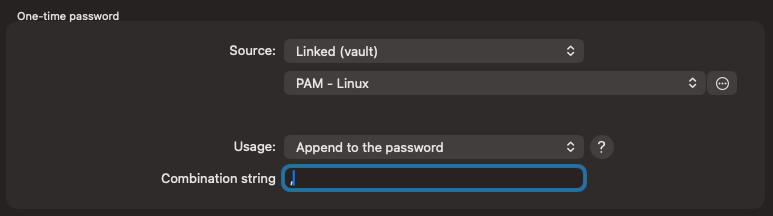
Thanks for your time!
1eaa551e-5d92-4d87-93d5-cd8c8a8feab7.png
af271c14-e887-411d-b9a8-c8564176a7c4.png
Hi eroi00,
Thank you for the detailed follow-up and for taking the time to isolate the exact configuration, that's very helpful.
We're currently reviewing this internally to confirm the behavior you're describing between the parent folder and host entry OTP Usage settings on macOS.
In the meantime, the workaround you found, setting the parent folder's OTP Usage to match the host entry's ("Specific to session"), is a safe way to keep things working. We'll follow up once we have more information.
Thanks again for your patience and for the thorough testing.
Best regards,
Eduard Sepulveda Lopez