Won't search entries in the fifth level (RDM)

Hello
When we search for a term, it won't be found if it's on the 5ht level of the tree, as a subentry: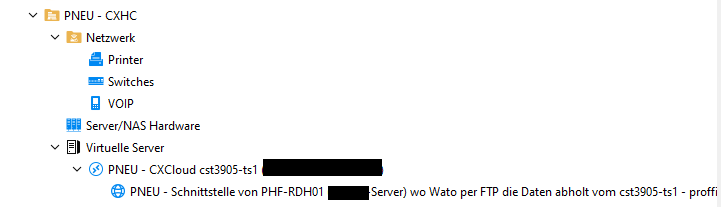
In this example, it won't find any words in the last subentry, like "Wato".
Can this be changed that it searches all entry levels.
Best regards
Patrick
0bc4f0fe-8afb-49e6-a41c-7752432fc4b7.png
All Comments (6)
Hello,
I'll move your ticket to the bug report forum, as this is not an intentional limitation. We'll try to reproduce this issue and work on a fix.
Can you confirm what version of RDM you're currently running?
Regards,
Hubert Mireault
Also, can you confirm you have the "Apply filter to subentries" filter option checked? I want to rule out subentries being the issue in general.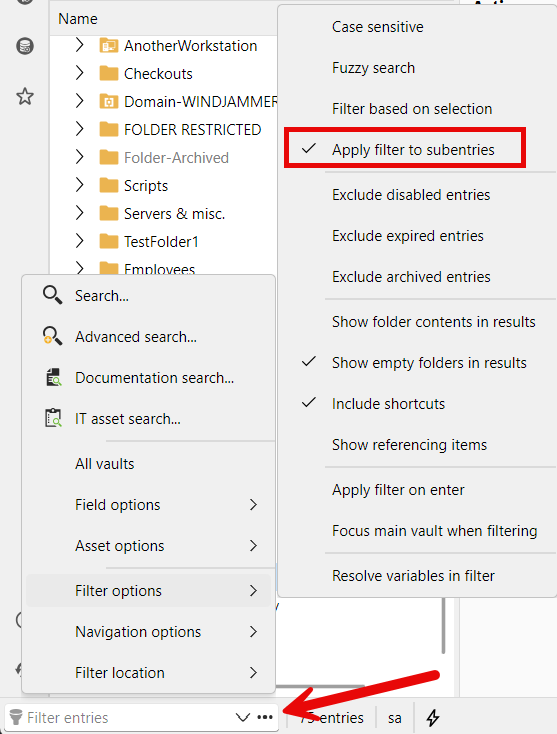
Regards,
Hubert Mireault
388ff576-7941-41e7-acbc-30db66393c8e.png
Hi Hubert
Oh I did not know about this filter, yes it was disabled. I enabled it and now it works! Thanks a lot!
And what are exactly the limits of Folder Levels. How many folders and subfolders can be created.
I saw that a sub-entry, can't have another sub-entry, is that by design?
Thanks and best regards
Patrick
Perfect, glad to know it was just a matter of the setting not being enabled.
And what are exactly the limits of Folder Levels. How many folders and subfolders can be created.
There should not be one per se. Certain things like variable resolving do have limits to avoid things like infinite resolution loops, but the folder structure itself should have no hard limit that I know of.
I saw that a sub-entry, can't have another sub-entry, is that by design?
For the sub-entries, the single level of depth is by design. In the past it was a hard limitation due to how sub-entries were stored, and while the code behind the implementation is much improved today, we kept the limitation for now as it would still need us to validate the architecture and plethora of settings to properly support multiple nested sub-entries. So in short, it's not impossible we'll eventually remove this limitation, but for now, it's in place and intentional.
Regards,
Hubert Mireault
Hi Hubert
One other thing we just recognized, when we try to move a sub-entry to somewhere else, that command is greyed out. Why ist that and could that be enabled?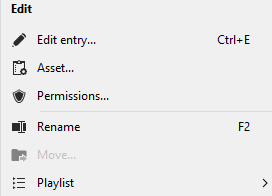
If you need to manually drag and drop such an entry in a list with thousands of entries, it takes a lot of time to scroll and find the right folder.
Best regards
Patrick
54633759-61df-476e-9186-2487b782eafb.png
That's very annoying, I agree. I will open a ticket so we can support this.
At the moment you need to use the "unparent" button which will put the entry at the same level as the parent entry once the action is completed, which as you say, makes it really difficult to properly handle afterwards.
Regards,
Hubert Mireault