Allow option to run the built-in tools as administrator
Allow option to run the built-in tools as administrator
1 vote

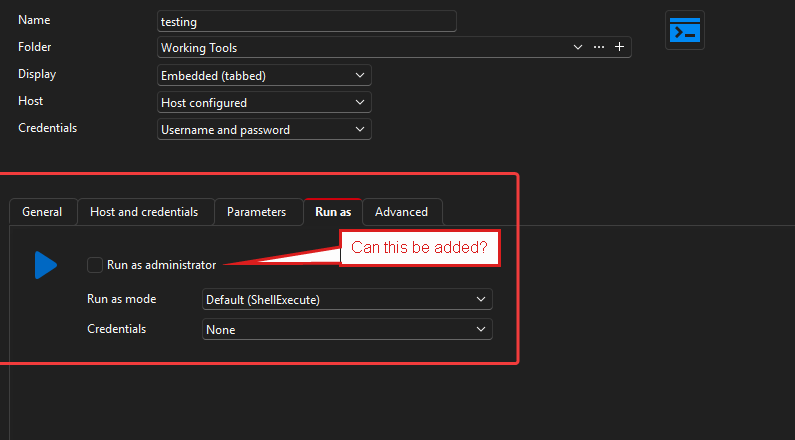
Looking at the "Command-Line" entry.... there is a tab "Run as" with a checkbox " Run as Administrator"
Can this be added as an option for the built-in tools?
Right now, the only alternative for me is to build everything from scratch and lose the clean default tools. This seems needlessly cumbersome. Under the hood, the built-in tools appear to be command-line entries so why is the option able to be changed there but not in the built-in tools?
The lack of this option also creates other problems as stated below.
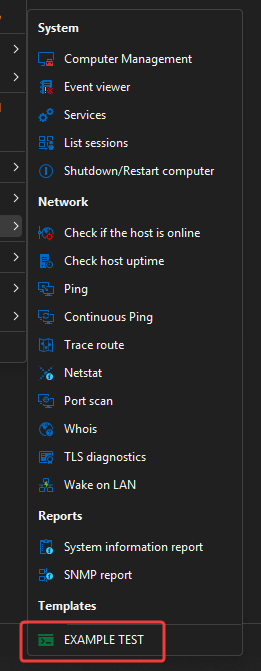
When I create a new tool, it just puts it under "Template" .... I do not find a place to sort created tools into categories.
I created a new example "tool/script" as shown below. This does appear like it will work, but again, seems messy long-term to re-create duplicate built-in entries. Also, when I create a new tool, it just puts it under "Template" .... I do not find a place to sort created tools into categories.
I did see where I could "turn off" the specific items... but this again just seems like the process would be
- Duplicate manually (since I can't seem to copy) the built-in tools
- Turn off the tools in Settings > Tools > Available Tools
- Have multiple re-created tools unsorted in a list under "Templates"
Thank you for any improvements you can make with this! :-)