Need some Help

On Friday I was able to ssh to my asr. Came in monday and I am getting the following error message. However I can use native putty and it works fine. This appears to only be an RDM issue. Any suggestions?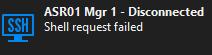
7438356a-74bb-4518-82a7-ff481107310e.png
Recommended Answer
Hello,
Following up on the log analysis: there is one more thing worth testing.
Looking at the log closely, RDM sends an environment variable request (LANG) right before the shell request, and the ASR rejects it. PuTTY, by default, does not send any environment variables at all, so this is actually a real difference between the two clients in how they talk to the ASR. It is possible the ASR's SSH implementation does not handle that request cleanly and this affects the shell request that follows it.
Could you please try this:
1. Right-click the "ASR01 Mgr 1" entry and select Properties.
2. Go to the Advanced tab.
3. Check the box labeled "Skip environment variable setup."
4. Click OK, then try connecting again.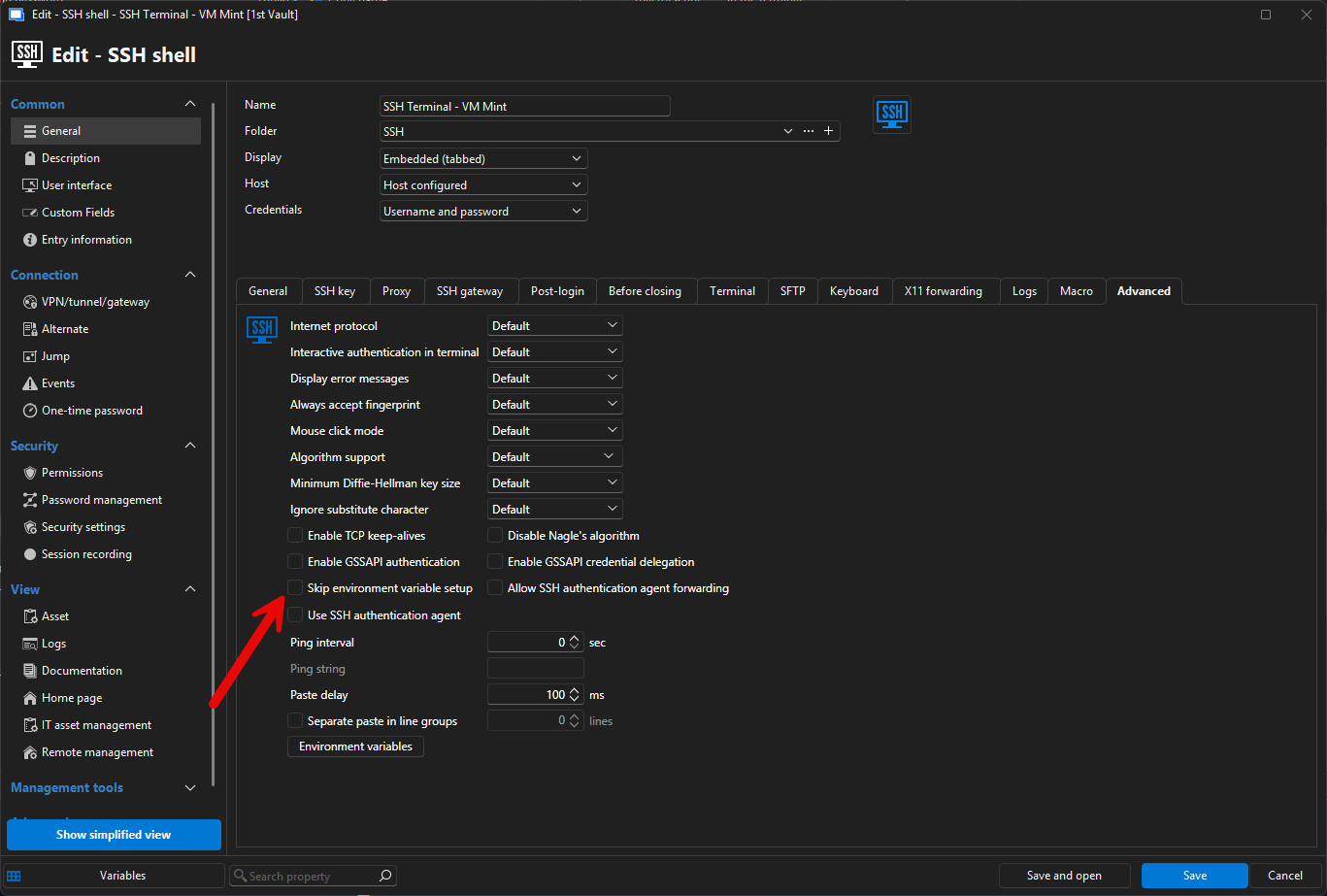
Please let us know how it goes.
Thank you again for your patience while we work through this.
Best regards,
Alexis Geller Peiro
4449d84e-5eeb-4ce8-8856-afd4267c8191.png
All Comments (9)
Hello,
Thank you for contacting us on that matter.
Could you please provide us with the RDM version and the workspace you are currently using?
https://docs.devolutions.net/rdm/workspaces/workspace-types
Could you also try a portable version to check whether it is not related to the local installation?
Instructions: https://docs.devolutions.net/rdm/kb/how-to-articles/portable-rdm-installation/
Thank you for your collaboration.
Best regards,
Alexis Geller Peiro
subscribing with new account
As i stated, this worked Friday and came back Monday and it doesn't work. I then validated that ssh to my ASR is in fact working using putty. I am now on version 2026.2.16
Hello,
Thank you for the update and for confirming the version (2026.2.16).
To keep narrowing this down, could you please help us with the following:
1. Which workspace are you currently using (SQLite, SQL Server, or Devolutions Server/Cloud)?
2. Were you able to try the portable version of RDM to see if the issue also occurs there? Instructions here if needed: https://docs.devolutions.net/rdm/kb/how-to-articles/portable-rdm-installation/
3. Since the connection reaches "Shell request failed" (meaning the SSH connection and authentication actually succeed, and the failure happens right when RDM requests the interactive shell), a verbose SSH log would help us see exactly what the ASR responds with at that step. Could you please enable it and reproduce the issue?
- Right-click the ASR01 Mgr 1 entry and select Properties
- Go to the Logs tab
- Check Enable Logging
- Set Verbose to 2
- Set Log Mode to Event
- Choose a Log Path
- Click OK, then launch the session again to reproduce the error
- Attach the resulting log file here
One more question that might help us narrow this down: does anyone else, or any script/monitoring tool, also connect to this same ASR over SSH regularly? We want to rule out the device simply running out of available SSH sessions.
Thank you for your patience while we look into this.
Best regards,
Alexis Geller Peiro
Here is the log. I like logical thinking, some of this doesn't register with me.
1. SQLite - not sure how this affects anything since this worked until Friday last week.
2. No - not sure how this affects anything since this worked until Friday last week.
3. done, file attached.
No there is nothing causing the sessions to run out. I stated to you that native putty works just fine. would you like to get on a support session?
ASR01 Mgr 1.txt
Hello,
Following up on the log analysis: there is one more thing worth testing.
Looking at the log closely, RDM sends an environment variable request (LANG) right before the shell request, and the ASR rejects it. PuTTY, by default, does not send any environment variables at all, so this is actually a real difference between the two clients in how they talk to the ASR. It is possible the ASR's SSH implementation does not handle that request cleanly and this affects the shell request that follows it.
Could you please try this:
1. Right-click the "ASR01 Mgr 1" entry and select Properties.
2. Go to the Advanced tab.
3. Check the box labeled "Skip environment variable setup."
4. Click OK, then try connecting again.
Please let us know how it goes.
Thank you again for your patience while we work through this.
Best regards,
Alexis Geller Peiro
4449d84e-5eeb-4ce8-8856-afd4267c8191.png
That worked!!! So the log was a much better course vs installing other programs.
NOW, why is this setting required when it was working until last friday?
Any idea why this happened?
Hello,
Great news that the setting resolved it. Since you asked why this would have started happening after working fine on Friday, here is what we found.
We checked and RDM itself did not update between Friday and Monday, so the change was not on our side. RDM has always sent that environment variable request as part of setting up an SSH session, so if the ASR only started rejecting it on Monday, something likely changed on the device side over the weekend.
Since the entry is named "ASR01 Mgr 1," a common cause for this kind of sudden change is a route processor switchover (the management module becoming active/standby can change over a maintenance window, and the newly active one may behave slightly differently). A software update or configuration change applied to the ASR over the weekend could also explain it.
If you would like to confirm the exact cause, it would be worth asking your network team whether there was any maintenance, software update, or RP switchover on ASR01 over the weekend in question.
With that said, we will go ahead and mark this case as resolved since the connection is working again. Feel free to reopen or reach out if you have any other questions.
Best regards,
Alexis Geller Peiro