"Remove MFA" not possible for delegated "admins"

Hello,
I have a few users that are allowed to do user admin tasks (create user, delete user, reset MFA). Unfortunately the last thing - reset MFA - is no longer possible. But this is important if a full admin is not available and someone needs to re-enroll MFA.
They have "System permissions, Administration, Management, Users => Custom" which was enough in the past.
Brgds Andreas
22695b26-7f27-44d9-8e19-d2f62d402438.png
Recommended Answer
Hi Deas,
As promised, here's the update from our development team.
On SQL Server workspaces this is the intended behaviour. Removing or resetting a user's MFA is reserved for administrators, and the "Users: Custom" system permission doesn't include it. It's not something that broke in a recent version. It's how these permissions are designed for SQL workspaces.
Right now there's no way to give that right to a non-admin user on a SQL workspace. For now, a full administrator has to remove the MFA in Administration > Users.
If you'd like delegated user admins to be able to do this, it would be worth posting it in the Feature Requests section of the forum. That way the product team sees it and other users can vote for it.
Thanks again for your patience and all the details you sent.
Best regards,
Eduard Sepulveda Lopez
All Comments (12)
Hi Deas,
Thanks for the screenshot, that looks like the Users list under Administration in RDM Windows.
Could you also share which workspace this is connected to (DVLS, SQL, or Cloud), along with the current versions of RDM Windows and that workspace?
One more thing that would help: a screenshot of where "Reset MFA" normally shows up, for example when you right-click a user, comparing a full admin account (where it works) with one of the custom-permission accounts (where it's missing). That will help us pin down exactly where it's disappearing.
Thanks again for your help with this.
Eduard Sepulveda Lopez
Hello,
we use an SQL datasource.
But I have no right-click user menu where I could reset it - it is only in the menu as shown on my screenshot. For a full admin the icon is not greyed out. That´s the only difference.
Brgds Andreas
Hi Deas,
Good to know, so the icon is there but greyed out just for the custom-permission users, while full admins see it active. That narrows things down nicely.
Could you share the exact RDM Windows version and the SQL Server (or DVLS) version behind it? And when you get a chance, a quick look at exactly which boxes are checked under System permissions – Administration – Management – Users for one of those accounts would help too, just to rule out something getting unchecked along the way.
Thanks for bearing with us on this.
Best regards,
Eduard Sepulveda Lopez
Hello,
RDM is latest - 2026.2.16 and SQL is 2019 with latest updates.
But I don´t know what check boxes you mean. When I go to System permissions, Administration, Management, Users I use "Custom" and can only select which users have this right. There are no check boxes where I could select something.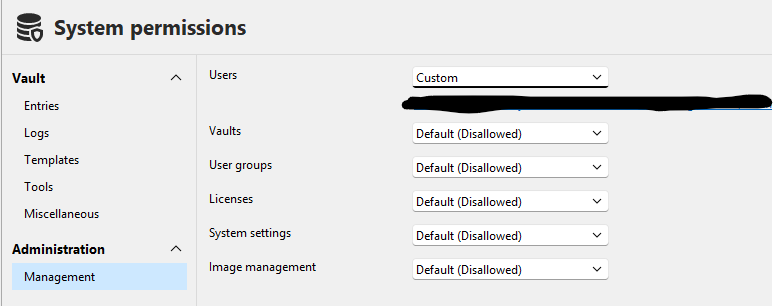
Brgds Andreas
aab8f5b8-2ebe-4906-b290-6cab949013ef.png
Hello,
This is how it looks for a full admin:
Brgds Andreas
c2762509-7084-416b-9fbb-20f585ae22d5.png
Hi Deas,
One more thing that would help before we hand this to our developer team: did this ever work correctly on 2026.2.16, or did it stop after upgrading from an earlier version? And does this affect all the users with "Users: Custom" access, or just some of them?
Either answer helps narrow down where to look.
Thanks again for all the detail so far.
Best regards,
Eduard Sepulveda Lopez
Hello,
I really don´t know when it broke - I last used it about a year ago...
It is a function that is needed when no "full" admin is available and one of our users need to reset his MFA. So it is not use daily, but when, it is a really important function.
Sorry!
Brgds Andreas
Hi Deas,
We're checking this internally now and will come back to you here as soon as we have an update.
Thanks again for your patience, Andreas.
Best regards,
Eduard Sepulveda Lopez
Hi Deas,
Sorry for the long wait, and thanks for all the details you sent.
We found the cause. The "Remove MFA" button in Administration > Users needs a specific permission to remove a user's MFA. On a SQL Server workspace, giving someone "Users: Custom" in System permissions doesn't include that permission. Right now only full administrators have it. That's why the button is greyed out for your delegated user admins and active for a full admin.
We've passed this to our development team. They're checking whether this is intended for SQL Server workspaces or something that should change. I can't promise a change or a date yet, but I'll update you here as soon as I have an answer.
Until then, a full administrator has to remove a user's MFA: Administration > Users, select the user, then Remove MFA.
Thanks again for your patience,
Eduard Sepulveda Lopez
Thanks for the explanation!
Brgds Andreas
Hi Deas,
As promised, here's the update from our development team.
On SQL Server workspaces this is the intended behaviour. Removing or resetting a user's MFA is reserved for administrators, and the "Users: Custom" system permission doesn't include it. It's not something that broke in a recent version. It's how these permissions are designed for SQL workspaces.
Right now there's no way to give that right to a non-admin user on a SQL workspace. For now, a full administrator has to remove the MFA in Administration > Users.
If you'd like delegated user admins to be able to do this, it would be worth posting it in the Feature Requests section of the forum. That way the product team sees it and other users can vote for it.
Thanks again for your patience and all the details you sent.
Best regards,
Eduard Sepulveda Lopez
Hello,
as I wrote - I am VERY sure, that this was working one or two years ago. But anyway - thanks for your effort, I´ll open a feature request.
Brgds Andreas