VPN/tunnel/gateway connect settings not respected when Jump host session is active.
VPN/tunnel/gateway connect settings not respected when Jump host session is active.

Hi guys,
Let me start by thanking you for the great products and Remote Deskopt Manager in specific. But even great products can have unexpected behavior, or at least unexpected behavior for me.
Some of our servers are only accessible over RDP when connected to our office network. When I'm out of the office I cannot even access these servers over VPN. The only way to access these servers is by using a Jump host.
I configured my RDP entries like this, to use the Jump host only when I'm not connected to the local network: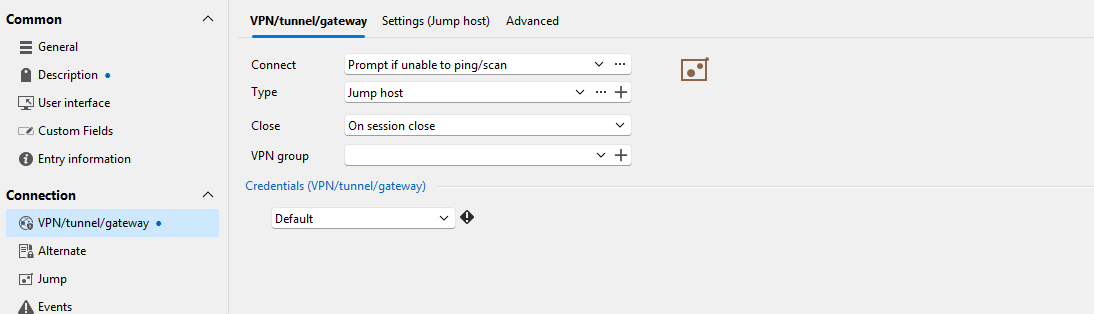
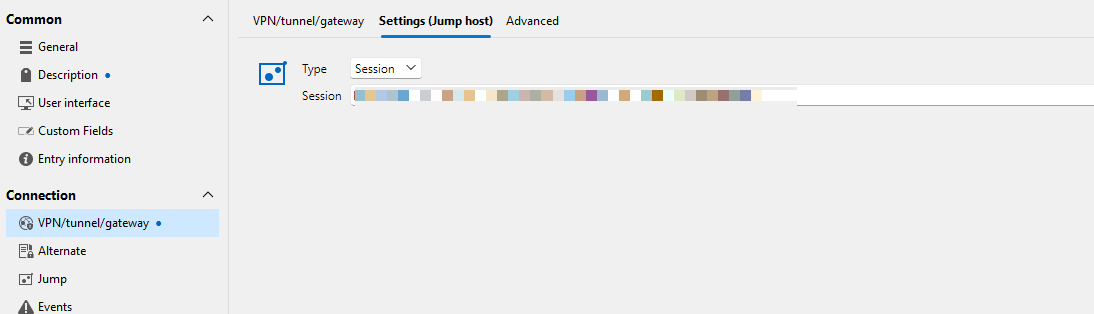
When I'm outside the office and check if the host is online, I get this expected result: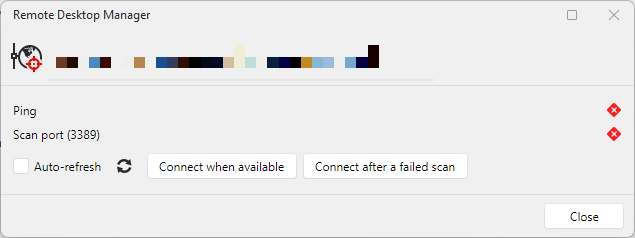
As expected when I connect to this server, this prompt appears: When I click Yes, RDM first connects to the Jump host and opens the RDP entry within.
However, the following behavior is unexpected. Regardless of whether I am inside or outside the office network, as soon as I have an active RDP connection to the jump host, all entries configured this way are opened within the Jump host. Even though "check if host is online" returns this: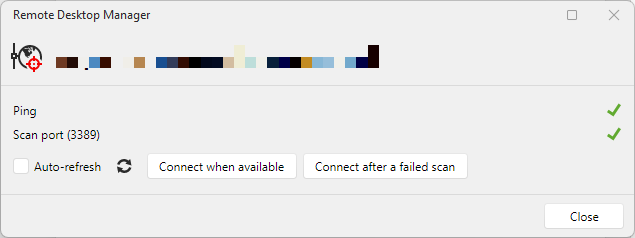
This behavior is not limited to RDP entries but also extends to other types, including SSH Shell.
Check 2.png
Prompt.png
Check.png
Settings 2.png
Settings 1.png
All Comments (1)
Hello,
Thank you for reaching out regarding this matter.
I was able to reproduce the behavior you reported on a smaller scale. I've submitted it to our development team for further review. They will investigate whether this is a bug or if the current behavior is the intended functionality of the "Prompt if unable to ping on scan" feature, as I'm not yet certain whether there may be a misunderstanding regarding how this option is expected to work.
I'll follow up with you as soon as we have either a clarification or, if necessary, a fix available in a future update.
Thank you for bringing this to our attention.
Best regards,
Jacob Lafrenière