"open when availabel" gone?

Hi,
2026.2.13.0
I miss the "open when available" button, since the last couple versions. I couldn't find any hind in the release notes.
Usualy it was in the contxt menu of "open with parameters", but it's not there.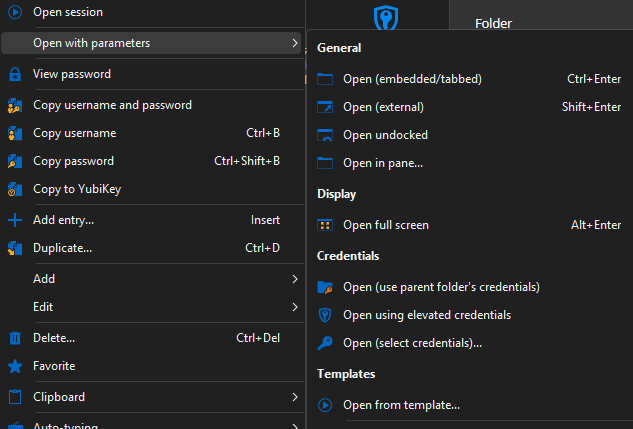
Only in the quick connection I still can find it.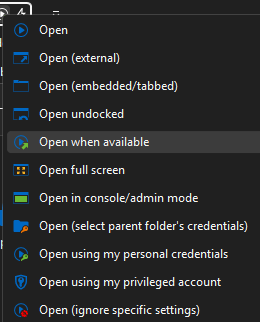
Has someone the same "problem" or can tell in which version it's still available? It was a realy nice feature, specially in reboot situations, because it's automaticlly reconnected the connect and I didn't forgot to work on this connection...
regards
Eric
cca9a966-cb97-4d3b-b251-3efbdd1ce114.png
724ff5fb-7cf4-4c95-84f3-12fa0dfe41b7.png
Recommended Answer
Hello Eric,
Thank you for reaching out to us regarding this,
Good news: "Open when available" has not been removed. Starting with RDM 2026.2, the Open menu was redesigned to show only your pinned actions by default, to keep the menu shorter. Less-common actions, including "Open when available," were moved into a new "Open (more)..." dialog instead of always being shown.
You can bring it back into your normal context menu in a few clicks. Use the Open dropdown on the Home ribbon, and choose "Open (more)...". In that dialog, search for "available," find the "Open when available" tile, and click the pin icon on it. It will then reappear directly in the entry's normal Open menu, exactly like before.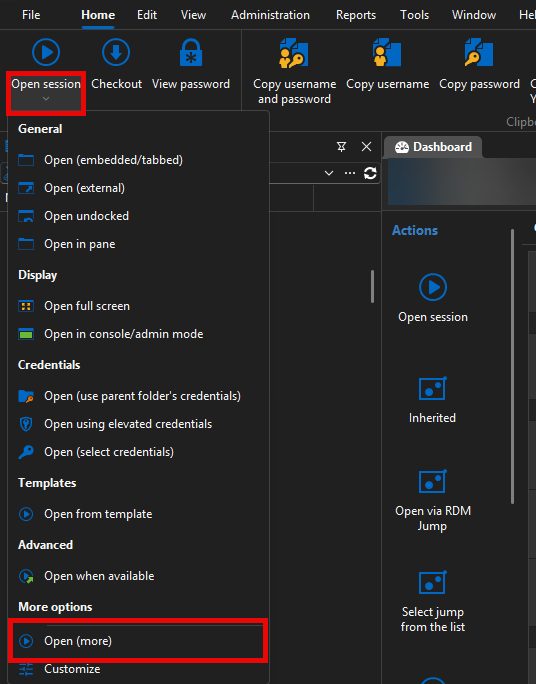 Let me know if this helps,
Best regards,
Samuel Dery
9c0869b9-040b-438e-817c-36b2c778eb75.png
All Comments (3)
Hello Eric,
Thank you for reaching out to us regarding this,
Good news: "Open when available" has not been removed. Starting with RDM 2026.2, the Open menu was redesigned to show only your pinned actions by default, to keep the menu shorter. Less-common actions, including "Open when available," were moved into a new "Open (more)..." dialog instead of always being shown.
You can bring it back into your normal context menu in a few clicks. Use the Open dropdown on the Home ribbon, and choose "Open (more)...". In that dialog, search for "available," find the "Open when available" tile, and click the pin icon on it. It will then reappear directly in the entry's normal Open menu, exactly like before.Let me know if this helps,
Best regards,
Samuel Dery
9c0869b9-040b-438e-817c-36b2c778eb75.png
Hi Samuel,
perfect, this worked!
Just a little addition: restart RDM is requiered and if you want to see it at the dashboard you need to "allow special open actions in the Dashboard".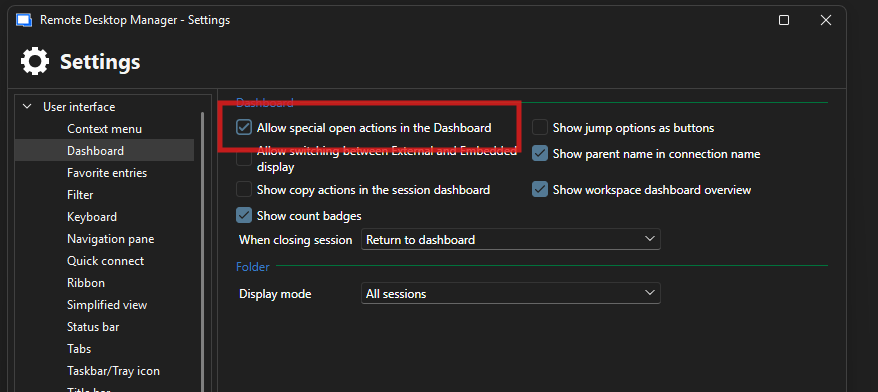
Thanks, @Samuel Dery!
best regards
Eric
20066470-2deb-47b4-9928-7135a37852d5.png
Hello,
Thank you for your reply.
Perfect! I'm glad that resolved the issue, and I appreciate you pointing this out.
Best regards,
Samuel Dery