Expired User & Passwort has no effect on RDP or Host
1 vote

Hi,
When the login credentials have expired, I can no longer view or copy the password. I think this behavior is correct.
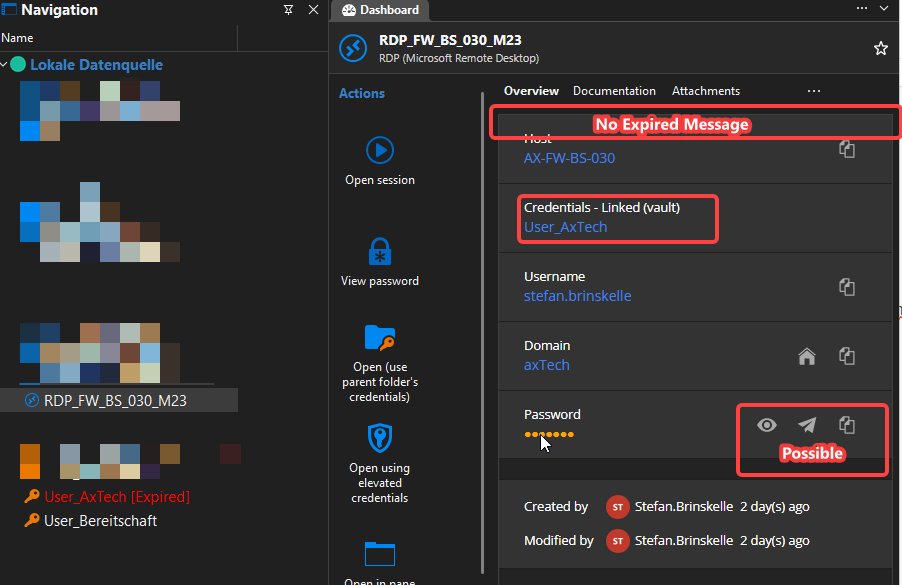
However, I can still copy the password from the RDP / Host entry (or any other entry that uses these credentials).
I would expect the RDP / Host entry to behave the same way as the login credentials entry:
- Copying the password should display the same error message.
- Starting a session should also be blocked with the same error dialog.
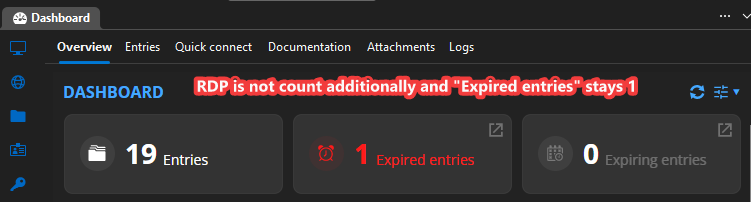
However, on the dashboard I would only like to see one notification about the expired credentials, not an additional notification for every RDP / Host (or other entry) that references those credentials.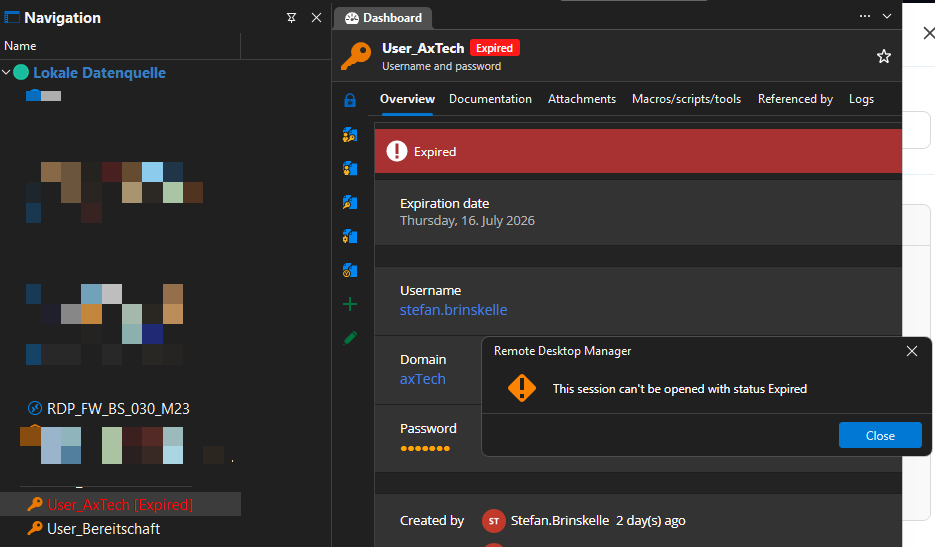
355df4f1-dc52-45cd-9f3a-7934d41063d7.png
43ce9df1-c2e3-40ad-acd5-a17730c5b32b.png
7936433a-3144-487c-889d-7a3f191bb661.png
All Comments (4)
Edit:
Opening the session should still be possible, but the warning message should be displayed.
For example, I have a Website entry that I use to update an expired password. In this case, opening the entry and using Copy & paste or autofill in Browser should still work, even though the password has expired.
Hello,
If I summarize your two messages, the change you would like is for an entry referencing an expired credential to have a warning, but not block the copy/open actions, is this correct?
We'd have to think about how best to implement this as there's some challenges:
- If we want to add a warning to the dashboard, there's a performance cost as we would need to resolve the credential link. It can be as simple as a direct link, or it could go through a full inherited structure, specific settings, etc.
- If we want to add a warning when running the entry that does not block the usage of it, we would have to add a separate system (since an expired status blocks execution), or a different status.
Regardless of these challenges, I think there's value to improving this as it's currently a bit contradictory, and not as informative as it could be.
Regards,
Hubert Mireault
Hello,
If I summarize your two messages, the change you would like is for an entry referencing an expired credential to have a warning, but not block the copy/open actions, is this correct?
Yes
We'd have to think about how best to implement this as there's some challenges:
- If we want to add a warning to the dashboard, there's a performance cost as we would need to resolve the credential link. It can be as simple as a direct link, or it could go through a full inherited structure, specific settings, etc.
This would be nice in the RDP or Other Entries: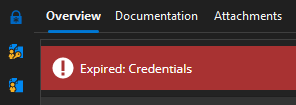
- If we want to add a warning when running the entry that does not block the usage of it, we would have to add a separate system (since an expired status blocks execution), or a different status.
I'm not sure if just the first point is enough.
Regardless of these challenges, I think there's value to improving this as it's currently a bit contradictory, and not as informative as it could be.
Regards,
303a9b39-e474-4c8a-bae9-63e58985dc78.png
Thank you for the confirmation. I'll open a ticket and we will see what we can do.
Regards,
Hubert Mireault